
Mobile Application Manual Testing: A Complete Guide for QA Beginners
Discover what mobile application manual testing really involves types, process, tools, and a simple checklist every QA beginner should know before their first project.
A beginner-friendly, in-depth guide to mobile application manual testing that explains what it is, how it differs from automation, the core testing types, the step-by-step STLC process, essential tools, common challenges, and how to build a QA career around this skill written for aspiring testers and students exploring software testing as a career.
Open any app store and you will find thousands of apps competing for the same five seconds of a user's attention. One frozen screen, one misaligned button, or one login that fails on a single Android phone is often enough to make someone delete an app and never come back. This is exactly why mobile application manual testing remains one of the most valuable skills in software quality assurance, even in an age of automation and AI-assisted testing tools.
If you are new to QA, or you are simply trying to understand how testers actually validate an app before it reaches your phone, this guide breaks it down in plain language what manual testing means for mobile apps, how it is different from automation, the types of testing testers perform by hand, the step-by-step process they follow, the tools they use, and how you can build a career around this skill.
What Is Mobile Application Manual Testing?
Mobile application manual testing is the process of checking a mobile app's functionality, usability, and behavior by physically operating it tapping buttons, swiping screens, entering data, and observing results without relying on automated scripts. A human tester follows a mobile app testing checklist or a set of test cases, executes each step on a real device or emulator, and compares what actually happens against what is expected.
Unlike a script that only checks what it was told to check, a human tester notices things scripts miss: a button that is technically clickable but visually confusing, text that gets cut off on a smaller screen, or an animation that feels slow even if it completes within the allowed time. That human judgement is the core value of manual testing, and it is a big part of why every solid QA curriculum, including Cinute Digital's manual testing course, still treats it as a foundational skill before moving on to automation.
Manual Testing vs. Automated Testing for Mobile Apps
A common question beginners ask is whether automation has made manual testing obsolete. It hasn't, and understanding why is important for anyone starting a QA career.
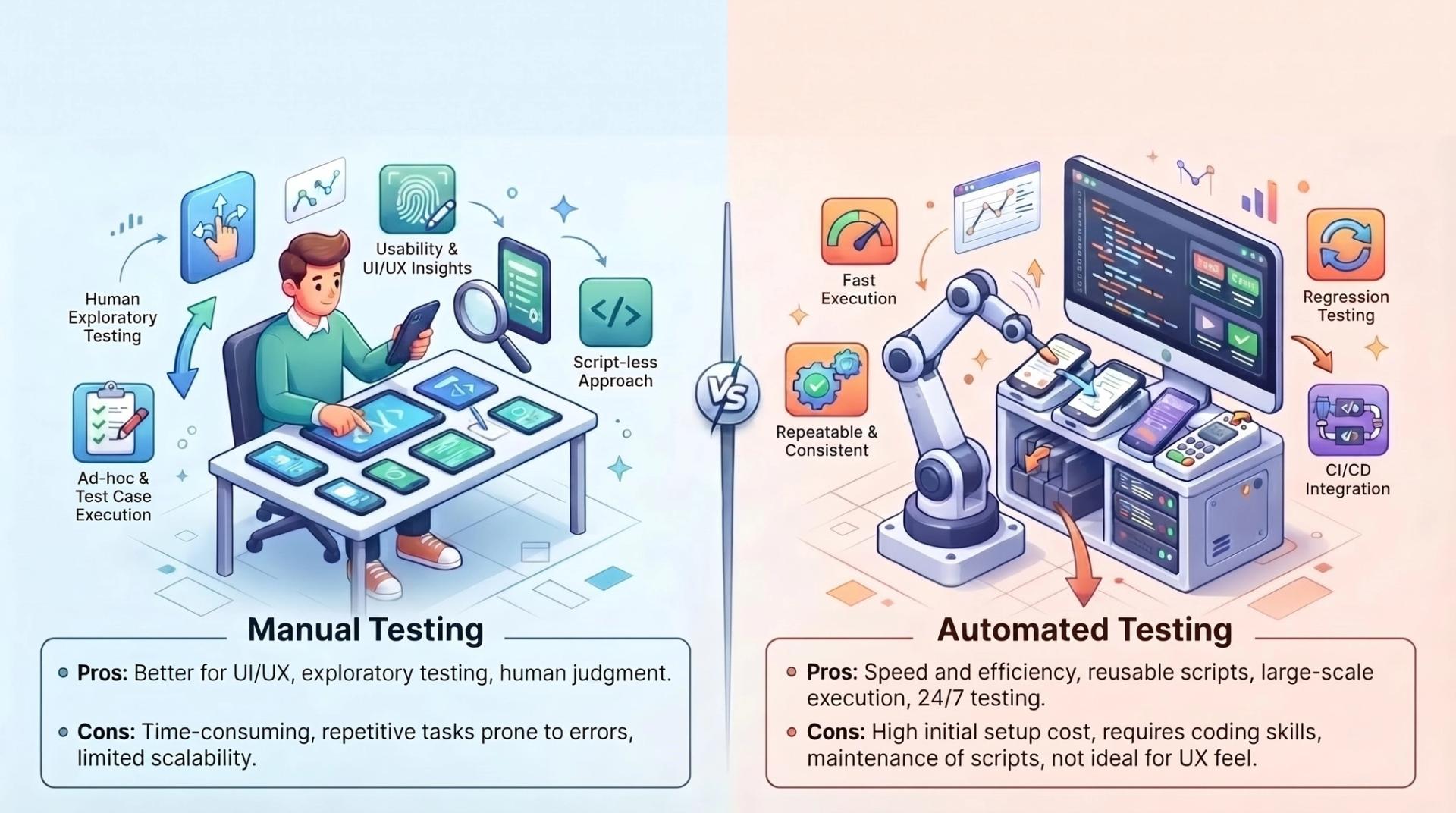
Manual testing is done by a person, without scripts, and is best suited for exploratory testing, usability checks, and situations where the app or feature changes frequently. It requires no coding knowledge, has a low setup cost, and is excellent at catching visual and experiential issues that automated scripts are not designed to notice.
Automated testing, on the other hand, uses tools and scripts (such as Appium, Espresso, or XCUITest) to execute predefined test cases automatically. It shines in regression testing, repetitive test cycles, and large test suites that need to run quickly and consistently across many devices. If you want to see how this works in practice, this detailed walk-through on regression testing automation is a useful next step once you are comfortable with manual fundamentals.
In real QA teams, the two approaches are complementary rather than competitive. New features are almost always tested manually first, because the test cases are not yet stable enough to automate. Once a feature is mature and stable, its test cases are gradually automated to save time on future regression cycles. This is why Cinute Digital structures its automation testing course as a natural progression after manual testing fundamentals, not a replacement for them.
Why Manual Testing Still Matters for Mobile Apps Specifically
Mobile apps face a unique challenge that most web applications do not: extreme device and environment fragmentation. Thousands of Android device models, multiple OS versions, different screen sizes, varying hardware capabilities, and unpredictable real-world conditions like patchy networks or low battery all affect how an app behaves. A script can verify that a button click triggers the correct function, but it takes a human to notice that the same button is positioned awkwardly on a smaller screen, or that a keyboard pop-up hides an important field on certain devices.
Manual testing is also essential for judging subjective quality how "smooth" an experience feels, whether an error message is actually understandable to a non-technical user, or whether a checkout flow feels trustworthy. These are usability questions that no automation framework can answer on its own, which is exactly why manual testers remain central to mobile QA teams even at companies with mature automation pipelines.
Core Types of Mobile Application Manual Testing
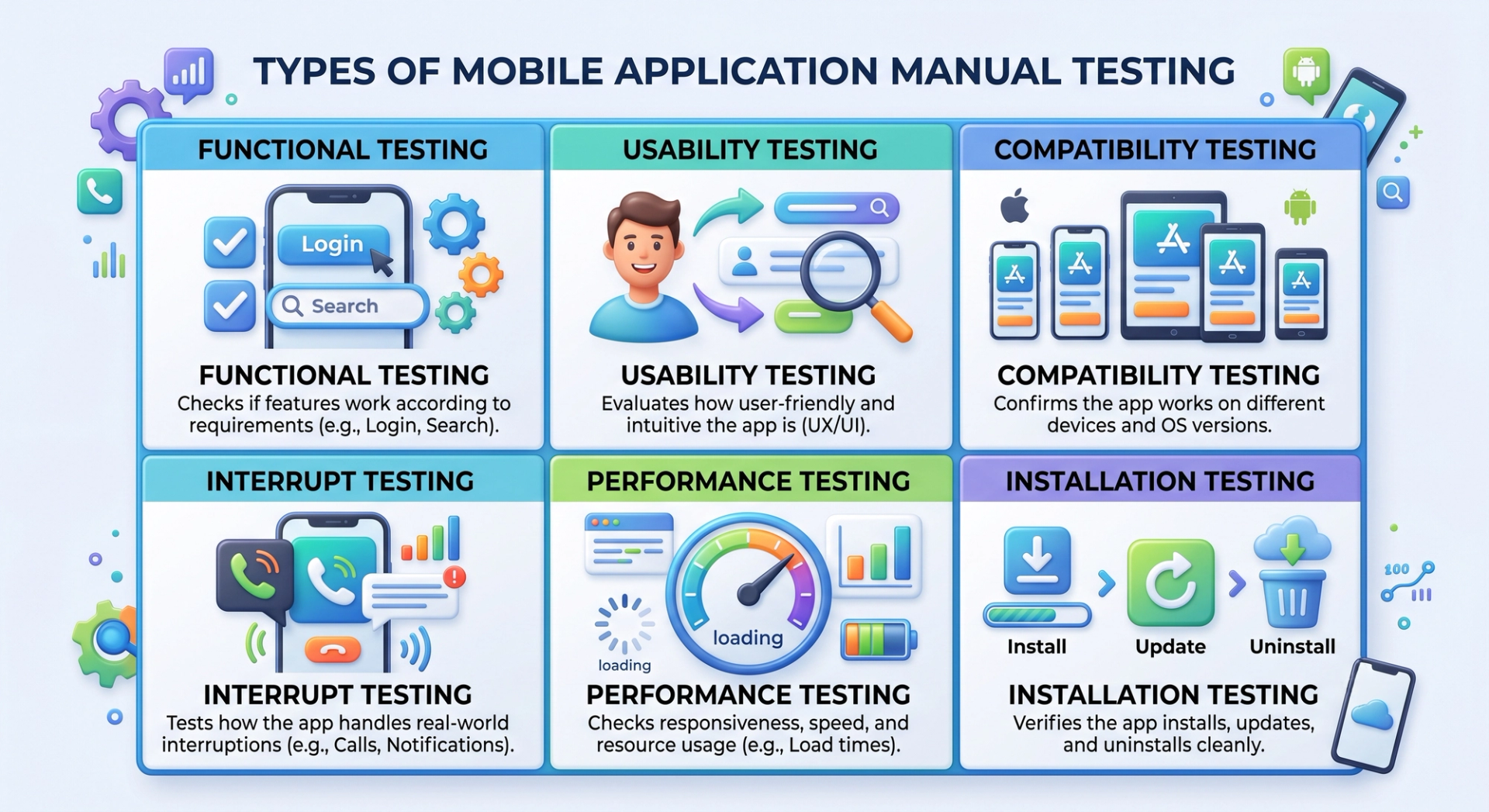
A thorough manual testing effort usually covers several distinct types of testing, each targeting a different risk area of the application.
Functional testing checks whether every feature works according to the requirements login, search, checkout, notifications, and so on by walking through each expected user flow step by step.
Usability testing evaluates how intuitive and comfortable the app is to use, focusing on navigation, layout, readability, and overall user experience from a real person's perspective.
Compatibility testing confirms the app behaves correctly across different devices, screen resolutions, operating system versions, and manufacturers, since an app that works perfectly on one phone can break entirely on another.
Interrupt testing verifies how the app responds to real-world interruptions such as incoming calls, low battery warnings, push notifications, charger connections, or switching between apps mid-task.
Performance testing (the manual, observational side of it) involves a tester noting load times, lag, and responsiveness under normal use, which complements the deeper load and stress testing typically done with dedicated tools.
Installation testing checks whether the app installs, updates, and uninstalls cleanly, including edge cases like interrupted downloads or insufficient storage space.
Together, these testing types form the backbone of a mobile QA strategy, and most structured mobile app testing checklists are simply an organized way of covering all six systematically.
The Manual Testing Process: A Step-by-Step Walkthrough
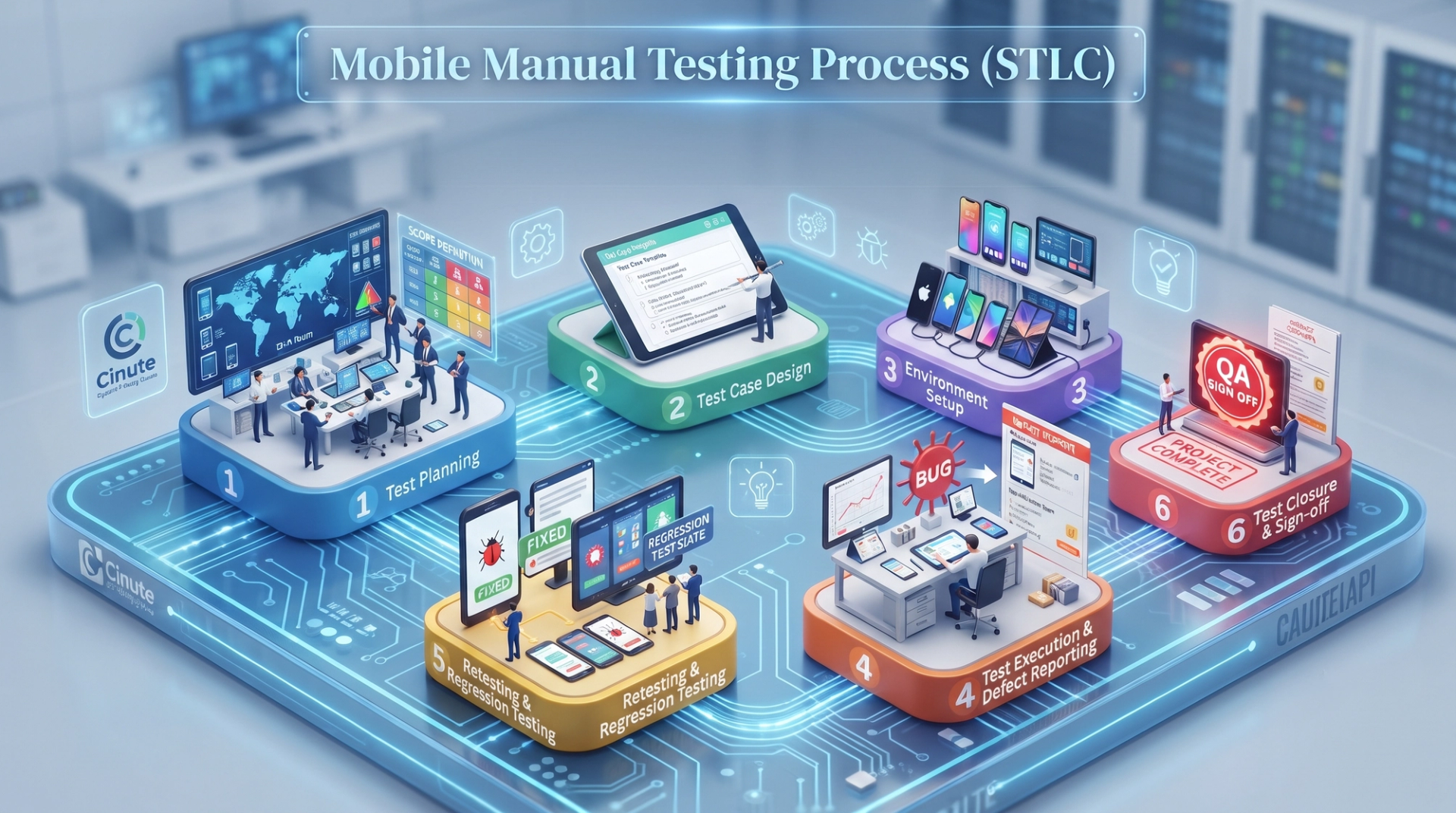
Manual testing is not random tapping it follows a structured lifecycle, often called the Software Testing Life Cycle (STLC), adapted for mobile apps.
It begins with test planning, where the QA team defines scope, decides which devices and OS versions to cover, and sets the overall test strategy based on the app's risk areas. Next comes test case design, where testers write clear, step-by-step test cases with expected results, ensuring anyone on the team could execute them consistently.
Environment setup follows, preparing the real devices, emulators, simulators, and test data needed for execution. Then testers move into test execution, running each test case and carefully logging the actual result against the expected one. Any mismatch becomes a candidate for defect reporting, where the tester documents the bug with clear reproduction steps, screenshots or screen recordings, device details, and a severity rating so developers can prioritize fixes efficiently.
Finally, once developers push fixes, testers perform retesting and regression testing to confirm the specific bug is resolved and that the fix hasn't broken anything else, before the cycle closes with a sign-off. Anyone studying this process in depth will recognise it as the same rigorous approach taught in Cinute Digital's API testing course, since back-end validation follows a very similar planning-to-closure discipline that complements front-end mobile testing.
Real Devices vs. Emulators and Simulators
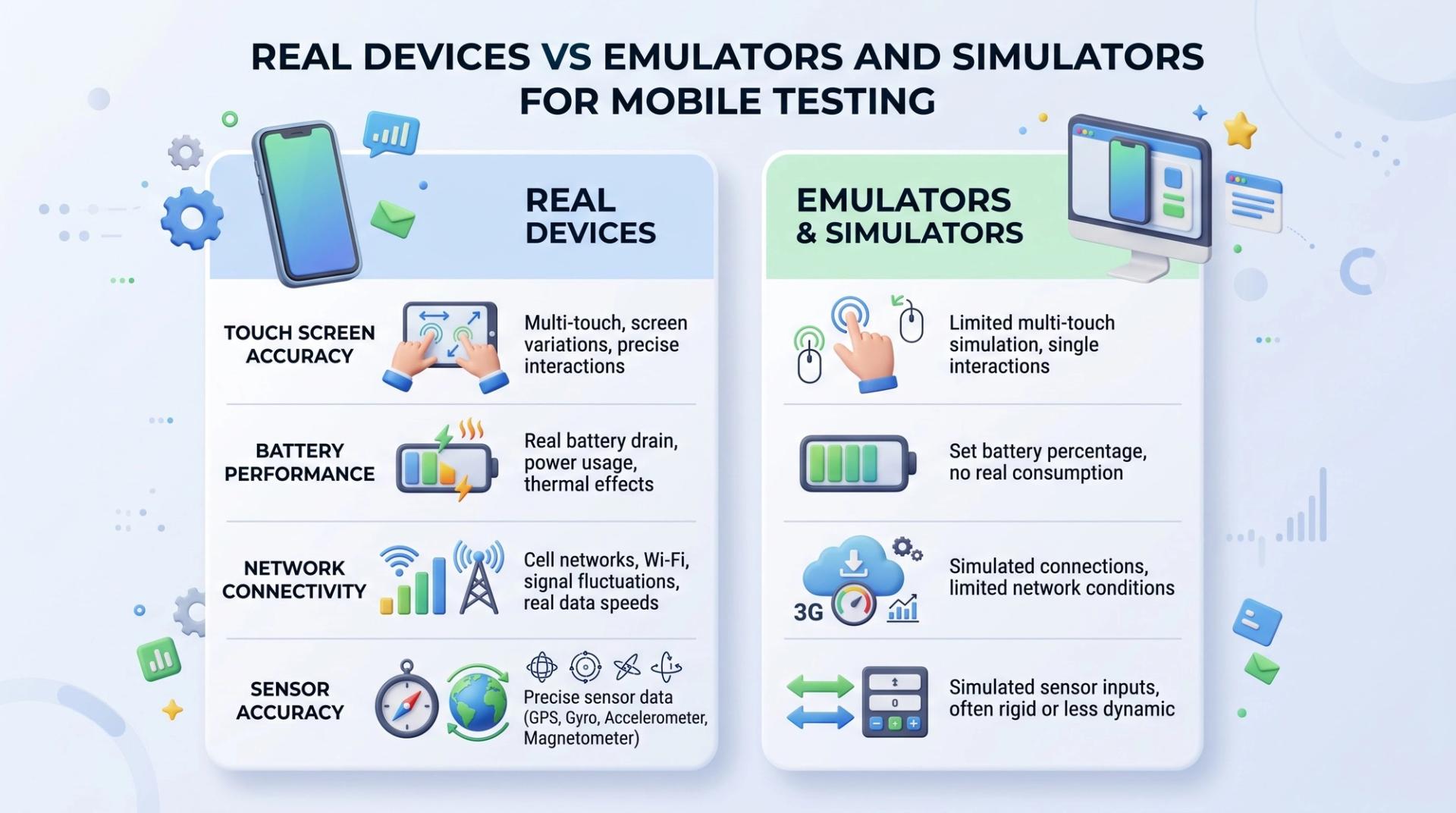
A frequent point of confusion for beginners is the difference between emulators, simulators, and real devices. Emulators (commonly used for Android) and simulators (used for iOS) are software-based environments that mimic a mobile device on a computer. They are fast, inexpensive, and useful for early-stage functional testing.
However, they cannot fully replicate real-world conditions: actual touch sensitivity, battery drain, heat generation, camera and GPS behaviour, true network switching between Wi-Fi and mobile data, or how the app performs when a genuine phone call interrupts it. This is why professional QA teams always validate an app on real devices before release, particularly for compatibility, interrupt, and performance testing. A well-rounded mobile testing strategy uses emulators for speed during development and real devices for final validation before launch.
Essential Tools Every Manual Tester Should Know
While manual testing does not require programming, testers do rely on a specific toolkit to stay organized and effective. This typically includes test management tools for writing and tracking test cases, bug-tracking tools like Jira for logging and monitoring defects, screen recording and screenshot tools for evidence, and basic device labs or cloud device platforms like BrowserStack for accessing multiple real devices without owning each one physically.
For a complete breakdown of the tools testers use day to day from test case management to bug tracking and API validation this comprehensive manual testing tools overview for 2026 is a practical reference worth bookmarking as you build your toolkit.
Common Challenges in Mobile Manual Testing
Mobile manual testing has practical difficulties worth planning for. Device fragmentation means testers can never cover every device and OS combination, so prioritization based on real user analytics becomes essential. Frequent OS and app updates mean test cases need regular review, and network variability testing on 3G, 4G, 5G, and Wi-Fi adds complexity that is easy to underestimate. Because manual execution takes time, testers must also balance thoroughness against tight release schedules, which is why risk-based prioritization is a core skill.
Best Practices and a Simple Mobile Testing Checklist
Good manual testers follow a consistent set of habits. Test on a mix of real devices and emulators rather than relying on just one. Write test cases that are specific and repeatable, not vague. Reproduce every bug at least twice before logging it, and always include the device model, OS version, and clear steps in the defect report. Prioritize coverage based on the features and devices your actual users rely on most, using analytics rather than guesswork. Retest thoroughly after every fix, and keep a working checklist covering functional, usability, compatibility, interrupt, performance, and installation testing so nothing gets skipped under deadline pressure.
Building a Career in Mobile Manual Testing
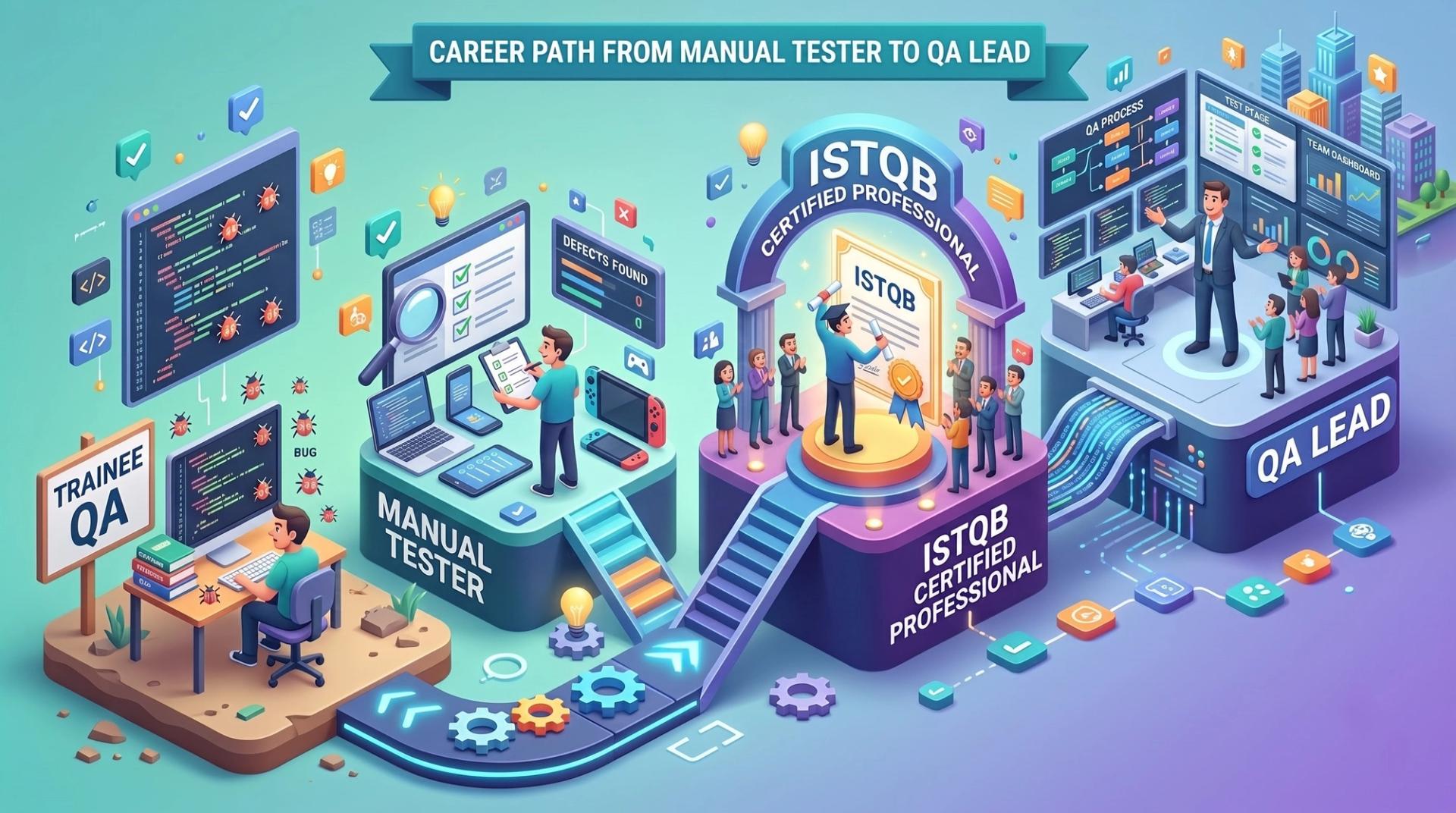
Manual testing is typically the entry point into a QA career, and it remains one of the most in-demand skills for beginners because most companies still hire dedicated manual testers, especially for mobile-first products. A typical growth path moves from trainee QA, to manual tester executing structured test cycles, toward earning a recognized certification, and eventually into automation, API testing, or senior QA leadership roles.
Certification adds real credibility here. If you are wondering whether it is worth pursuing, this ISTQB certification prep guide lays out exactly how it strengthens a QA resume and what employers look for.
For those who want structured, mentor-led training that goes beyond individual course topics, Cinute Digital's Advanced Manual and Automation Testing Master Program combines manual fundamentals, automation, and real-world projects into one placement-focused pathway. And because a course is only as valuable as the outcomes it leads to, it's worth reviewing Cinute Digital's placement support and hiring outcomes to see how training translates into actual job opportunities.
Frequently Asked Questions
What is manual testing in mobile application testing?
It is the process of testing a mobile app's features, usability, and behaviour by hand without automation scripts using real devices or emulators to confirm the app works as intended and feels right to use.
Is manual testing still needed when automation tools exist?
Yes. Automation is excellent for repetitive regression checks, but manual testing catches usability issues, visual glitches, and unexpected real-device behaviour that scripts are not designed to notice. Most QA teams rely on both.
What skills do I need to start a career in mobile manual testing?
You need a solid understanding of SDLC and STLC concepts, strong test case writing ability, attention to detail, familiarity with bug-tracking tools like Jira, and basic knowledge of Android and iOS platform differences. Coding is not required to begin.
How long does it take to become job-ready in manual testing?
Most structured, project-based programs take a few weeks to a few months, depending on prior experience. Consistent hands-on practice with real test cases and defect reporting matters more than the calendar time spent.
Does manual testing have good career growth?
Yes. It is the standard entry point into QA, and testers commonly progress into automation, API testing, performance testing, or QA leadership roles as they gain experience and certifications like ISTQB.
Final Thoughts
Mobile application manual testing is far from an outdated skill it is the foundation on which reliable, user-friendly apps are built, and the starting point for a rewarding QA career. It combines structured process with genuine human judgement, catching the kinds of issues that automated scripts are simply not designed to notice. Whether you are exploring QA as a first career or adding structured testing knowledge to an existing tech background, understanding manual testing thoroughly its types, its process, its tools, and its challenges will make you a stronger, more well-rounded tester no matter where your career goes next.
If you're ready to turn this knowledge into a job-ready skill set with live projects, expert mentorship, and placement support, explore Cinute Digital's testing programs and take the next step toward a QA career.
Tags

A Manual Tester in TESTRIQ QA LLP and also as Corporate Trainer with CDPL. With a focused career in training and development.