
Comprehensive Manual Testing Tools Overview: The Ultimate 2026 Guide for Students


Explore our comprehensive manual testing tools overview for 2026. Discover the top test management, bug tracking, and API testing software every QA student needs to master to launch a successful tech career in software engineering.
Unlock your QA career with our ultimate 2026 guide to manual testing tools. Learn the industry-standard software for test management, bug tracking, and API validation to become a job-ready software tester.
In the fast-paced world of software engineering, quality assurance (QA) remains the bedrock of successful product delivery. Even as artificial intelligence and automated frameworks dominate industry headlines in 2026, the human element of software testing cannot be replaced. Human intuition, contextual understanding, and exploratory testing capabilities are what ultimately ensure an application is user-friendly and functionally robust. For students and aspiring QA engineers, understanding the theoretical concepts of software testing is only half the battle. The other half is mastering the practical ecosystem of software testing tools used by Agile teams worldwide.
This comprehensive manual testing tools overview is designed to demystify the technology stack that QA professionals use daily to ensure flawless user experiences. Whether you are enrolled in an IT training institute or learning independently, familiarizing yourself with the best manual testing software is a non-negotiable step toward a lucrative tech career. From defect tracking systems to test management dashboards, having a strong command of these applications will significantly elevate your marketability as a modern software tester.
What is Manual Testing, and Why is it Essential in 2026?
Before diving into the manual testing tools list, it is crucial to understand what manual testing is in software engineering. Manual testing is the process where QA analysts execute test cases without the use of automated scripts. Testers put themselves in the shoes of the end-user, navigating through the application's interface, trying different input combinations, and meticulously verifying that the software behaves exactly as specified in the business requirements.
Many students wonder if manual testing is becoming obsolete in the age of automation. The definitive answer is no. While automation is fantastic for repetitive regression testing, manual testing is absolutely vital for:
- Exploratory Testing: Testers actively learn about the system and design unscripted tests on the fly to find hidden edge cases.
- Usability Testing: Only a human can evaluate if a user interface is intuitive, aesthetically pleasing, and easy to navigate.
- Ad-Hoc Testing: Informal testing performed without formal test cases to break the system in unpredictable ways.
- Early-Stage Development: When an application is still in its infancy and the user interface is rapidly changing, writing automation scripts is counterproductive. Manual QA tools allow for rapid feedback during these initial sprints.
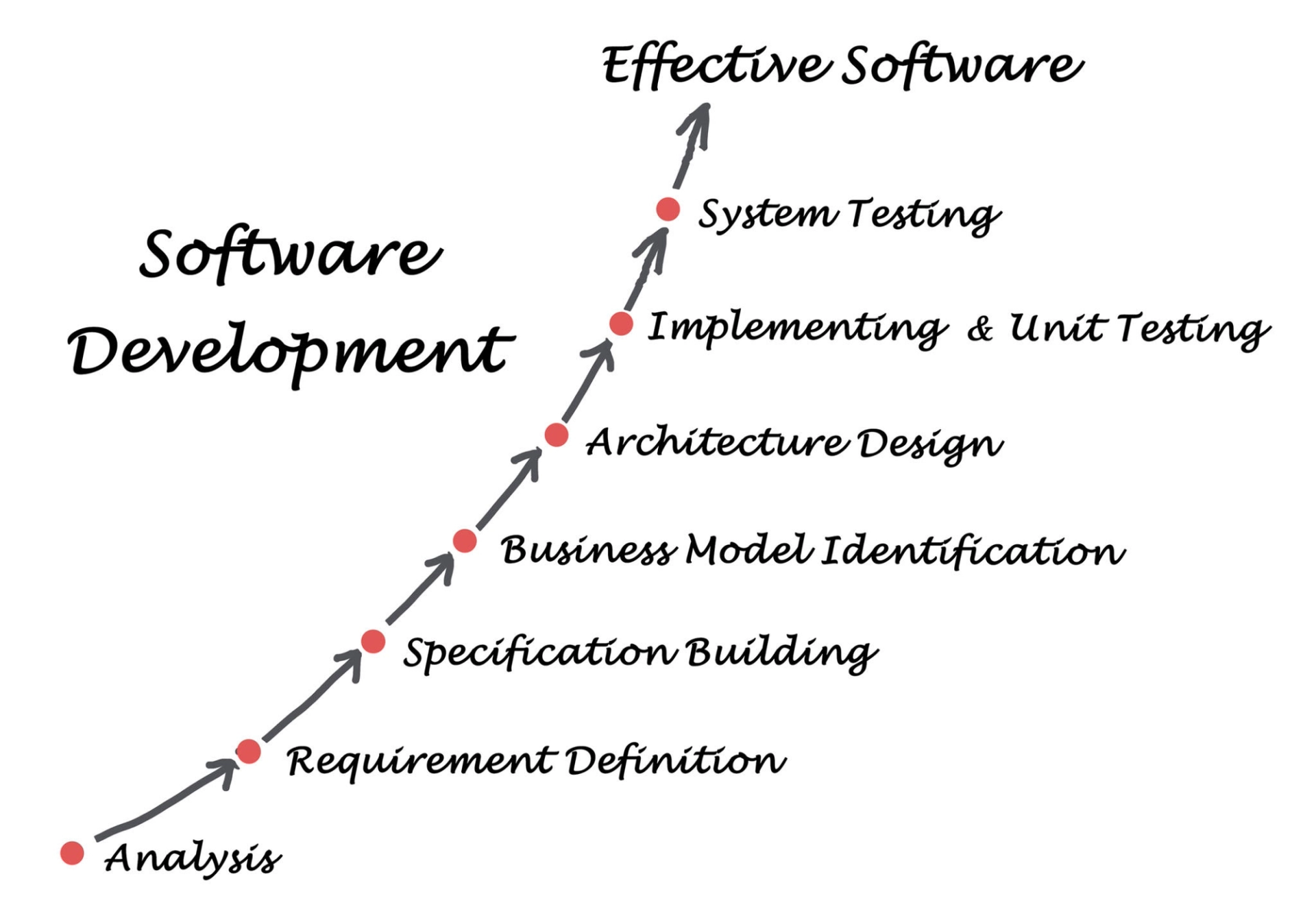
Understanding the software testing lifecycle (STLC) is essential because different tools serve different phases of this cycle. From test planning and test case creation to execution and bug reporting, utilizing the top tools for manual testing ensures that nothing falls through the cracks.
Categorization of Software Testing Tools
The landscape of QA testing tools is vast and can be overwhelming for beginners. To simplify this, industry experts generally categorize these tools based on their primary function within the defect lifecycle and test management process. For the purpose of this manual testing tools overview, we will break them down into four distinct categories:
- Test Management Tools: Used for writing test cases, planning test runs, and tracking overall test coverage.
- Bug Tracking and Defect Management Tools: Used for logging, tracking, and resolving software anomalies.
- API and Backend Testing Tools: Used for manually validating server responses and database integrity.
- Cross-Browser and Accessibility Tools: Used to ensure the application works flawlessly across different devices and meets usability standards.
Top Test Management Tools for QA Teams
Test management is the organizational backbone of any quality assurance process. Without proper test management tools, QA teams would be lost in a sea of Excel spreadsheets and chaotic Word documents. These specialized platforms allow testers to map their test cases to specific business requirements, ensuring complete traceability.
1. TestRail
TestRail is widely considered one of the best test management tools in the industry. It provides a centralized platform for QA teams to manage, track, and organize their software testing efforts. For a student entering the corporate world, encountering TestRail is highly likely.
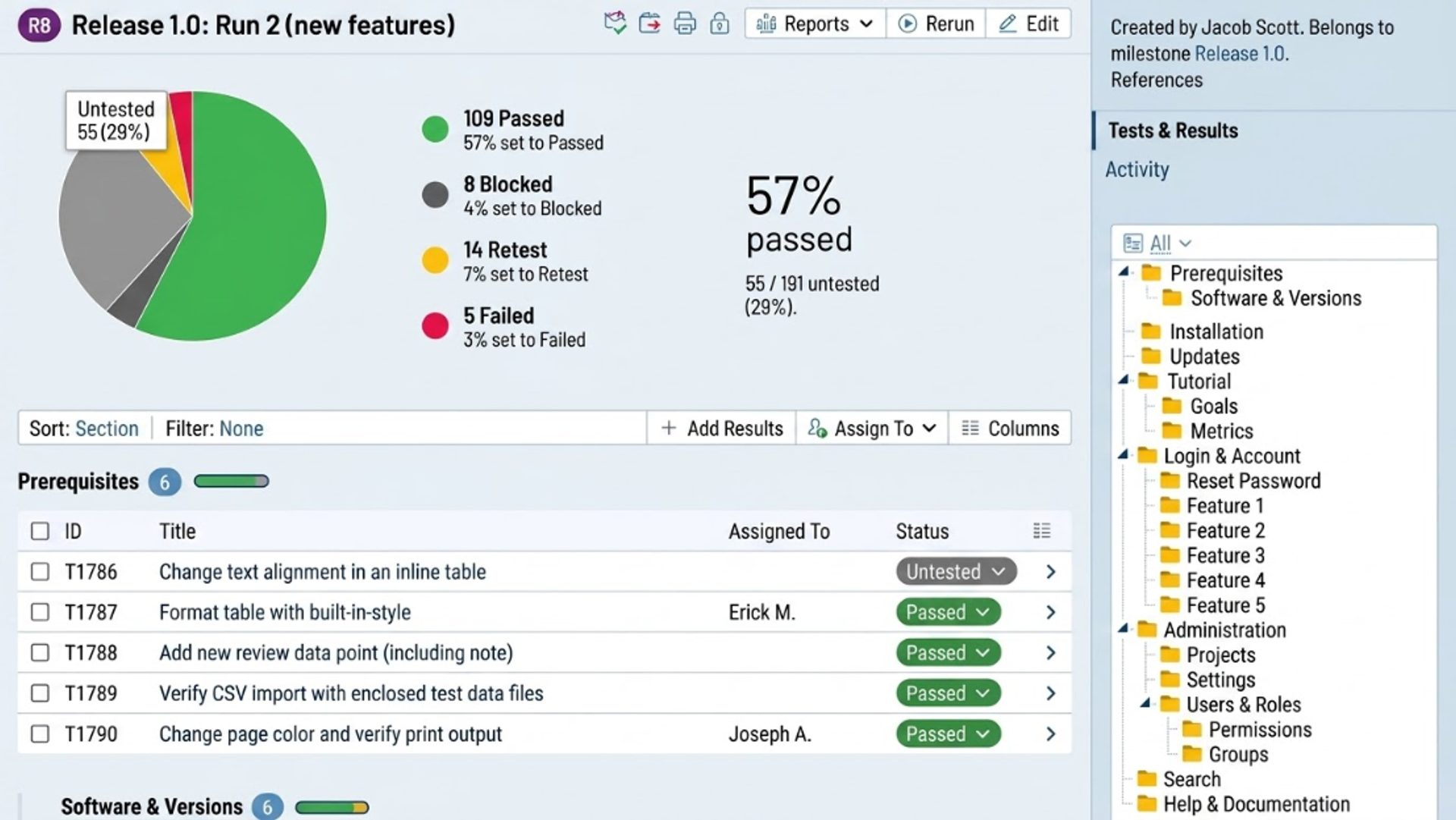
- Key Features: It offers a highly intuitive user interface where testers can quickly write detailed test cases, organize them into logical suites, and initiate test runs. TestRail’s real-time dashboards provide instant visibility into testing progress, showing precisely how many tests have passed, failed, or are currently blocked.
- Why it stands out: TestRail integrates seamlessly with major defect tracking tools like Jira. When a manual tester fails a test case in TestRail, they can automatically generate a bug ticket in Jira with all the necessary steps to reproduce the issue already populated.
2. Zephyr Scale
Zephyr Scale is an enterprise-grade test management solution that lives directly inside Atlassian’s ecosystem. Unlike standalone applications, Zephyr is an add-on that transforms a standard project management board into a full-fledged software quality assurance powerhouse.
- Key Features: Zephyr allows testers to create reusable test scripts, link them directly to Agile user stories, and track execution cycles sprint by sprint. Its advanced reporting capabilities generate traceability matrices that prove to stakeholders that every feature has been thoroughly validated.
- Why it stands out: Because it is built natively into Jira, the learning curve is significantly reduced for teams already using Atlassian products. It fosters deep collaboration between developers and manual testers.
3. TestLink
For students looking for a free, open-source alternative to practice their skills, TestLink is the industry standard. While its user interface might feel a bit dated compared to modern SaaS products, its underlying architecture teaches the fundamental principles of test management perfectly.
- Key Features: TestLink supports test project planning, test suite creation, requirement management, and user role assignments. It requires users to map test cases directly to software requirements, reinforcing the concept of Requirement Traceability.
- Why it stands out: Being open-source, it is an excellent tool for educational environments and startup companies operating on strict budgets.
Top Bug Tracking and Defect Management Tools
Once a manual tester discovers a discrepancy between the expected result and the actual result, a defect (or bug) must be logged. Bug tracking tools are the communication bridge between the QA department and the software developers. A well-written bug report is a critical skill, and these tools facilitate that process.
4. Jira
Jira is the undisputed king of Agile project management and defect tracking. While originally built for issue tracking, it has evolved into a comprehensive suite used by Scrum teams globally.
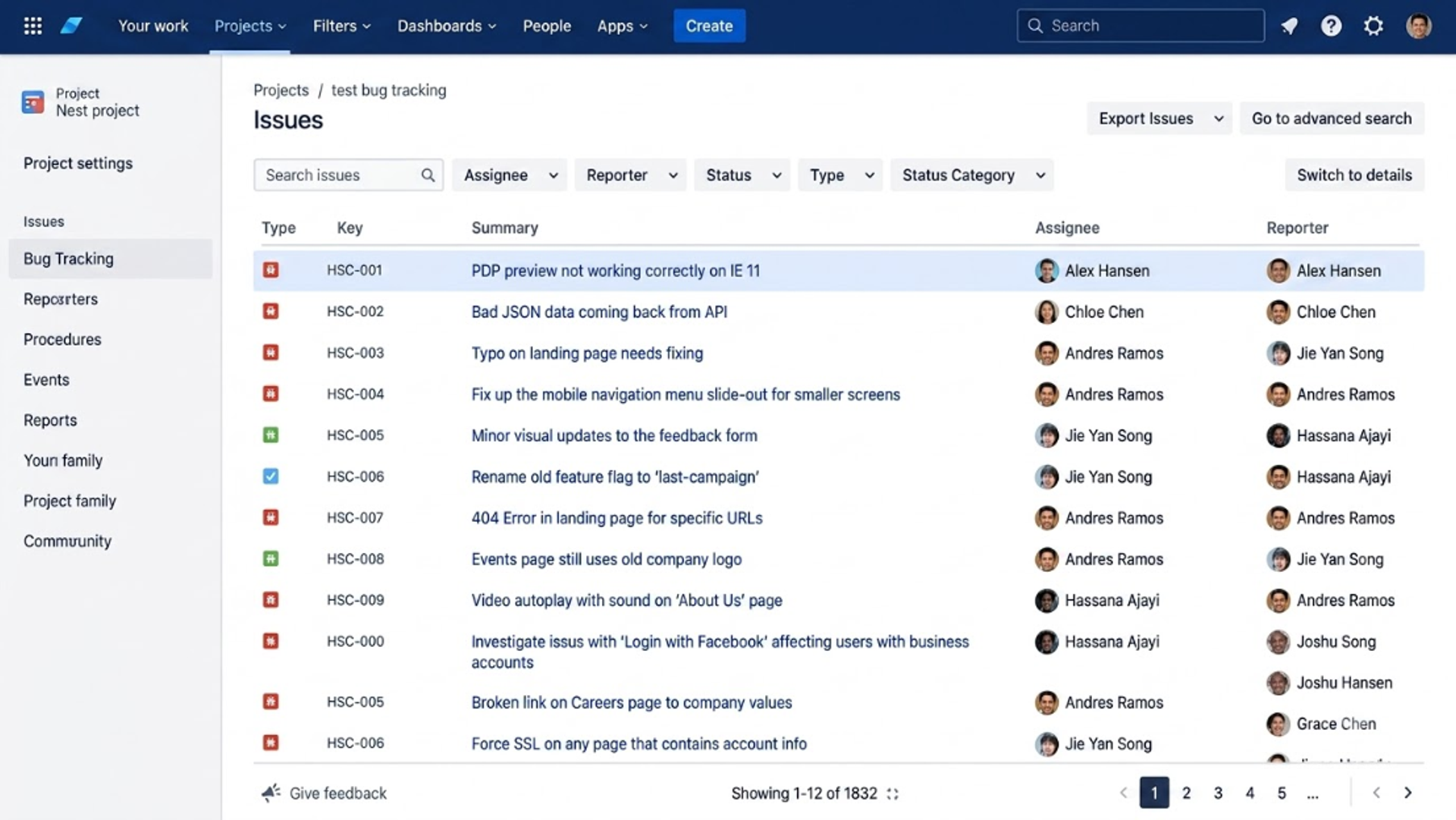
- Key Features: Jira utilizes custom workflows (e.g., To Do -> In Progress -> In QA -> Done). Testers can create detailed bug tickets that include descriptions, priority levels, environmental details, and attachments (screenshots or screen recordings).
- Why it stands out: Jira’s querying language (JQL) allows testers to create highly customized filters and dashboards to track the exact status of their logged defects. Understanding Jira is an absolute prerequisite for any modern software testing professional.
5. Bugzilla
Developed by the Mozilla Foundation, Bugzilla is one of the oldest and most robust open-source defect tracking tools available.
- Key Features: It offers advanced search capabilities, scheduled reports, and a highly customizable workflow system. Bugzilla is designed to handle high volumes of data and massive user bases without performance degradation.
- Why it stands out: While modern tech startups might favor sleeker interfaces, many massive enterprise organizations and legacy systems still rely on Bugzilla due to its unparalleled stability and security features.
6. Trello
While not exclusively a QA tool, Trello is frequently used by smaller teams and startups for lightweight bug tracking.
- Key Features: Operating on a Kanban board methodology, Trello uses visual cards to represent bugs. Testers can move these cards across columns representing different stages of resolution.
- Why it stands out: Its simplicity makes it incredibly accessible. For students working on personal projects or small freelance gigs, Trello offers an immediate, visually appealing way to manage manual testing tasks without complex configurations.
API and Backend Testing Tools for Manual Testers
Modern web applications rarely function as isolated systems; they rely heavily on Application Programming Interfaces (APIs) and databases to communicate. Manual testing is no longer restricted to clicking buttons on a graphical user interface (GUI). Today’s QA engineers must know how to test the backend logic.
7. Postman
Postman has revolutionized how QA engineers approach API testing. It allows manual testers to send requests (GET, POST, PUT, DELETE) to a server and analyze the responses without needing a front-end interface.
- Key Features: Testers can organize their API requests into collections, set up different environmental variables, and manually inspect JSON or XML responses for accuracy, status codes, and performance times.
- Why it stands out: Postman bridges the gap between manual and automated testing. You can manually verify an endpoint today and easily script assertions for it tomorrow. To truly master this critical skill, students should explore dedicated training, such as the API Testing using POSTMAN and RestAPIs course, which covers the depths of backend validation.
8. Database Verification Utilities
Manual testing frequently requires validating that data entered into the front-end application actually saves correctly in the backend server. Tools like MySQL Workbench or pgAdmin are heavily utilized by QA engineers to write SQL queries and verify data integrity. Understanding database normalizations, joins, and complex queries is a massive advantage for any tester. Learning these backend principles through a structured Database Management System using MySQL program ensures testers can confidently navigate the entire tech stack, rather than just the user interface.
Cross-Browser and Accessibility Tools
A software application might look perfect on a Windows desktop using Google Chrome, but completely break on an iPhone using Safari. Ensuring cross-platform compatibility is a major component of the manual testing process.
9. BrowserStack
BrowserStack is a cloud-based testing platform that provides QA teams with instant access to thousands of real mobile devices and desktop browsers.
- Key Features: Instead of a company purchasing hundreds of physical smartphones and tablets for their QA lab, BrowserStack allows manual testers to virtually "rent" a device. You can interact with a real iPhone 15 running Safari natively through your own web browser.
- Why it stands out: It completely eliminates the "it works on my machine" excuse. It provides highly accurate environmental replication, making responsive design testing and cross-browser validation seamless and cost-effective.
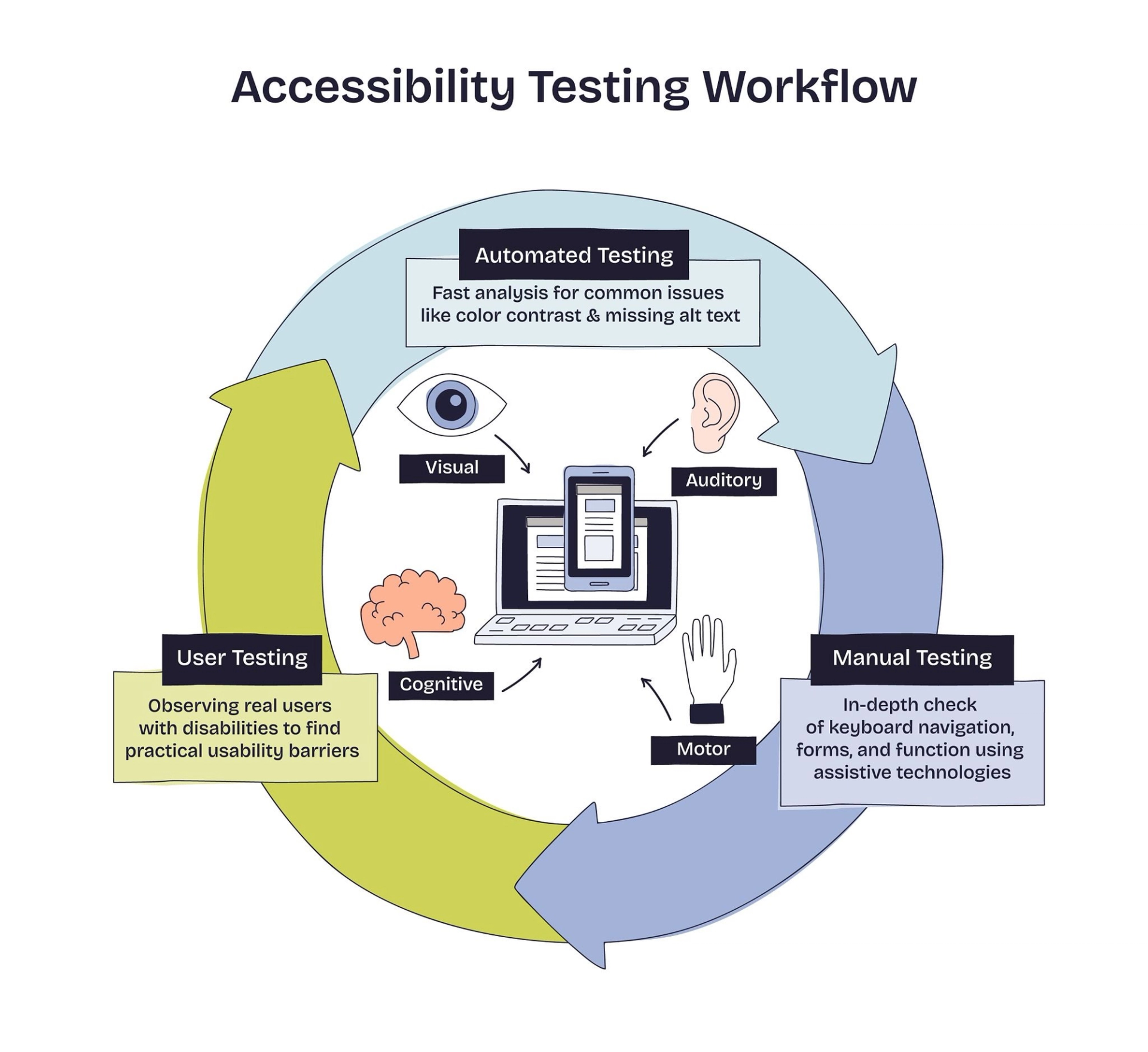
Accessibility Testing Workflow
10. Screen Capture and Documentation Utilities
Clear communication is a tester's most valuable asset. When a manual tester finds a bug, they must document it so clearly that a developer can reproduce it immediately. Tools like Snagit and Loom are essential companion tools. Snagit allows testers to take screenshots and annotate them with arrows, highlights, and text boxes to point out exact UI flaws. Loom enables testers to record their screen and narrate their actions while reproducing a complex bug, providing developers with undeniable, step-by-step visual evidence of the failure.
How to Choose the Right QA Testing Tools
With so many options available, determining the best manual testing software for a specific project requires careful consideration. Organizations evaluate several factors before finalizing their QA tech stack:
- Project Methodology: Agile teams utilizing Scrum frameworks will naturally gravitate toward Jira and Zephyr due to their sprint-based structures. Traditional Waterfall projects might prefer the rigid documentation structures of TestLink.
- Budget Constraints: Open-source tools like Bugzilla and TestLink are excellent for cost-conscious startups, whereas enterprise corporations will invest in premium platforms like BrowserStack and TestRail for their dedicated support and vast feature sets.
- Integration Capabilities: The most critical factor in 2026 is how well a tool communicates with the rest of the software pipeline. A test management tool must integrate with the bug tracker, which in turn must integrate with the team's communication platforms (like Slack or Microsoft Teams).
For a student, the goal is not to memorize every single feature of every tool. Instead, the focus should be on understanding the underlying principles of the Software Testing Life Cycle (STLC) and how these tools facilitate those phases. If you understand how a traceability matrix works in TestRail, you can easily adapt to Zephyr or Xray in the future.
Building a Career in Quality Assurance with Cinute Digital
Reading a manual testing tools overview is the first step, but gaining hands-on experience is what transforms a student into an employable QA engineer. The software industry is highly competitive, and employers actively seek candidates who possess practical, industry-aligned skills and recognized certifications, such as the ISTQB foundation level.

To bridge the gap between theoretical knowledge and practical execution, enrolling in an industry-led training program is highly recommended. Cinute Digital, a premier technology training organization, offers specialized curriculums designed to make students completely job-ready.
By starting with a comprehensive Manual Software Testing foundation, students learn how to facilitate Scrum teams, design robust test cases, and manage the defect lifecycle utilizing the exact tools mentioned in this guide.
As you progress in your career, the demand for deeper technical expertise will grow. QA professionals looking to move into leadership roles or tackle complex system architectures can vastly benefit from an Advanced Software Testing curriculum. This level of education focuses on risk-based testing, actionable quality metrics, and performance test readiness.
Furthermore, the industry is increasingly moving toward a hybrid QA model where testers must possess both manual intuition and automation capabilities. For those looking to master both ends of the spectrum, the Advanced Manual & Automation Testing - Master Program provides an end-to-end mastery of test strategy, framework design, and CI/CD pipeline integration. Alternatively, if you already have a solid foundation in manual concepts and want to strictly build automation frameworks using Selenium and Jenkins, the dedicated Advanced Automation Testing track will elevate your technical proficiency to a senior level.
Conclusion
Manual testing is far from a legacy concept; it is an evolving, highly technical discipline that ensures the software we rely on daily is functional, secure, and user-centric. By mastering the manual testing tools list detailed in this guide from TestRail for management, Jira for bug tracking, to Postman for API validation you are equipping yourself with the exact skill set demanded by top-tier tech companies in 2026.
The best way to solidify this knowledge is through consistent practice and expert mentorship. Explore the diverse software testing courses available, get your hands dirty with real-world projects, and start building your career in software quality assurance today.
Frequently Asked Question
1. Is manual testing still relevant in 2026 with the rise of AI and automation?
Yes, absolutely. While automation handles repetitive regression tasks, manual testing remains indispensable for exploratory testing, user experience (UX) evaluations, and initial feature testing. Human intuition and critical thinking are essential for identifying edge cases that automated scripts cannot catch.
2. What are the most essential manual testing tools a beginner should learn first?
Beginners should focus on mastering three core tools: Jira for defect management and issue tracking, TestRail (or TestLink) for writing and executing test cases, and Postman for basic API validation. Together, these tools cover the standard daily workflow of an entry-level QA engineer.
3. Do I need programming or coding skills to use manual testing tools?
No prior programming knowledge is required to use standard manual testing software like Jira, Bugzilla, or basic Postman. However, having a foundational understanding of SQL for database validation and basic JSON/XML data formats will help you excel at backend manual testing.
4. How do test management tools differ from bug tracking tools?
Test management tools (like TestRail and Zephyr) are designed for planning, creating, organizing, and executing test suites and test runs. Bug tracking tools (like Jira and Bugzilla) focus specifically on logging, reporting, assigning, and tracking the resolution status of software defects found during those test runs.
5. Can I transition from a manual tester to an automation QA engineer later?
Yes, starting in manual testing is the ideal foundation for an automation career. Once you understand the Software Testing Life Cycle (STLC) and how to write thorough test cases manually, learning automation frameworks using languages like Python or Java becomes much easier and more contextual.
Tags

A Manual Tester in TESTRIQ QA LLP and also as Corporate Trainer with CDPL. With a focused career in training and development.