
Regression Testing Automation in Software Testing: A Simple Guide for Beginners


Every time a developer fixes one thing, something else can quietly break. Regression testing is how testers catch it — and automation is how they catch it in minutes instead of days. This beginner-friendly guide explains regression testing automation in plain English: what it is, the types, which tests to automate first, the tools to learn in 2026, and the interview questions you'll actually be asked.
A complete beginner's guide to regression testing automation in software testing. Understand what regression testing means and why it matters, learn the difference between regression, retesting, smoke and sanity testing, explore the types of regression testing, master the test automation pyramid, discover which tools to learn (Selenium, Playwright, Postman, Rest Assured, Jenkins), see how regression suites run inside a CI/CD pipeline, understand and fix flaky tests, and follow a six-stage roadmap from beginner to job-ready automation tester including the interview questions companies ask freshers.
Imagine you fix a leaking tap in your kitchen. The tap works perfectly now. But the next morning, you find water dripping from the bathroom ceiling because the plumber's repair disturbed a pipe you never touched.
That is exactly what happens in software. A developer fixes one bug, and a completely different feature stops working.
Finding those hidden breakages is the job of regression testing and doing it automatically, quickly, and repeatedly is what regression testing automation is all about. It's one of the most in-demand skills in QA today, and one of the easiest to understand once someone explains it without jargon.
This guide does exactly that.
What Is Regression Testing?
Regression testing means re-testing features that already worked, to make sure a new change didn't break them.
The word regression means "going backwards." So a regression is when working software goes backwards into a broken state not because of a new feature, but because of a side effect of some other change.
Here's a real example. An e-commerce team updates the login page to add "Sign in with Google." Login works beautifully. But the "Forgot Password" link on the same page now leads to a blank screen. Nobody edited that link. It broke anyway.
If the team only tested the new Google login, they would have shipped a broken password reset to thousands of users.
Regression testing asks one simple question: did we break anything that used to work?
Regression vs Retesting vs Smoke vs Sanity
Beginners mix these four up constantly, and interviewers love asking about them. Here's the difference in one table:
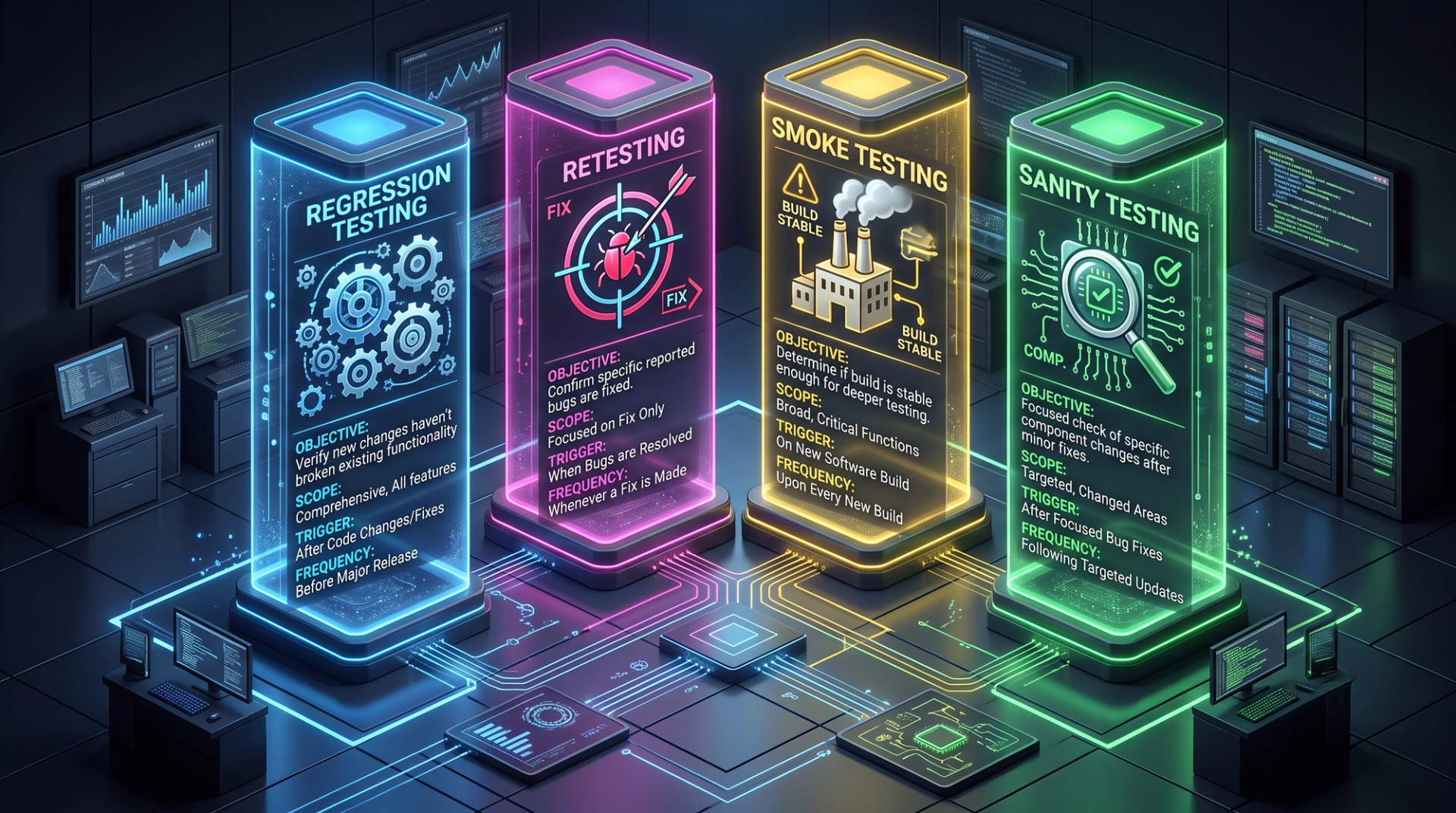
An easy way to remember it: retesting looks at the bug, regression looks at everything around the bug.
These distinctions form part of the ISTQB Foundation syllabus and appear in almost every fresher QA interview, which is why they're covered early in a structured manual software testing course before anyone touches automation tools.
Types of Regression Testing
Not every code change needs the same amount of re-testing. Teams pick a scope based on how risky the change is:
- Unit regression testing - re-runs tests for one isolated piece of code, ignoring everything around it. Fastest and narrowest.
- Partial regression testing - tests the changed module plus the modules directly connected to it. The everyday default.
- Complete regression testing - re-runs the entire test suite. Used for major releases, framework upgrades, or many changes landing together.
- Selective regression testing - runs only the test cases affected by the change, chosen deliberately rather than by module.
- Progressive regression testing - used when requirements themselves changed, so new test cases are written alongside the old ones.
- Corrective regression testing - used when nothing in the requirements changed, so existing test cases can be re-used exactly as they are.
- Retest-all regression testing - the brute-force approach of re-running everything from the beginning. Thorough, slow, and expensive.
How teams actually choose: small bug fix → partial. Requirement change → progressive. Major release or library upgrade → complete. Tight deadline with a low-risk change → selective.
In agile teams, partial and selective regression run every sprint, while complete regression is usually reserved for release candidates because a two-week sprint simply doesn't have room for a full suite executed by hand.
Why Manual Regression Testing Stops Working
Manual regression is fine at the start. Then simple maths breaks it.
Suppose your application has 400 regression test cases, and each takes about 3 minutes to run by hand.
400 × 3 = 1,200 minutes = 20 hours
That's one tester spending two and a half full working days, just clicking through screens they've already tested before, for a single release.
Now imagine the company releases every week. Or every day, which is normal for modern products. The maths simply stops working.
Three bad things happen when teams try to keep up manually:
- Testers start skipping cases. Under deadline pressure, "low-risk" tests get dropped. Those skipped areas become exactly where bugs hide.
- Attention drops. Running the same 400 steps for the fortieth time makes anyone miss things. That's human nature, not carelessness.
- Releases slow down. The whole company's delivery speed gets limited by how fast QA can click.
Automation solves this by making repetition free. The computer re-runs the boring 400 checks in minutes, and testers spend their time on exploratory testing, edge cases, and usability the thinking work that machines are genuinely bad at.
Important point for beginners: automation does not replace manual testers. It removes the repetitive part of their job so they can do the more valuable, better-paid part.
What Regression Testing Automation Actually Means
Regression testing automation means writing code that tests your code.
Instead of a human opening a browser, typing a username, clicking login, and checking the dashboard appeared, a script does all of it. Then it does it again on 300 other test cases, in parallel, in eight minutes, at 2 AM, without complaining.
A working automated regression setup has four parts:
- Test scripts - the code that drives the app and checks the results
- Test data - reliable usernames, products, and records the tests can depend on
- Test environment - where the tests run (browsers, servers, mobile devices)
- The trigger - the system that runs tests automatically whenever code changes
Beginners usually focus only on the first part. In real projects, test data is where most automation fails. If two tests use the same login account at the same time, they interfere with each other and fail randomly even though the application is perfectly fine.
The Test Automation Pyramid: What to Automate Where

The biggest mistake new automation testers make is trying to automate everything through the user interface.
UI tests are the slowest, most fragile, and most expensive tests to maintain. They break every time a developer renames a button. A test suite made entirely of UI tests takes hours to run and fails constantly.
The test automation pyramid gives you a healthier balance:
Think of it this way: if you want to check that a 20% discount is calculated correctly, don't open a browser and click through five checkout pages for 45 seconds. Test the calculation directly in milliseconds.
Save UI tests for the handful of journeys that genuinely matter - signup, login, checkout, payment, and your product's single most important workflow.
This is why serious training programmes teach API-level testing before UI automation. Learning API testing with Postman and Rest Assured gives you faster, more stable tests and makes you far more useful to a team than someone who only knows how to click through browsers.
Which Tests Should You Automate First?
You cannot automate everything at once, and you shouldn't try. Score each test case on four questions:
Automate these first: login, registration, payment and checkout, search, add/edit/delete operations, user permissions, and anything connected to revenue.
Automate later: admin panels used by five internal people, rarely-visited settings pages, secondary reports.
Don't automate: features still changing every week, one-time checks, and anything needing human judgement about how something looks or feels.
That last point matters. A test that takes four hours to automate, runs twice a year, and breaks every sprint is a waste of effort. Automation is an investment it should pay for itself.
Regression Testing Tools to Learn in 2026
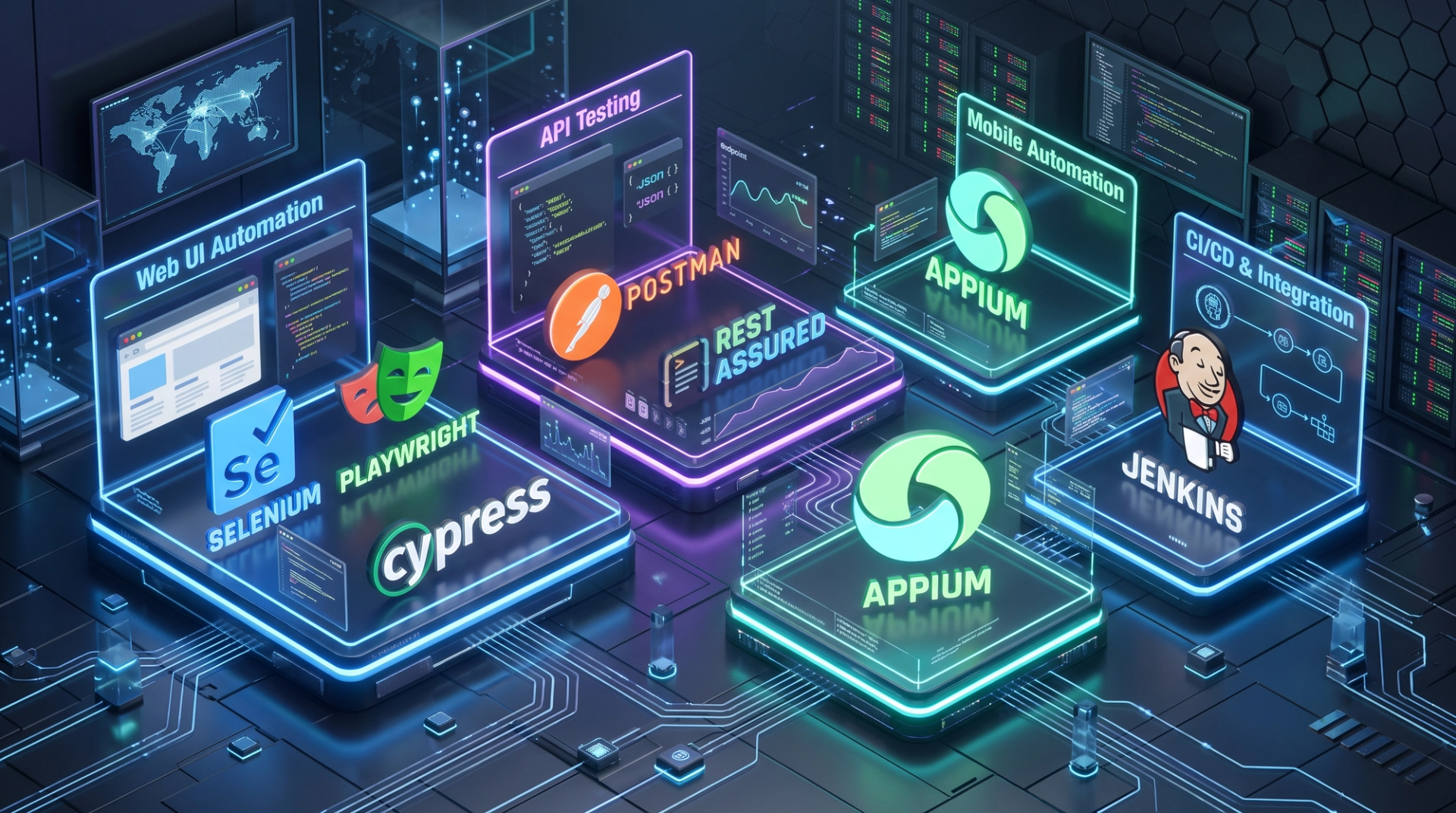
Selenium is still the most requested skill in Indian job listings, largely because thousands of companies already have huge Selenium suites that need maintaining. Playwright is growing quickly and is genuinely nicer to work with, so learning both makes you flexible.
You'll also need a programming language. Most Selenium jobs in India expect Java, which is why a solid Java programming foundation is usually the first real step in an automation career. If you're aiming at newer teams, startups, or data-heavy products, Python programming is the faster and friendlier alternative.
You don't need to be a full developer. You need to comfortably write loops, conditions, functions, and classes and understand what your code is doing.
How Regression Tests Run Inside CI/CD
This is the part that turns a "student project" into a real, industry-grade skill.
CI/CD (Continuous Integration / Continuous Delivery) means code changes are automatically built and tested the moment a developer submits them. Your regression tests plug directly into that pipeline.
But running all 1,000 tests on every single code change would make developers wait an hour for feedback so they'd stop waiting. Real teams tier their tests:
- On every code submission - unit tests plus 15–30 critical smoke tests. Target: under 10 minutes.
- When code merges to the main branch - full API regression plus key UI journeys. Target: under 30 minutes.
- Every night - the complete regression suite across all browsers and devices.
- Before every release - everything, as a final gate.
Three techniques make this possible: parallel execution (splitting tests across multiple machines), test selection (running only tests affected by the change), and containers (making sure every run starts from an identical clean state).
Being able to say "I've integrated a Selenium suite into Jenkins and run it in parallel" is what separates a candidate who gets shortlisted from one who doesn't. That pipeline work is the core of a hands-on advanced automation testing course, where you build the framework rather than just write individual scripts.
The Flaky Test Problem
A flaky test passes sometimes and fails other times on exactly the same code.
Flaky tests are the number one reason automation projects get abandoned. Once a suite gives false alarms, developers start re-running failures until they turn green. At that point the tests have stopped protecting anyone.
Common causes and their fixes:
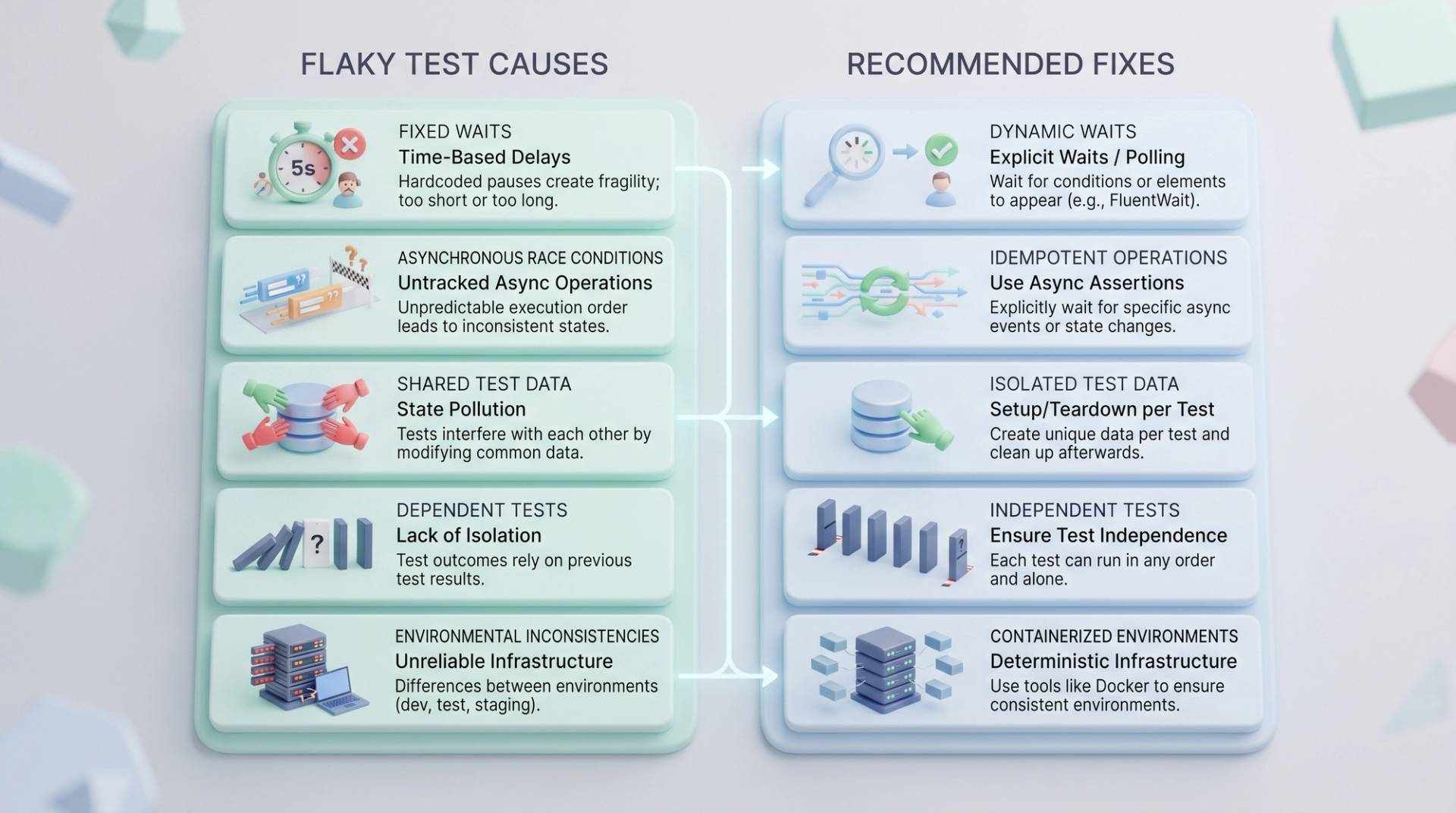
The professional rule: quarantine, don't ignore. When a test proves flaky, move it out of the main pipeline immediately, log it as a bug, and fix it within a set deadline. Never leave a known-flaky test blocking your build "for now."
Being able to diagnose and explain flakiness is a genuine senior-level skill. Most freshers have never even heard the term, so mentioning it in an interview makes an immediate impression.
How Teams Measure Success
Managers don't care how many test scripts you wrote. They care about four numbers:
- Escaped defects - bugs that reached real users. This is the number regression testing exists to reduce.
- Suite run time - how fast the team gets feedback. This decides how often the company can release.
- Flake rate - the percentage of unreliable results. Healthy suites stay under 1%.
- Critical path coverage - how much of the revenue-earning journey is automated. Far more meaningful than total test count.
Learning to talk about your work in these terms instead of "I automated 200 test cases" is what gets automation testers promoted.
Where AI Helps in 2026 (And Where It Doesn't)
AI has genuinely improved parts of this work:
- Self-healing locators automatically fix broken element selectors when developers change the page, cutting maintenance dramatically.
- Smart test selection predicts which tests are most likely to catch a bug in a given change.
- Visual AI spots real layout breaks while ignoring harmless pixel differences.
- Test generation produces reasonable first drafts of routine test scripts.
Where it still falls short: AI-generated tests can be confidently wrong. They often produce tests that check a page loaded, rather than checking the total was correct. That creates a false sense of safety, which is more dangerous than having no test at all.
Every AI-generated test needs a human to review it. That's why testers who understand why a test exists remain very much in demand AI has raised the value of judgement, not removed it.
Your Roadmap: From Beginner to Automation Tester
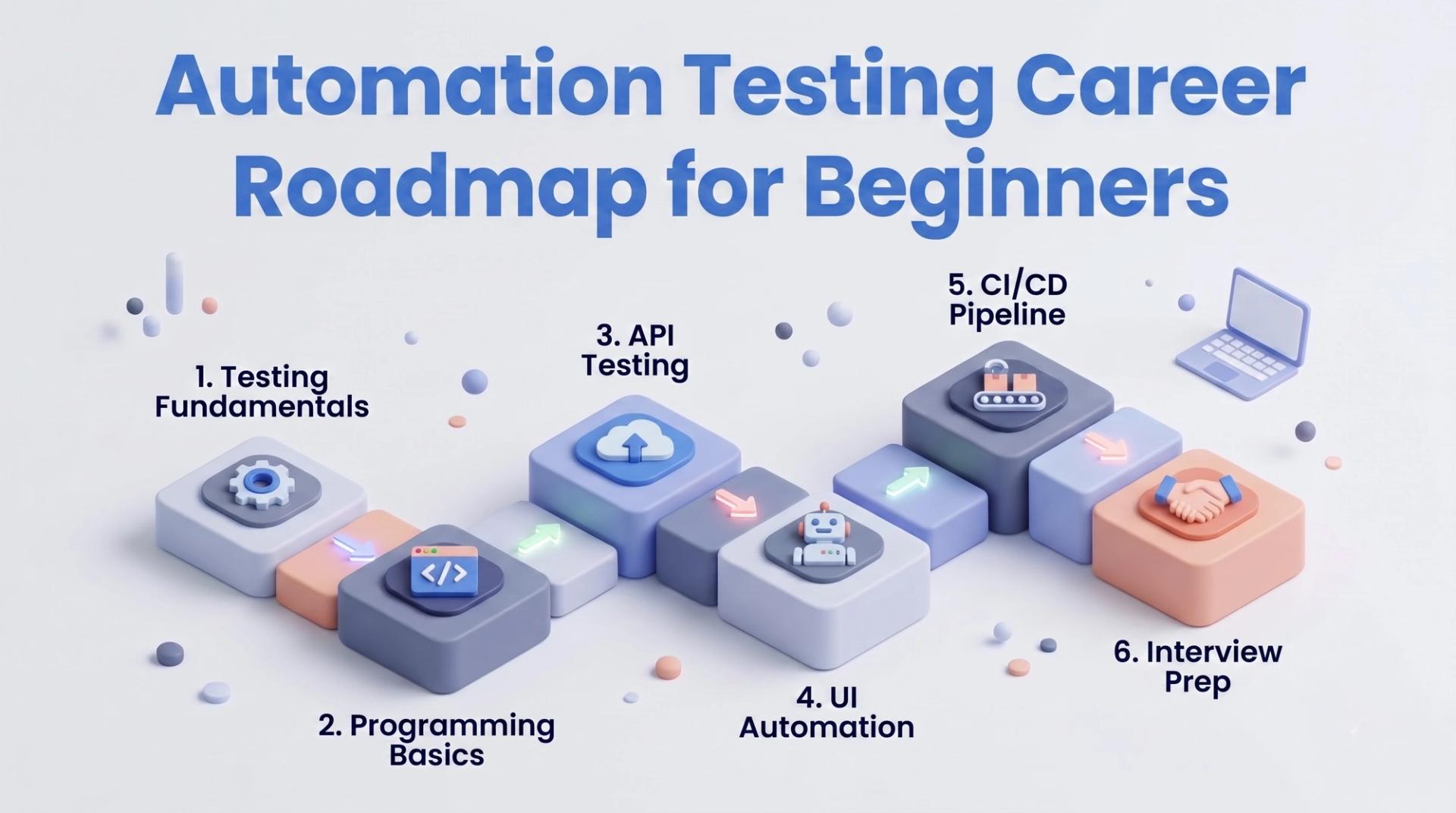
Stage 1 - Testing fundamentals (4–6 weeks) Learn the software testing life cycle, test case design, defect life cycle, and the regression/retesting distinction. Prepare for ISTQB Foundation alongside it.
Stage 2 - Programming basics (6–8 weeks) Pick Java or Python. Get comfortable with loops, conditions, functions, OOP, and collections. Don't rush this weak programming is the most common reason automation careers stall.
Stage 3 - API testing (3–4 weeks) Learn Postman, then Rest Assured. Fast wins, stable tests, high demand.
Stage 4 - UI automation (8–10 weeks) Selenium or Playwright, locators, waits, and then frameworks Page Object Model, TestNG, data-driven testing, reporting.
Stage 5 - CI/CD and scale (3–4 weeks) Jenkins or GitHub Actions, Git, parallel execution, cross-browser testing.
Stage 6 - Portfolio and interviews Build two or three real projects on GitHub. Practise explaining your framework design out loud.
If you'd rather follow this as one structured path with mentorship instead of assembling it yourself, the advanced manual and automation testing master program covers exactly this sequence end to end.
Before interviews, test yourself honestly CDPL's free online mock tests are a quick way to find the gaps in your fundamentals while there's still time to fix them.
Common Interview Questions on Regression Testing
Practise answering these out loud:
- What is regression testing, and how is it different from retesting?
- When would you choose not to automate a test case?
- How do you decide which tests go into the smoke suite?
- What is a flaky test, and how have you handled one?
- Explain the test automation pyramid.
- How do you integrate a regression suite into a CI/CD pipeline?
- How do you manage test data across parallel test runs?
- What would you do if the regression suite takes three hours to run?
Notice that most of these test thinking, not tool syntax. Anyone can learn Selenium commands; teams hire people who can reason about test strategy.
You can see the kinds of roles these skills lead to on CDPL's student placement stories most automation hires come from exactly this progression.
Five Mistakes to Avoid
- Automating the UI first: Start with API tests faster, more stable, better return.
- Chasing a coverage percentage: 90% coverage of unimportant code is worth less than 40% coverage of checkout.
- Learning tools without programming: Selenium without solid Java or Python makes you a script copier, not an engineer.
- Tolerating flaky tests: Every ignored failure teaches the team that failures can be ignored.
- Skipping manual testing fundamentals: You cannot automate a test case you couldn't design by hand.
Frequently Asked Questions
Is regression testing manual or automated?
It can be both, but it's the single best candidate for automation because the same tests are repeated for every release.
Can regression testing be 100% automated?
No. Automate the repeatable checks, and keep humans for exploratory testing, usability, and unexpected edge cases.
Do I need coding skills for regression testing automation?
Yes, but not developer-level. Comfort with loops, conditions, functions, and OOP in one language is enough to start.
How long does it take to learn automation testing?
With consistent effort, most learners reach job-ready level in about six months including fundamentals, programming, and framework building.
Which is better to learn, Selenium or Playwright?
Selenium has more job openings today; Playwright is more modern and pleasant to use. Learn Selenium first for employability, then add Playwright.
Can non-IT graduates learn automation testing?
Yes. Testing is one of the most common entry routes into IT for non-engineering backgrounds, provided you're willing to learn programming basics properly.
Final Thoughts
Regression testing automation isn't about writing hundreds of scripts. It's about making sure that the things which already work keep working automatically, quickly, and reliably, every time the code changes.
Start small. Pick twenty critical test cases, automate them properly, make them run in under ten minutes, and make sure they never give false alarms. That single well-built suite will teach you more than a hundred half-finished scripts.
And it's a genuinely durable skill. Every company that ships software needs someone who can stop old features from silently breaking which is why automation testers remain one of the steadiest hiring categories in Indian IT.
Ready to build this skill properly? Explore CDPL's software testing courses live classes, real projects, expert mentors, and placement support.
Tags

Drives software development initiatives, leading teams to build robust, scalable, and high-performance solutions with latest tools and technologies.