
Defect Reporting and Tracking in Software Testing: A Complete Guide


Learn what defect reporting and tracking really means in software testing the bug life cycle, how to write a clear defect report, severity vs priority, and the tools QA teams use every day.
A beginner-friendly, in-depth guide to defect reporting and tracking in software testing that covers the bug life cycle, how to write an effective defect report, the difference between severity and priority, popular tracking tools like Jira and Bugzilla, best practices, common challenges, and how these skills build a strong QA career written for aspiring testers and students exploring software testing as a profession.
Every app you use today, no matter how polished it feels, shipped with bugs that someone found, wrote down, and followed up on before you ever saw the finished product. That behind-the-scenes discipline is called defect reporting and tracking, and it is one of the most underrated skills in software testing. A tester who can write a clear, reproducible bug report and track it through to closure is often more valuable to a team than one who simply "finds" issues without documenting them properly.
If you are new to QA, or you want to understand how testing teams actually manage the thousands of issues that surface during a project, this guide breaks it down in plain language what a defect is, why reporting and tracking it matters, the life cycle every bug goes through, how to write a report developers will actually thank you for, the difference between severity and priority, the tools teams rely on, and how this one skill can shape an entire QA career.
What Is a Defect in Software Testing?
A defect, commonly called a bug, is any difference between what an application is expected to do and what it actually does when tested. If a login button is supposed to take a user to their dashboard but instead throws an error, that gap between expected and actual behaviour is a defect. It is worth knowing the related terms too: an error is a mistake made by a developer while writing code, a defect is the flaw that mistake leaves behind in the software, and a failure is what happens when that defect causes the application to behave incorrectly in front of a real user.
Understanding this distinction matters because defect reporting is really about capturing that failure the moment it appears, before the details are forgotten. It is the same foundational thinking covered in Cinute Digital's manual software testing guide, which walks through how testers identify these gaps in the first place before a single defect report is ever written.
Why Defect Reporting and Tracking Matters
It is tempting to think that finding a bug is the hard part and writing it down is just paperwork. In practice, the opposite is often true. A defect that is found but poorly reported can waste more time than the bug itself developers cannot reproduce it, testers get pulled back in for clarification, and the fix gets delayed while everyone chases missing details.
Good defect reporting and tracking gives a team three things it cannot function without: clear communication between testers and developers, a reliable way to prioritize what gets fixed first, and a historical record that shows how stable a product really is. It also gives managers real data defect density, time-to-fix, and reopen rates to judge release readiness instead of guessing. This is exactly why defect management is treated as a core, testable skill in structured programs like Cinute Digital's manual testing course, where students practice writing and tracking real defect reports rather than only reading about the concept.
The Defect Life Cycle Explained
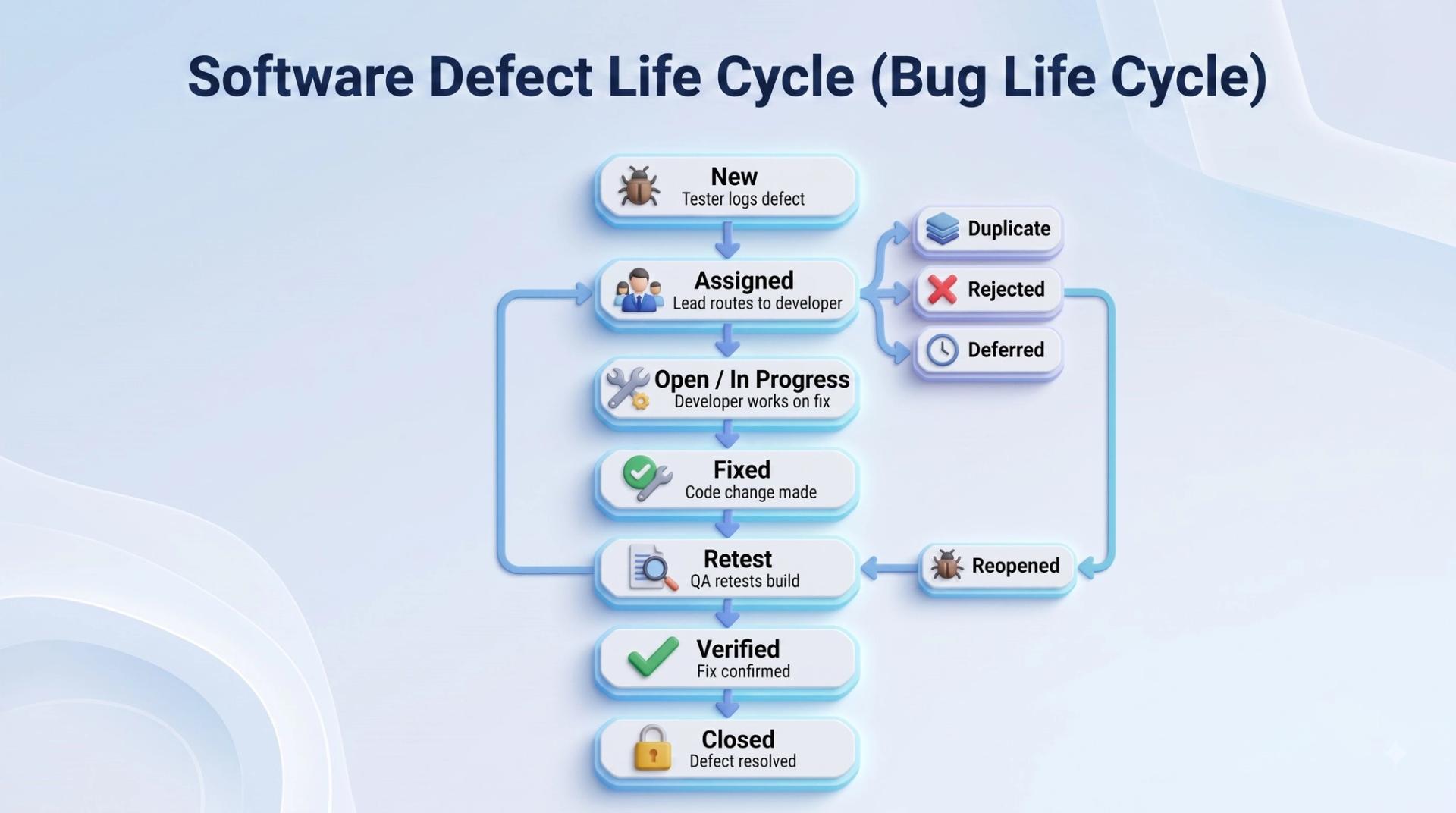
Every defect moves through a predictable sequence of states from the moment it is found to the moment it is closed, often called the bug life cycle or defect life cycle. While tool names vary, the stages usually look like this:
A defect starts as New the moment a tester logs it. It then moves to Assigned, once a lead or manager routes it to the right developer. From there it becomes Open or In Progress, while the developer investigates and works on a fix. Once the code change is made, the status changes to Fixed, and the build moves back to QA for Retest. If the fix works and no side effects appear, the tester marks it Verified and it is eventually Closed. If the same issue reappears, it gets marked Reopened, and the cycle starts again from Assigned.
A few side paths matter too. A defect can be marked Duplicate if it has already been logged, Rejected if it is not actually a bug (perhaps it is working as designed), or Deferred if the team decides to fix it in a later release. Learning to navigate this life cycle accurately, and knowing which status to apply and when, is one of the most commonly tested skills in QA interviews and certification exams.
Anatomy of a Good Defect Report
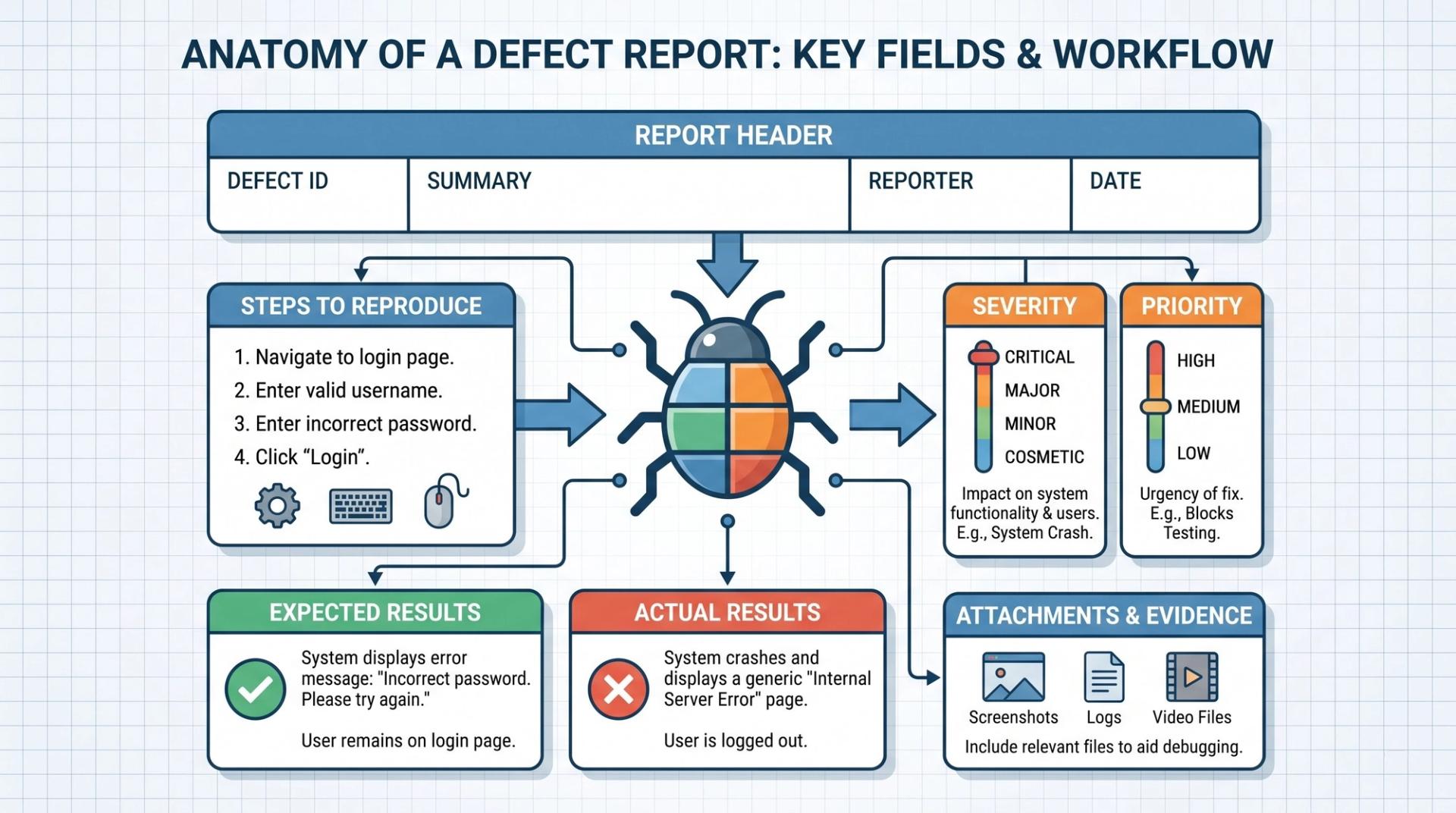
A defect report is only useful if someone who never saw the bug happen can read it and reproduce the exact same problem. That means every report needs a few non-negotiable elements: a short, specific title that summarizes the issue rather than a vague line like "app not working"; a clear description of what went wrong; step-by-step instructions to reproduce it; the expected result versus the actual result; the environment details such as device, browser, OS version, or app build number; a severity and priority rating; and supporting evidence like a screenshot, screen recording, or log file.
This same level of precision matters even more when the defect comes from behind the scenes rather than the screen. In Cinute Digital's API testing course, students learn to report back-end defects with the exact request payload, endpoint, response code, and expected versus actual response body, since a vague "API failed" report is almost impossible for a back-end developer to act on. The habit of writing precise, evidence-backed reports is a skill that carries across every layer of testing, from the UI down to the database.
Severity vs Priority: What's the Difference?
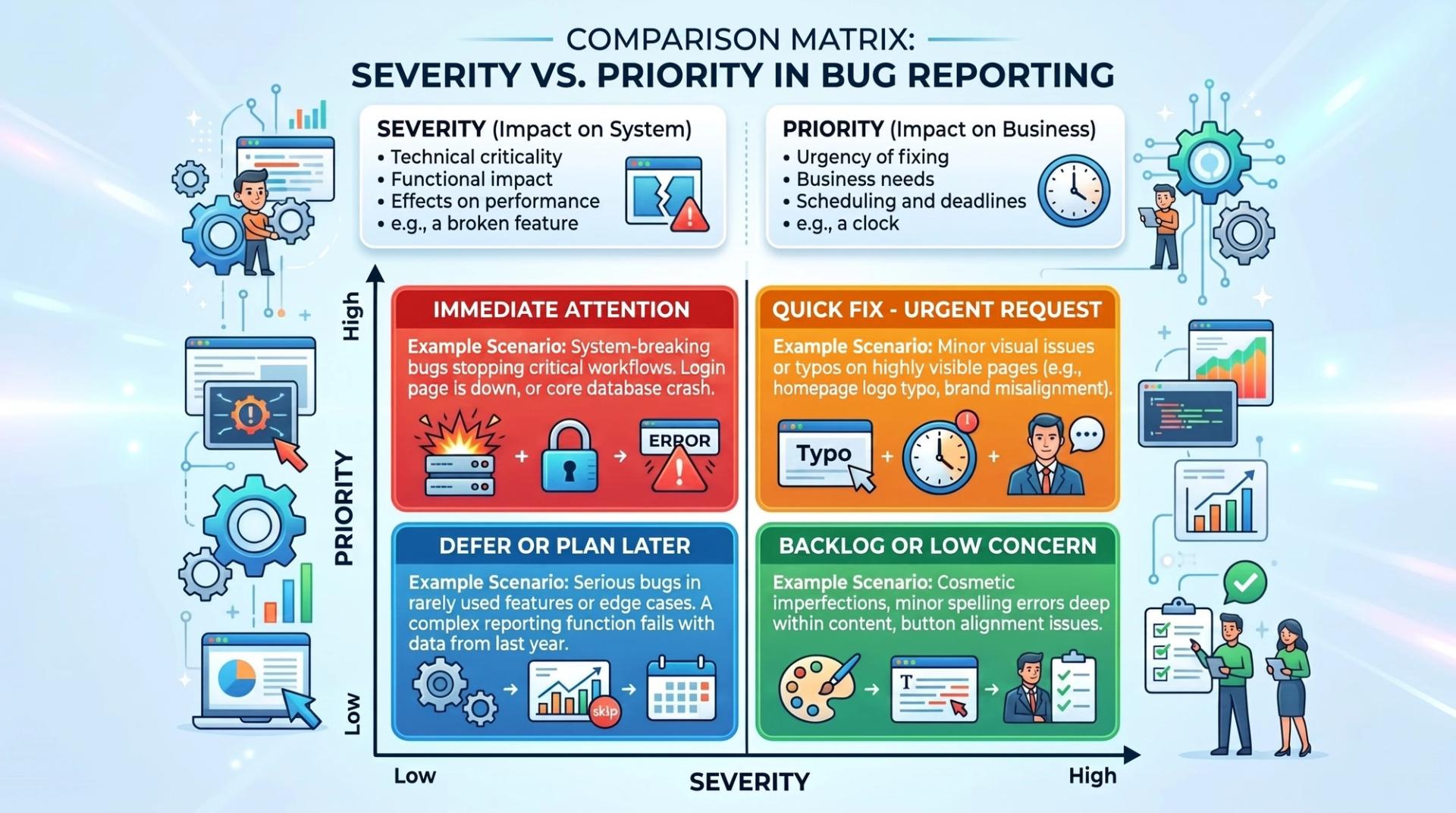
This is one of the most confused concepts for beginners, and one of the most frequently asked questions in QA interviews. Severity measures how much technical damage a defect causes to the application does it crash the app, corrupt data, or block a core feature? Priority measures how urgently the business wants it fixed, regardless of how technically serious it is.
The two do not always move together, which is exactly why the distinction matters:
Being able to explain this table confidently, with your own examples, is exactly the kind of question covered in Cinute Digital's QA fresher interview questions guide, which is worth reviewing before any testing interview.
Popular Defect Tracking Tools
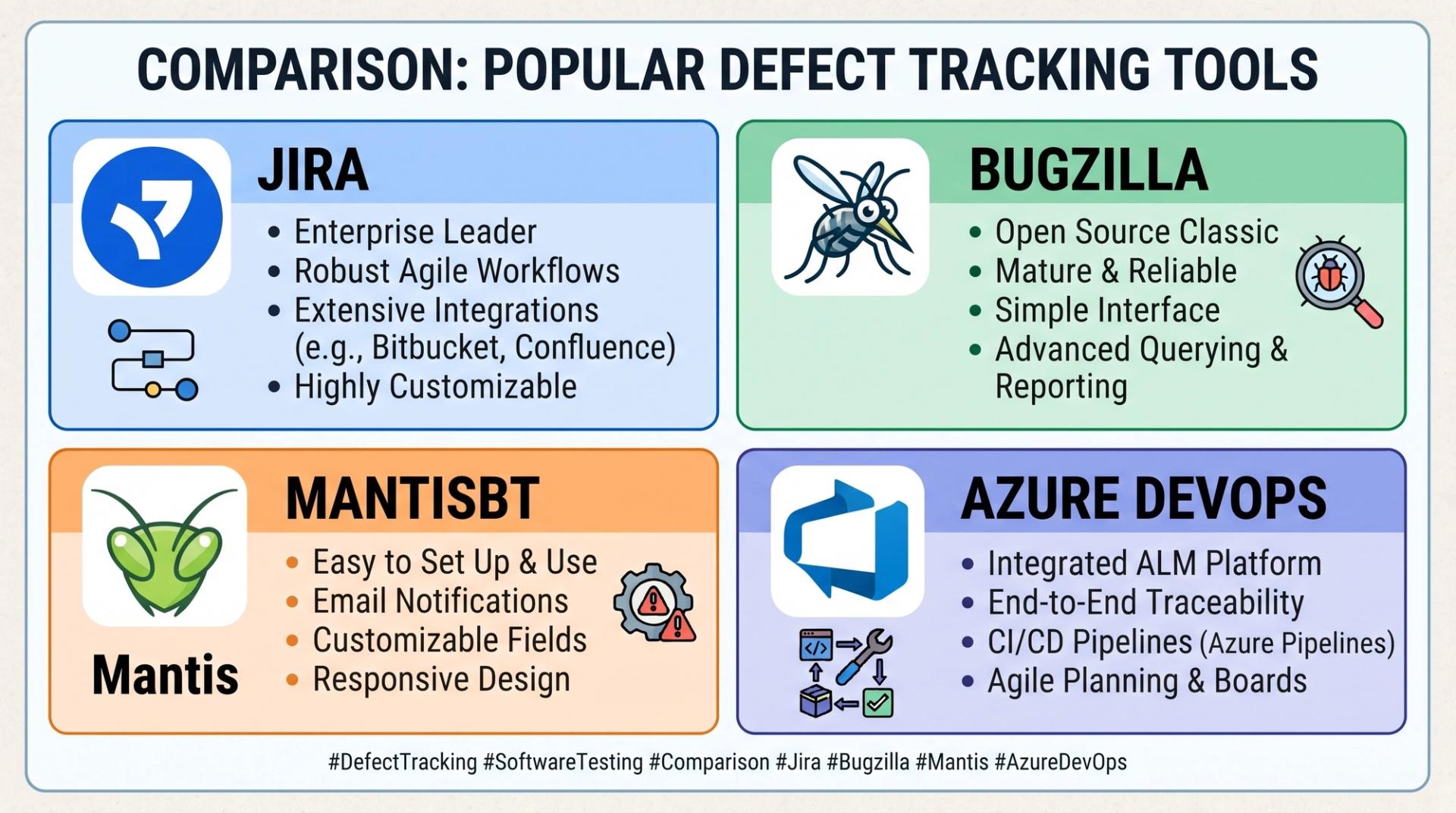
Manual reporting skills matter, but almost no team logs bugs on paper or in spreadsheets anymore. Jira is the most widely used defect and project tracking tool in the industry, popular for its customizable workflows and integration with development pipelines. Bugzilla is a long-standing, open-source option still used by many organizations for straightforward defect tracking. Mantis Bug Tracker offers a lighter-weight, easy-to-learn alternative that smaller teams often prefer. Azure DevOps combines defect tracking with broader project and release management, which suits teams already using Microsoft's development ecosystem.
Regardless of which tool a company uses, the underlying workflow is the same: log the defect with full details, assign it, track its status through the life cycle, and link it back to the test case that found it. For a broader look at how these tools fit alongside test case management and reporting software, Cinute Digital's comprehensive manual testing tools overview for 2026 is a practical reference to bookmark.
Best Practices for Effective Defect Reporting and Tracking
Strong defect management comes down to a handful of consistent habits. Always reproduce the issue at least twice before logging it, so you are confident it is a real, repeatable defect and not a one-off glitch. Log one issue per report rather than bundling several unrelated problems together, since a report covering three different bugs is nearly impossible to track or close cleanly. Write titles that describe the actual problem, not just the symptom, and always attach evidence such as a screenshot or short recording.
Search for existing reports before logging a new one to avoid duplicates, and follow up on fixed defects promptly so retesting does not become a bottleneck before release. As test suites grow, teams increasingly connect defect tracking to their automation pipelines, so a failed regression run in a CI/CD pipeline can automatically flag a potential defect for review. Cinute Digital's automation testing course covers exactly this kind of integration, showing how automated test failures feed directly into a team's defect tracking workflow instead of staying buried in a log file.
Common Challenges in Defect Management
Even experienced teams run into recurring friction around defects. Duplicate reports pile up when testers do not search before logging, wasting developer time on issues already being fixed. Vague reports without clear reproduction steps send bugs bouncing back and forth between QA and development. Severity and priority disagreements are common too, since developers and product managers do not always see urgency the same way testers do. And without a habit of root cause analysis, teams often end up fixing the same category of bug repeatedly instead of addressing what is actually causing it. Recognizing these patterns early, and building the discipline to avoid them, is what separates a junior tester from a QA professional teams trust with critical releases.
Building a QA Career Around Defect Management Skills
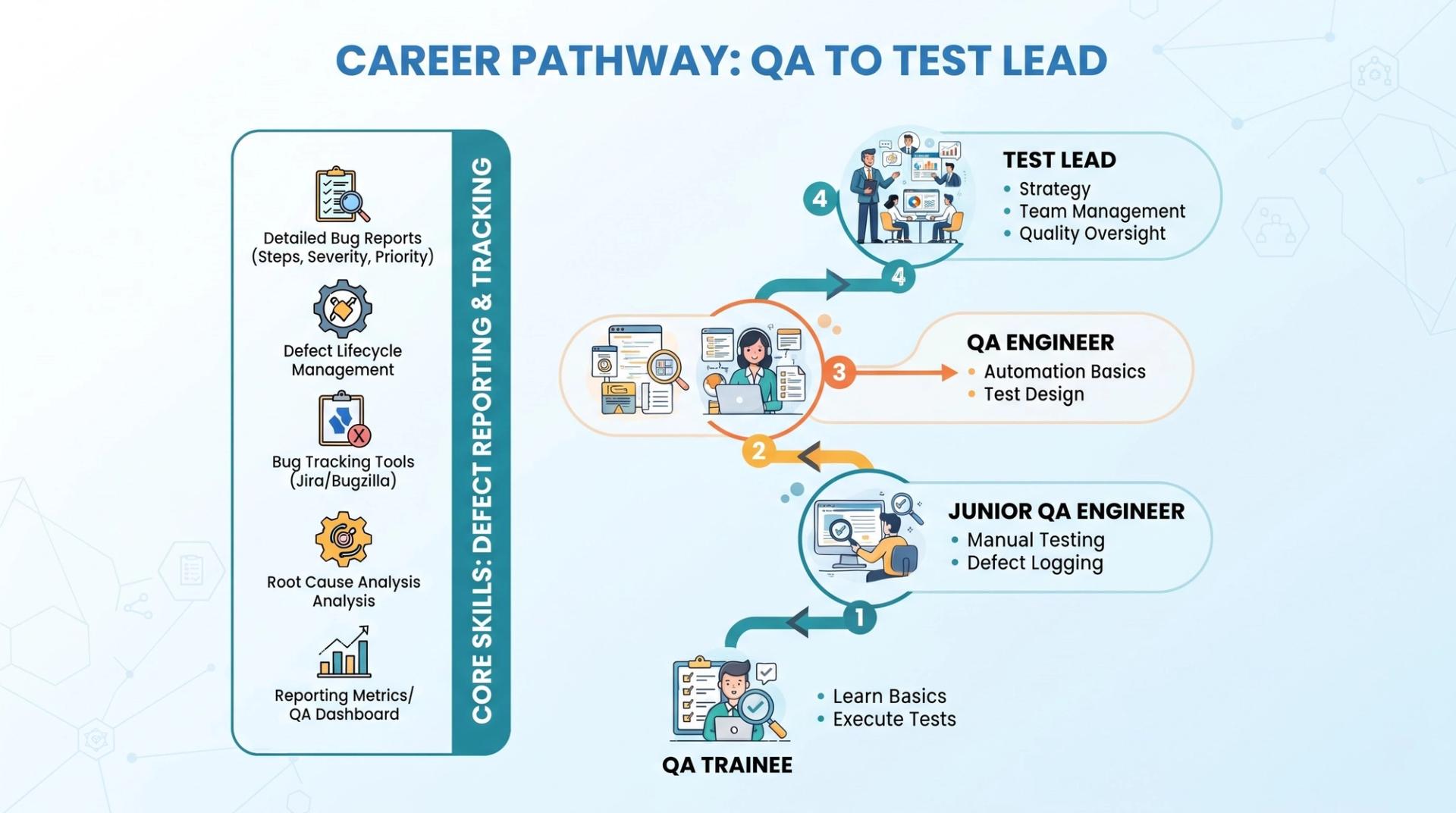
Defect reporting and tracking is often the very first hands-on skill a new QA hire is judged on, because it shows up in daily work from week one, long before someone is trusted with complex automation frameworks. Testers who write clean, reproducible, well-prioritized reports tend to earn trust faster, get pulled into more critical projects, and move more quickly toward roles like test lead or QA analyst.
Certifications add credibility to this skill set as well. Cinute Digital's guide on what the ISTQB certification is and why it matters explains how formal recognition of defect management and testing fundamentals strengthens a resume in a competitive hiring market. For learners who want structured, mentor-led practice across manual testing, automation, and real defect tracking workflows in one placement-focused program, Cinute Digital's Advanced Manual and Automation Testing Master Program combines all of these skills with live projects rather than isolated topics.
Frequently Asked Questions
What is defect reporting and tracking in software testing?
It is the process of documenting a bug in detail once it is found, then following it through a defined life cycle from New to Assigned, Fixed, Retested, and Closed, until it is resolved and verified.
What is the difference between a defect, an error, and a failure?
An error is a mistake a developer makes while coding, a defect is the resulting flaw left in the software, and a failure is what happens when that defect causes the application to behave incorrectly for a user.
What is the difference between severity and priority?
Severity measures the technical impact of a defect on the application, such as whether it crashes the system. Priority measures how urgently the business wants it fixed, which does not always match the severity level.
Which tools are commonly used for defect tracking?
Jira, Bugzilla, Mantis Bug Tracker, and Azure DevOps are among the most widely used defect tracking tools, each offering ways to log, assign, and track bugs through their life cycle.
Do I need coding skills to report and track defects well?
No. Defect reporting is primarily about attention to detail, clear writing, and structured thinking. It is one of the most accessible entry points into a QA career, and a skill every tester builds regardless of whether they later move into automation.
Final Thoughts
Defect reporting and tracking is not the glamorous side of software testing, but it is arguably the most practical skill a QA professional can master early in their career. It combines careful observation with clear communication, and it directly determines how quickly a team can turn a discovered bug into a shipped fix. Whether you are just starting to explore QA or already testing applications informally, learning to write a precise defect report and understanding how it moves through its life cycle will make you noticeably more effective and more employable from day one.
If you are ready to build this skill along with full QA fundamentals through live projects, expert mentorship, and placement support, explore Cinute Digital's testing programs and take the next step toward a software testing career.
Tags

A Manual Tester in TESTRIQ QA LLP and also as Corporate Trainer with CDPL. With a focused career in training and development.