
Security Testing Essentials: A Complete Beginner's Guide for Students and New Testers
Security testing isn't optional anymore it's a core QA skill every student and beginner tester needs. Here's a complete, beginner-friendly breakdown of types, tools, and the process.
A beginner's guide to understanding security testing its types, tools, process, and career path explained in simple terms for students and new testers.
Every time you log into your college portal, pay a food delivery app, or submit an online exam, there's an invisible process working behind the scenes to keep your data safe. That process is the result of security testing one of the most important, and most misunderstood, areas of software development today.
If you're a student exploring a career in software testing, QA, or cybersecurity, understanding security testing essentials isn't optional anymore it's a core skill employers actively look for. This guide breaks down everything you need to know, from the basics to real tools professionals use, in simple language anyone can follow.
What Is Security Testing?
Security testing is a type of software testing that checks whether an application, website, or system is protected against threats, vulnerabilities, and unauthorized access. Unlike functional testing, which checks if a feature works, security testing checks how safely it works.
In simple terms: functional testing asks, "Does the login button work?" Security testing asks, "Can someone break into the system through that login button?"
This makes security testing a form of non-functional testing, since it doesn't test what a system does, but how well it protects itself while doing it. It's a critical checkpoint before any application goes live, especially for platforms handling personal data, payments, or confidential business information.
For students who want to go deeper into how software testing fits into the broader development lifecycle, this complete guide to software testing basics is a great place to start before diving into security-specific concepts.
Why Security Testing Matters (Especially Today)
Cyberattacks aren't rare anymore they're a daily reality. Data breaches, ransomware attacks, and phishing scams regularly make headlines, and the financial and reputational damage they cause can be massive for companies of any size.
Here's why security testing has become essential:
- Protects sensitive data - user passwords, financial details, medical records, and academic data must stay confidential.
- Builds user trust - customers are far more likely to use apps and websites that clearly protect their information.
- Prevents financial loss - the cost of fixing a breach after launch is far higher than testing before release.
- Ensures legal compliance - regulations like GDPR and India's DPDP Act require organizations to safeguard user data.
- Maintains business reputation - one public breach can damage years of brand trust.
For a company, ignoring security testing is like locking the front door of a house but leaving all the windows wide open. To understand how this fits into a company's overall QA strategy, you can explore why quality assurance matters for businesses in more depth.
The Core Principles of Security Testing
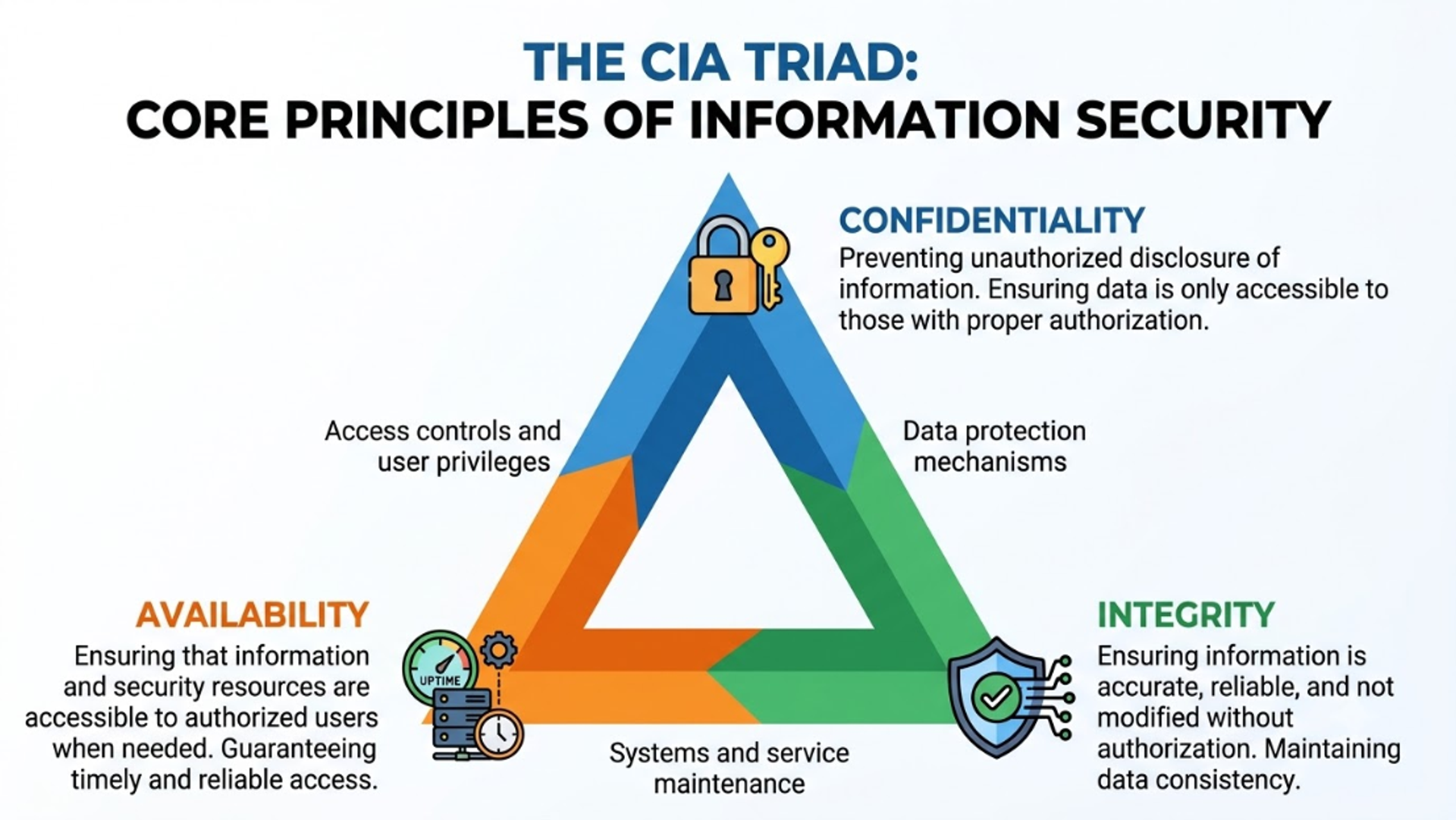
Security testing revolves around a foundational concept called the CIA Triad, along with a few additional principles that testers must understand:
- Confidentiality – Ensuring information is accessible only to authorized users.
- Integrity – Making sure data isn't altered or tampered with during storage or transfer.
- Availability – Ensuring systems and data are accessible when needed, without downtime caused by attacks.
- Authentication – Verifying that users are who they claim to be (e.g., login credentials, OTPs).
- Authorization – Confirming that authenticated users only access what they're permitted to.
- Non-repudiation – Ensuring an action, once performed, can't be denied by the user who performed it (useful in transactions and audit trails).
Every security test a QA engineer performs is essentially checking one or more of these six principles.
Types of Security Testing You Should Know
There isn't just one kind of security testing it's an umbrella term covering several specialized techniques. Here are the main types every beginner should understand:
1. Vulnerability Scanning
An automated process that scans systems for known weaknesses using predefined vulnerability databases. It's usually the first step in identifying security gaps.
2. Security Scanning
A broader process, often manual, that identifies network and system weaknesses and provides solutions to reduce risk.
3. Penetration Testing (Pen Testing)
This simulates a real cyberattack on a system to identify exploitable vulnerabilities. Testers, sometimes called ethical hackers, try to "break in" the way a malicious hacker would but with permission, and for the purpose of fixing the issue. Learn more about how this works in our detailed penetration testing services overview.
4. Risk Assessment
This involves analyzing potential security risks in the organization and ranking them by severity, so teams know what to fix first.
5. Security Auditing
An internal inspection of an application's code and architecture to spot security flaws, often line-by-line.
6. Ethical Hacking
A more aggressive form of testing where certified professionals attempt to exploit system weaknesses just as a cybercriminal would, but with full legal authorization.
7. Posture Assessment
A combination of security scanning, ethical hacking, and risk assessment to give an organization an overall picture of its security standing.
Understanding these types side by side with functional QA approaches will make more sense once you compare them with manual vs automation testing methods, since security testing often blends both manual expertise and automated tools.
Common Vulnerabilities Every Tester Should Know
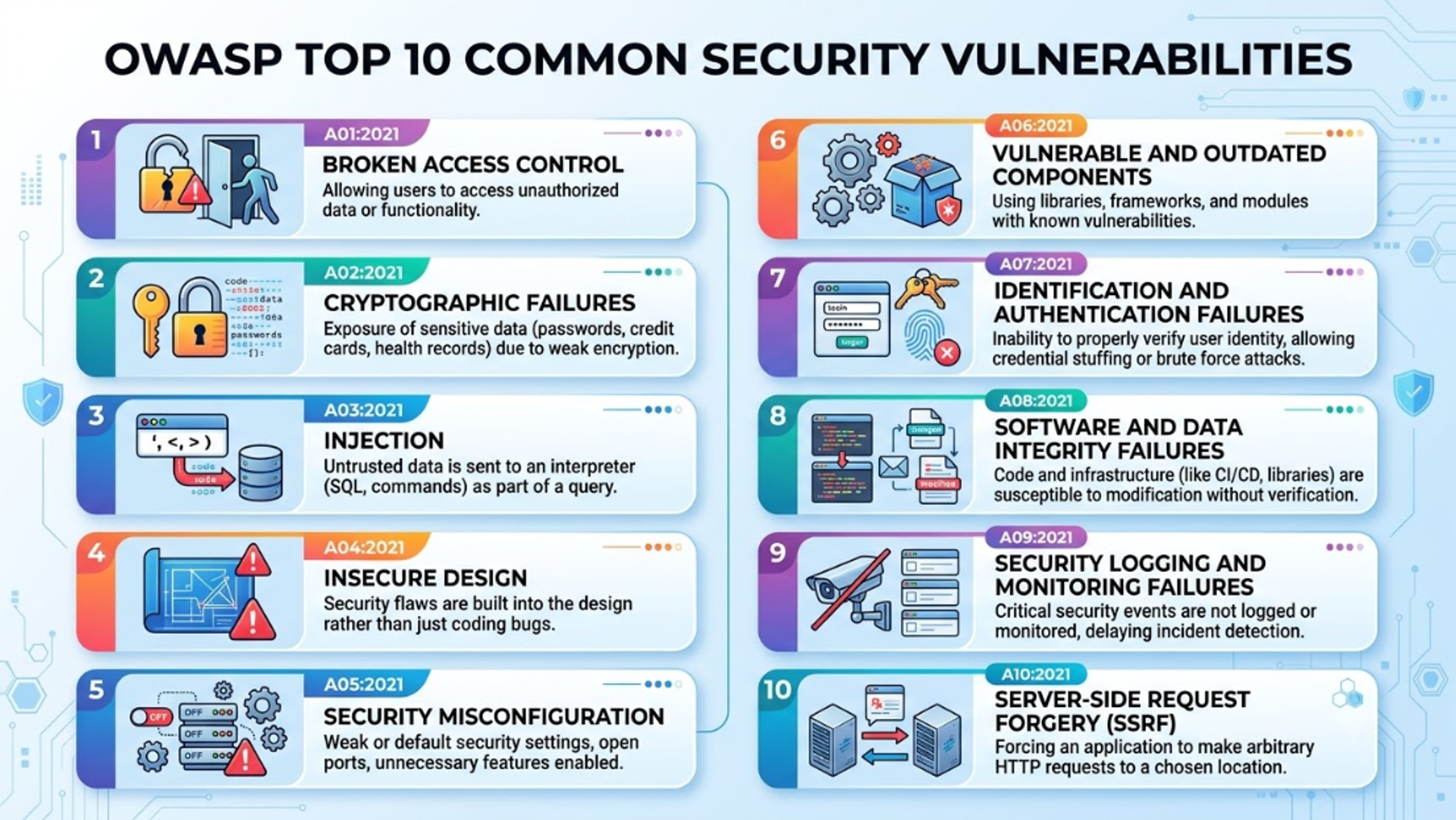
Most security issues fall into a well-documented list called the OWASP Top 10 a globally recognized standard maintained by the Open Web Application Security Project. Some of the most common vulnerabilities include:
- SQL Injection (SQLi) – Attackers insert malicious SQL code into input fields to access or manipulate databases.
- Cross-Site Scripting (XSS) – Malicious scripts are injected into trusted websites, often to steal user data.
- Broken Authentication – Weak login mechanisms that allow attackers to hijack user sessions.
- Security Misconfiguration – Default settings, open cloud storage, or unnecessary features left enabled.
- Sensitive Data Exposure – Poorly protected data such as unencrypted passwords or personal information.
- Cross-Site Request Forgery (CSRF) – Tricking a logged-in user into performing unwanted actions.
Understanding these vulnerabilities in detail is one of the fastest ways to build real credibility as a tester. For a deeper breakdown, check out this guide on common web application vulnerabilities and the OWASP Top 10.
The Security Testing Process: Step by Step
Security testing follows a structured methodology rather than random poking around. Here's a simplified version of how professionals approach it:
- Requirement Analysis – Understand what needs to be protected (data, features, user roles).
- Threat Modeling – Identify likely attack scenarios based on the system's architecture.
- Test Planning – Define scope, tools, and techniques to be used.
- Vulnerability Identification – Use scanning tools and manual review to find weak points.
- Exploitation (Penetration Testing) – Attempt controlled attacks to confirm vulnerabilities are real and exploitable.
- Reporting – Document findings clearly, including severity levels and recommended fixes.
- Remediation & Retesting – Developers fix the issues, and testers verify the fixes actually work.
This cycle often repeats throughout a product's lifecycle security testing isn't a one-time task, it's continuous. If you're a student learning testing fundamentals, it helps to first get comfortable with the complete software testing life cycle (STLC) before specializing in security.
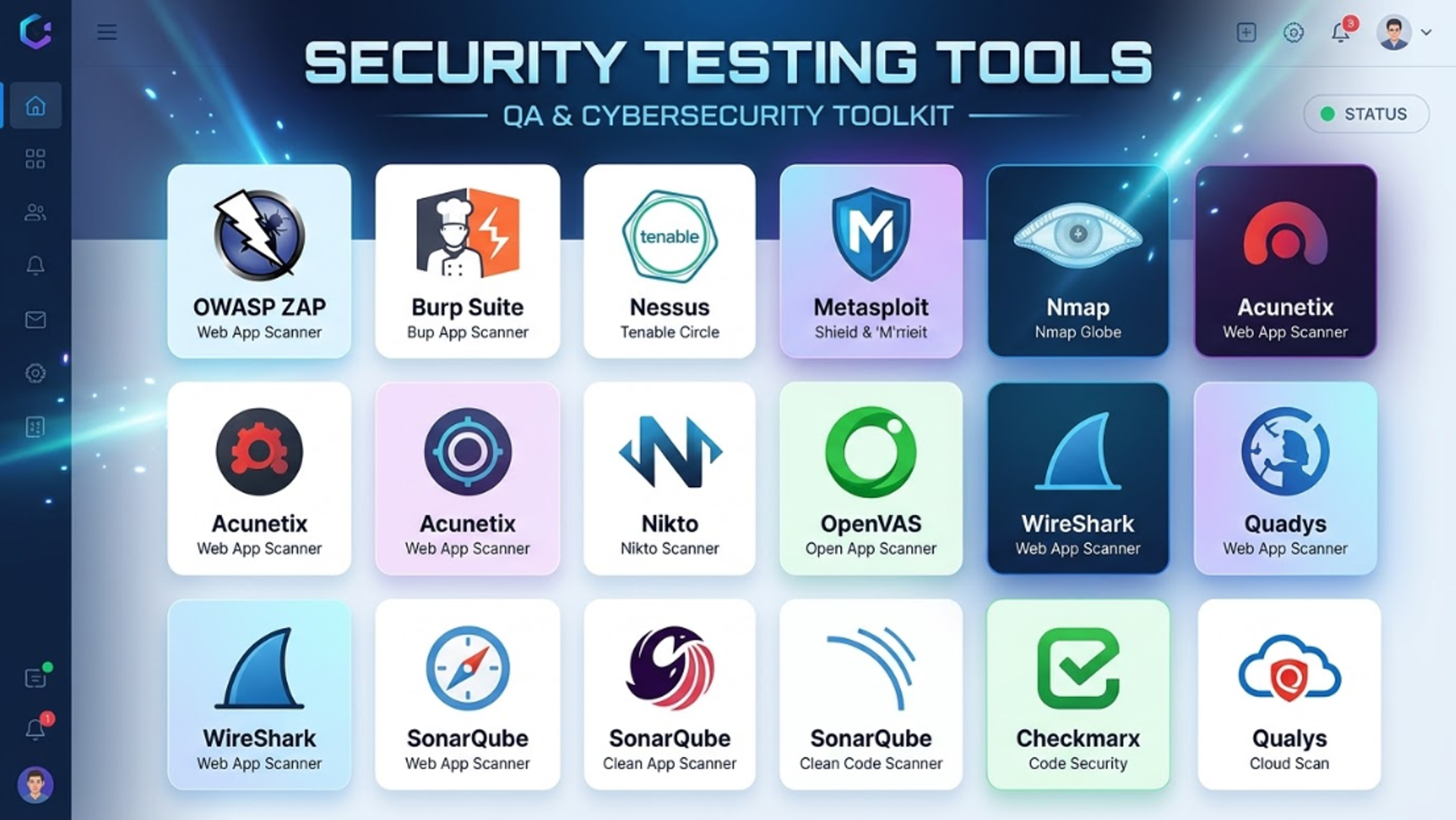
Popular Security Testing Tools (Great for Practice)
You don't need an expensive setup to start learning. Many of the following tools are free, beginner-friendly, and widely used by professionals:
Security Testing Best Practices for Beginners
If you're just getting started, keep these best practices in mind:
- Always test in authorized environments - never test a live system without explicit permission; unauthorized testing is illegal.
- Think like an attacker, act like a defender - understand the mindset of a hacker, but apply it to protect systems.
- Document everything - clear reporting is just as important as finding the vulnerability itself.
- Stay updated - vulnerabilities and attack techniques evolve constantly; following OWASP updates keeps your knowledge current.
- Practice on legal platforms - use dedicated practice environments like OWASP Juice Shop, TryHackMe, or Hack The Box to build hands-on skills safely.
- Combine automation with manual testing - automated scanners catch known issues fast, but manual testing uncovers logic-based flaws tools often miss.
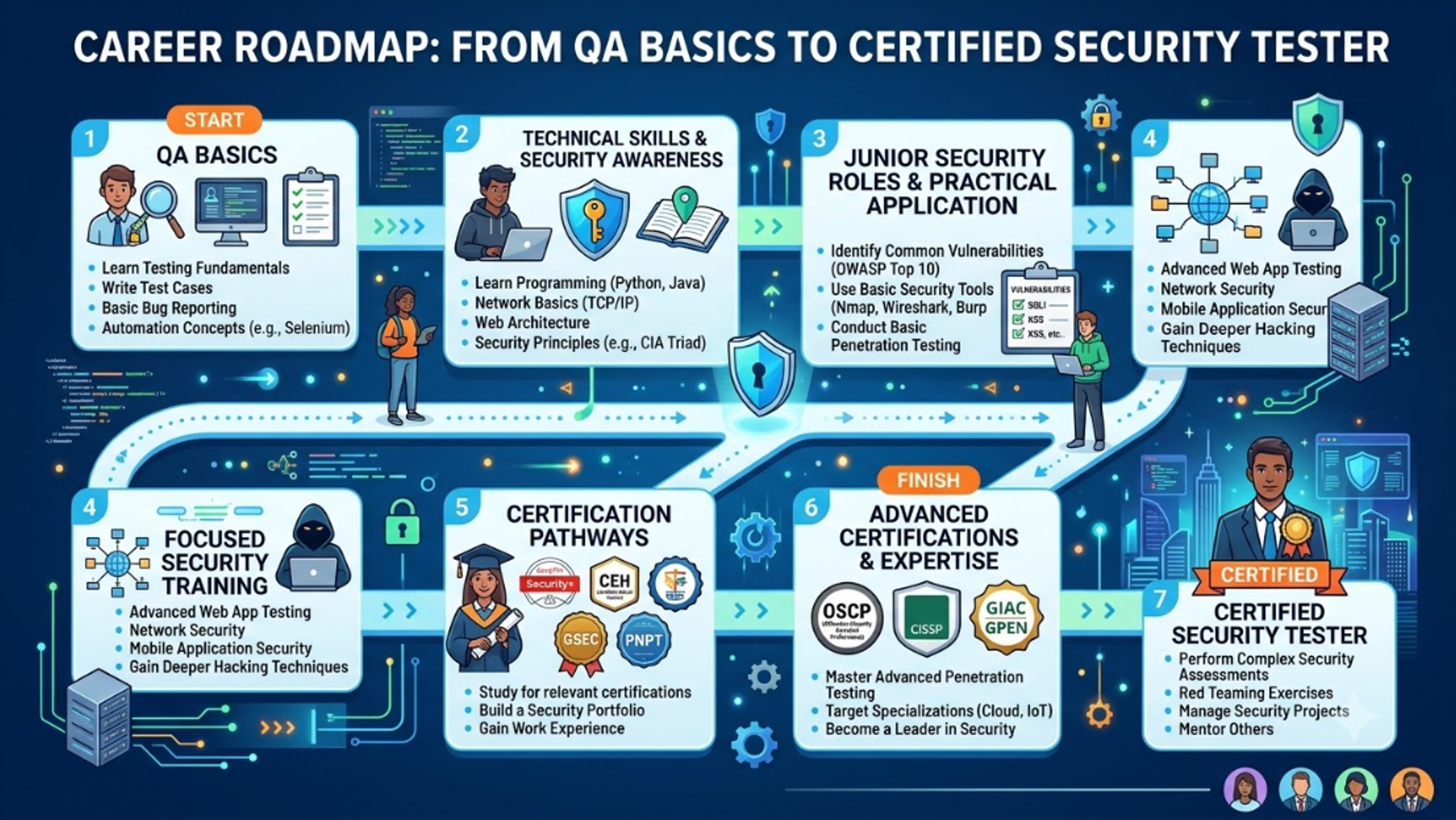
Building a Career in Security Testing: A Quick Roadmap for Students
Security testing is one of the fastest-growing career paths in tech, and it's very achievable for students willing to build skills step by step:
- Build a QA foundation – Start with core software testing concepts and terminology.
- Learn networking basics – Understand how data travels (TCP/IP, DNS, HTTP/HTTPS).
- Get hands-on with tools – Practice with OWASP ZAP, Burp Suite, and Wireshark.
- Understand OWASP Top 10 thoroughly – This is the foundation of almost every entry-level security interview.
- Consider certifications – Options like CEH (Certified Ethical Hacker), CompTIA Security+, or ISTQB with a security specialization add credibility.
- Build a portfolio – Document practice projects, CTF (Capture the Flag) challenges, or bug bounty findings.
For students weighing this path against other QA specializations, this guide on building a career in software testing offers a broader view of where security testing fits within the QA industry.
Frequently Asked Questions
Q1. Is security testing the same as penetration testing?
No. Penetration testing is one specific type of security testing. Security testing is the broader umbrella that includes vulnerability scanning, risk assessment, security auditing, and more.
Q2. Do I need coding skills to start security testing?
Basic scripting knowledge (Python is popular) helps significantly, but many entry-level security testing tasks can be learned using GUI-based tools like OWASP ZAP and Burp Suite before diving into scripting.
Q3. Can a fresher or student get a job in security testing?
Yes. Many companies hire freshers into junior QA or security analyst roles and provide on-the-job training, especially for candidates who show hands-on practice through personal projects or certifications.
Q4. What is the difference between security testing and quality assurance?
Quality assurance (QA) covers the overall process of ensuring software meets requirements, including functionality, performance, and usability. Security testing is a specialized subset of QA focused specifically on protecting systems from threats.
Final Thoughts
Security testing might sound intimidating at first, but at its core, it's simply about asking one question repeatedly: "How could this be broken into, and how do we stop that?" Once you understand the core principles, common vulnerabilities, and basic tools, you already have a strong foundation to build on.
Whether you're a student exploring your first QA internship or someone curious about cybersecurity as a career, the best way forward is consistent, hands-on practice. Start small, use free tools, follow OWASP resources, and build real projects you can show employers.
If you'd like guided support, structured learning paths, or want to explore how professional QA teams handle real-world security testing projects, feel free to get in touch with our team we're always happy to help students and professionals navigate their testing journey.
Tags

A Manual Tester in TESTRIQ QA LLP and also as Corporate Trainer with CDPL. With a focused career in training and development.