
Load Testing with JMeter: A Complete Guide for Software Testing Students & Professionals


Discover how to master load testing with JMeter—the tool that teaches you why performance matters. Perfect for students, graduates, and professionals building testing careers.
Master load testing with JMeter—the industry standard for performance testing. Perfect for testing students, graduates, and professionals seeking career advancement.
Have you ever wondered why an app that works perfectly in testing suddenly crashes when thousands of users access it simultaneously? This is where load testing with JMeter becomes crucial for every software tester's skill set.
If you're a college student learning software testing, a recent graduate building your career in QA, or an IT professional seeking to upskill, JMeter is the industry-standard tool you absolutely need to master. In this comprehensive guide, we'll explore load testing from the ground up—making sure concepts like "concurrent users," "response times," and "throughput" become second nature to you.
Let's dive in and unlock one of the most valuable skills in modern software testing!
What Is Load Testing and Why Every Software Tester Should Learn It
Before jumping into JMeter, let's understand the "why" behind load testing. Many students ask: "If our application works fine in regular testing, why do we need load testing?"
The answer is simple yet powerful: regular testing doesn't reveal performance issues.
When you test an application manually or through standard automation testing, you typically have:
- A few users accessing the system
- Normal network conditions
- Minimal database queries
- Low server load
But in the real world, applications face:
- Thousands of simultaneous users (think e-commerce during sales)
- Network delays and interruptions
- Database bottlenecks
- Server resource constraints
This is where load testing steps in. It answers critical questions every professional in the industry needs to answer:
For Students & Graduates:
- Will the application I built perform under real-world conditions?
- What's the maximum number of users my system can handle?
- Where are the performance weaknesses in my application?
- How do I detect and fix performance issues early?
For Companies & Hiring Managers:
- Can our infrastructure handle holiday season traffic?
- Are users waiting too long for responses?
- Which parts of our application need optimization?
- What's our system's breaking point?
JMeter answers all these questions by simulating realistic user load and providing detailed performance metrics. This is why companies like Cinute Digital teach load testing as part of their comprehensive software testing courses — it's a non-negotiable skill for professional testers.
What Exactly Is JMeter? The Beginner-Friendly Explanation
JMeter is an open-source load testing tool developed by Apache. Think of it as a virtual environment where you can simulate hundreds or thousands of users accessing your application simultaneously, then watch how it performs.
Key advantages that make JMeter perfect for students and beginners:
- It's Free - No licensing costs, no subscriptions. Students and fresh graduates can install it on their personal computers and practice immediately.
- Simple to Learn - JMeter has a graphical interface (GUI) that's intuitive. You don't need advanced programming knowledge to get started.
- Industry Standard - Companies like TechMahindra, Accenture, and other partners of Cinute Digital's placement network use JMeter for performance testing. Learning it makes you immediately employable.
- Supports Multiple Protocols - JMeter can test HTTP/HTTPS, FTP, JDBC databases, SMTP, POP3, and more. This breadth makes it suitable for diverse testing scenarios.
- Comprehensive Reporting - JMeter generates detailed reports showing response times, throughput, error rates, and graphs—exactly what managers and stakeholders want to see.
For students planning a career in software testing, JMeter is the perfect stepping stone. It teaches you performance testing fundamentals while giving you a tool that's actually used in professional environments.
The Core Concepts Every Student Must Understand
Before you start using JMeter, let's clarify the terminology you'll encounter. Understanding these concepts separates competent testers from average ones.
1. Virtual Users (Threads)
In JMeter, "threads" represent virtual users. If you create 1,000 threads, you're simulating 1,000 real users accessing your application simultaneously.
Why this matters for students: Your job is to figure out: "How many concurrent users can my application handle before performance degrades?"
2. Response Time
The time it takes for your application to respond to a user's request. Measured in milliseconds.
For example: A user clicks a button at 1:00:00 PM, and the page loads at 1:00:02 PM. Response time = 2 seconds = 2000 milliseconds.
Industry standards: Most applications aim for response times < 2 seconds. Anything beyond that frustrates users.
3. Throughput
The number of requests your application can process per second.
Simple analogy: If a restaurant can serve 10 customers per hour with full satisfaction, that's its throughput. Similarly, if your web server processes 500 requests per second, that's your throughput.
4. Error Rate
The percentage of requests that fail. In production systems, this should be near 0%.
Why testers care: If under load, 5% of user requests fail, that means during peak traffic, customers experience problems. This is unacceptable and needs to be fixed before launch.
5. Ramp-up Time
How quickly you bring virtual users into the test. A 300-second ramp-up with 1,000 users means adding about 3-4 new users per second.
Why it matters: Realistic load testing gradually increases users rather than launching all 1,000 simultaneously. Real users don't all appear at once!
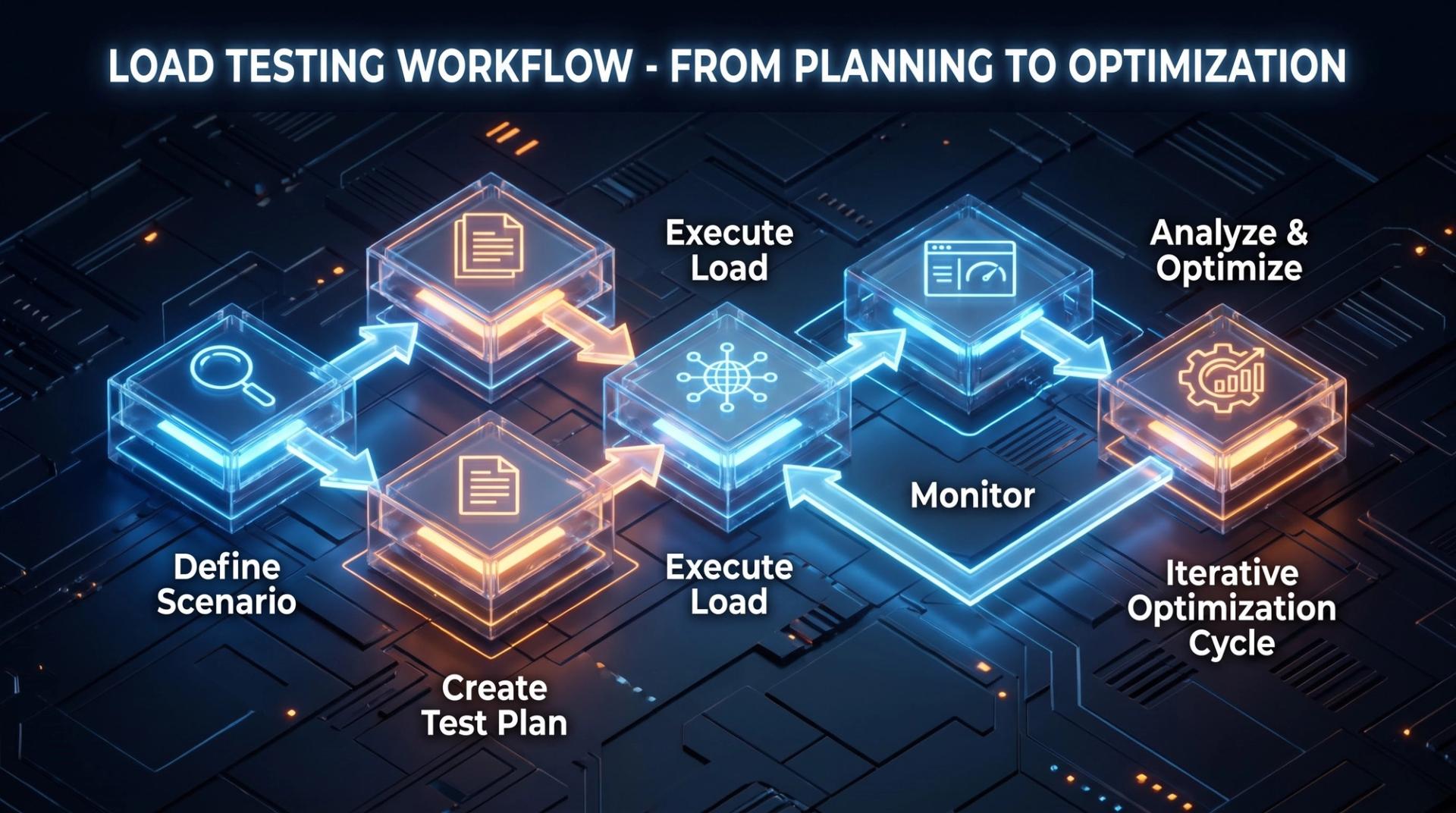
Step-by-Step: Your First JMeter Load Test
Now, let's create your first load test. This is designed for students with no prior experience.
Step 1: Download and Install JMeter
- Visit apache.org/jmeter (it's completely free)
- Download the appropriate version for your operating system (Windows, Mac, or Linux)
- Extract the zip file and run JMeter
- You'll see a simple interface with menus and options
Note for students: When installing at college labs or on university systems, ask your institution about partnering with Cinute Digital for proper technical training. Many colleges partner with professional institutes for hands-on technical education.
Step 2: Create Your First Test Plan
A test plan is your container for everything. Think of it as a folder holding all your testing instructions.
- In JMeter, right-click on "Test Plan" and add a "Thread Group"
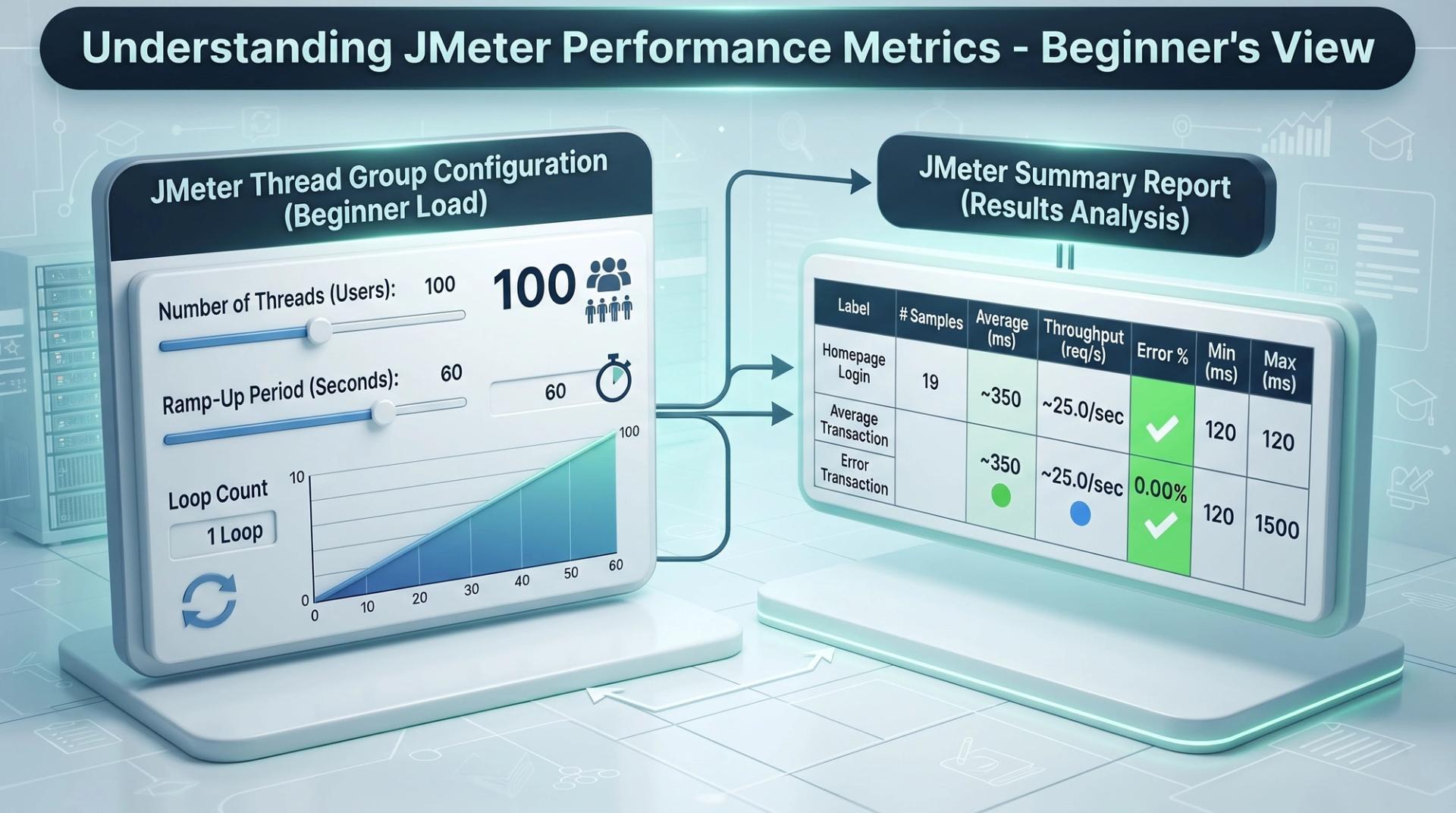
- Configure your thread group:
- Number of Threads: 100 (start small!)
- Ramp-up Time: 60 seconds (gradually add users over 1 minute)
- Loop Count: 1 (each user runs once)

Step 3: Add an HTTP Request
This tells JMeter which website or application to test.
- Right-click your Thread Group → Add → Sampler → HTTP Request
- Enter:
- Server Name: www.example.com (or your application URL)
- Path: / (or specific page like /login)
- Method: GET (for retrieving pages) or POST (for submitting forms)
Step 4: Add Listeners (Results Collection)
Listeners collect and display results. This is where you see if your test was successful.
- Right-click Test Plan → Add → Listener → View Results Tree
- Also add: Summary Report (shows aggregated statistics)
Step 5: Run Your Test
- Click the Start button (green triangle) in the toolbar
- Watch as JMeter simulates 100 users accessing the website
- Monitor the results in real-time
After your test completes, look at the Summary Report showing:
- Average response time
- Min/Max response times
- Throughput (requests per second)
- Error percentage
Congratulations! You've just performed your first load test. You've essentially answered: "Can this website handle 100 concurrent users?"
Why Load Testing Skills Are Critical for Your Career
If you're a student wondering whether to invest time in learning JMeter, here's why it matters for your career prospects:
1. High Demand in Job Market Every tech company needs testers who can verify performance. Whether it's a startup or a Fortune 500 company, load testing is essential before launch.
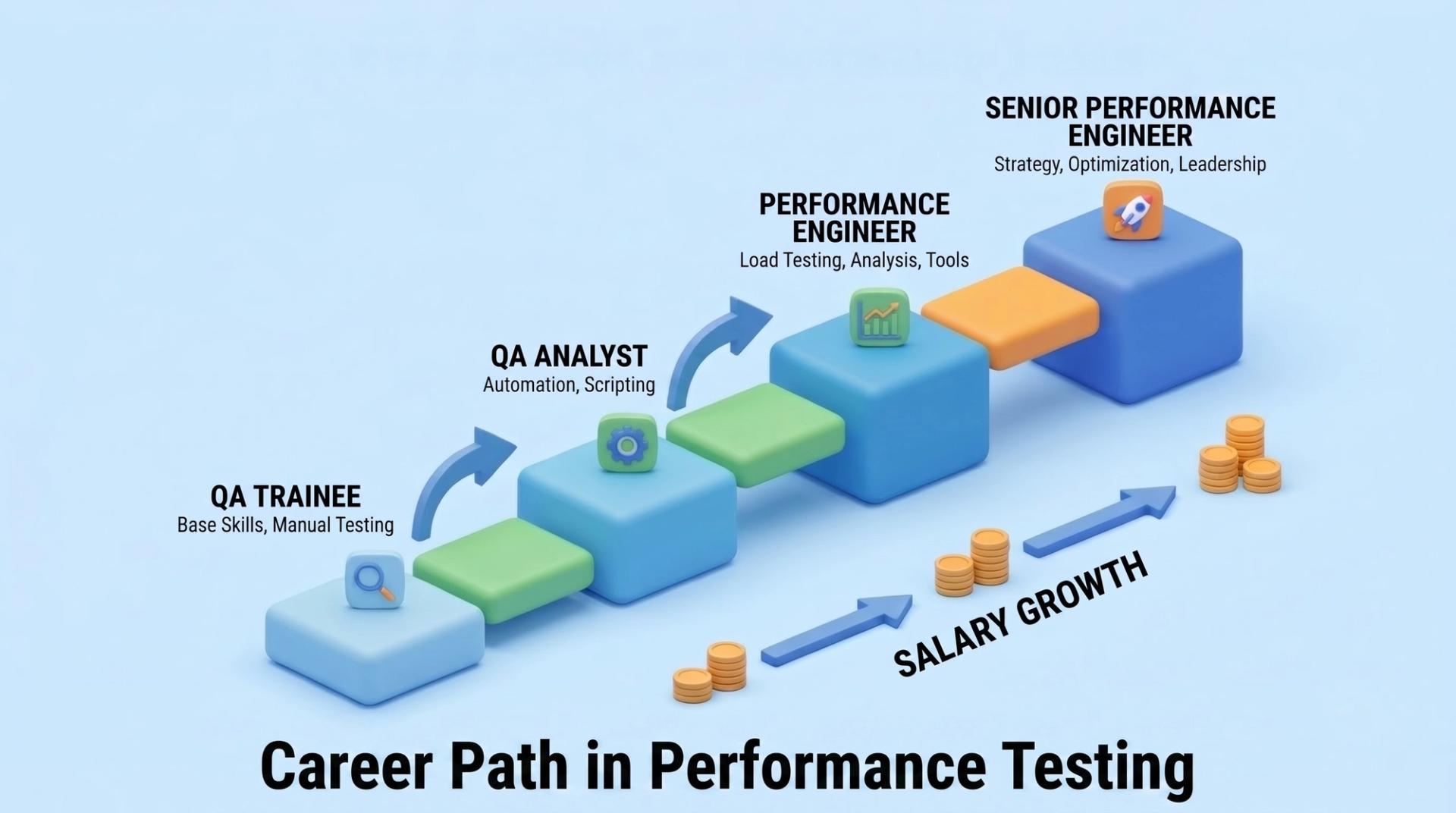
2. Better Salaries Performance testing specialists earn 15-20% more than general QA testers, according to industry surveys. Learning JMeter increases your earning potential.
3. Career Advancement Performance testing knowledge opens doors to senior QA roles, test automation lead positions, and eventually, QA management roles.
4. Global Opportunities Performance testing is needed everywhere. Whether you work at companies like Cinute Digital's partner network that includes TechMahindra, Accenture, and others, or join multinational corporations, these skills are valued globally.
For parents and educators: Learning load testing with industry-standard tools like JMeter makes graduates immediately employable. This directly impacts placement success and career satisfaction.
Best Practices for Professional Load Testing
As you progress from student to professional, apply these practices:
1. Test in Realistic Environments
Don't test on your personal laptop. Use proper testing environments similar to production to get accurate results.
2. Create Realistic Test Data
If your actual users' behaviour follows certain patterns, replicate those in your tests. Don't just send random requests.
3. Set Clear Performance Goals
Before testing, define acceptable performance:
- "Response time should be < 2 seconds for 95% of requests"
- "System should handle 10,000 concurrent users"
- "Error rate should be < 0.1%"
4. Monitor Infrastructure During Tests
Watch CPU, memory, and disk usage while testing. Sometimes the bottleneck isn't your application code but rather the server infrastructure.
5. Test Early, Test Often
Don't wait until the application is complete to start load testing. Integrate it into your development cycle through continuous testing practices.
Common Mistakes Students and Beginners Make
Learn from others' errors:
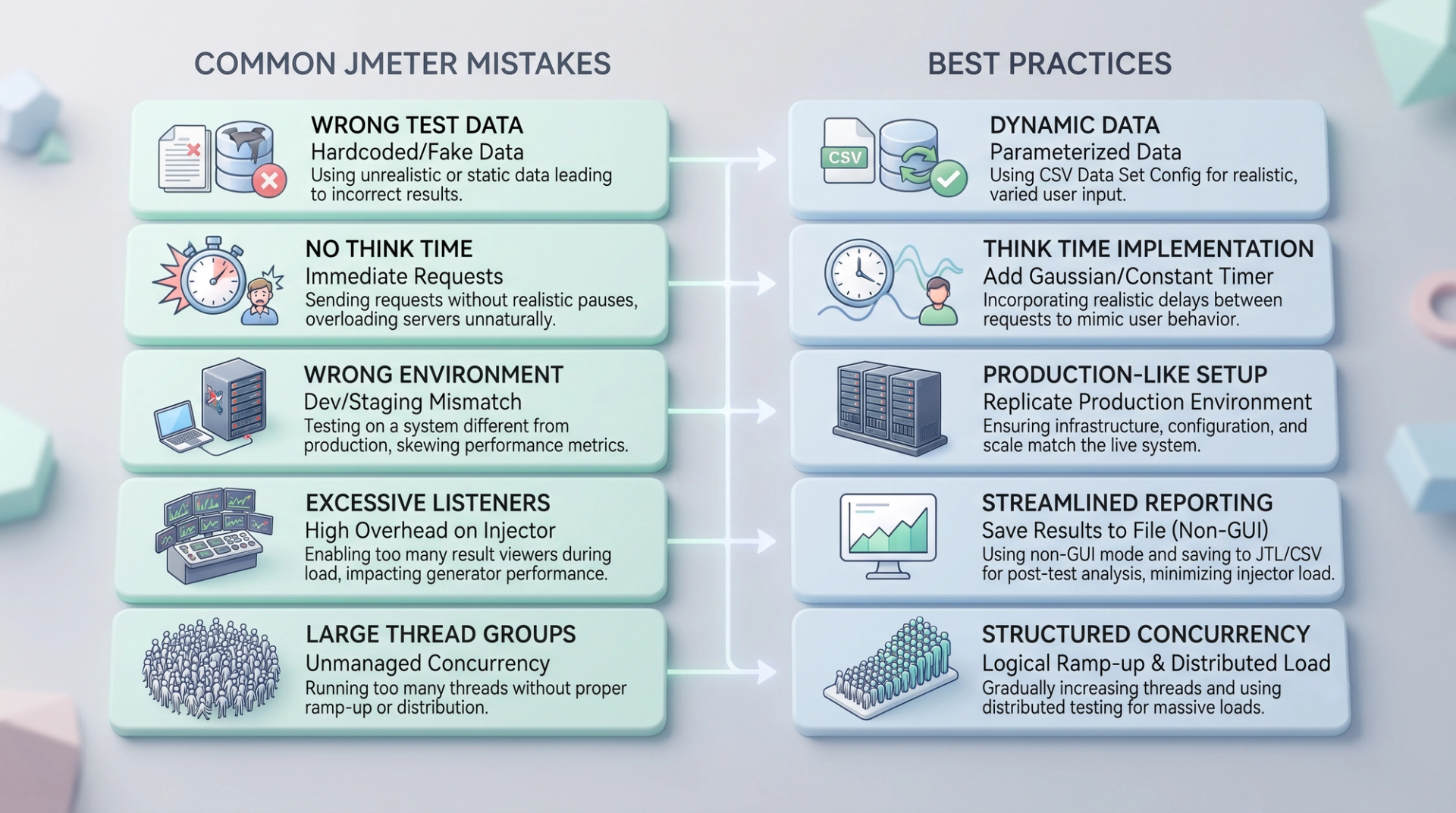
Mistake 1: Using Incorrect Test Data
Using the same request millions of times doesn't match real user behaviour. Real users search for different things, update different records, etc.
Mistake 2: Ignoring "Think Time"
Users don't click buttons instantly. Add realistic delays between actions to simulate human behaviour.
Mistake 3: Testing Against the Wrong Environment
Testing against your development laptop when you need to test against the staging environment. This gives misleading results.
Mistake 4: Only Looking at Average Response Times
The average might look good, but what about the slowest 1% of users? They might experience 30-second response times while average is 2 seconds.
Mistake 5: Not Documenting Your Tests
When you leave a job or your company needs to review tests later, proper documentation becomes crucial. Always document your test scenarios.
How to Land Your First Testing Job Using JMeter Knowledge
If you're a graduate or job seeker, here's how to leverage JMeter knowledge:
1. Build a Portfolio Create load tests for popular websites or open-source projects. Document your findings in a blog or GitHub repository. Hiring managers love seeing practical examples.
2. Get Certified While ISTQB certification focuses on testing fundamentals, adding JMeter expertise through Cinute Digital's practical courses makes you stand out.
3. Prepare Real Interview Answers Practice explaining:
- "What's the difference between load testing and stress testing?"
- "Walk me through how you'd performance test an e-commerce website"
- "How would you identify a performance bottleneck?"
4. Network in the Testing Community Join testing forums, attend webinars, and connect with professionals. Many jobs are filled through referrals.
5. Gain Real-World Experience Internship programs and on-job training with proper mentorship accelerate learning. Real projects teach more than any tutorial.
Resources for Continued Learning
Your learning journey doesn't end here. Excellent resources include:
Free Resources:
- Apache JMeter official documentation
- YouTube channels dedicated to JMeter tutorials
- Medium articles on performance testing
Structured Learning:
- Cinute Digital's Advanced Software Testing Course covers performance testing comprehensively
- Java Programming course helps understand the underlying technology
- Automation Testing courses teach complementary skills
Professional Development:
- Contribute to open-source projects using JMeter
- Present your findings to your team
- Take on performance testing responsibilities at your workplace
Conclusion: Your Path Forward in Performance Testing
Load testing with JMeter isn't just a skill—it's your ticket to a rewarding career in software testing. Whether you're a college student exploring career options, a recent graduate seeking your first job, or an IT professional upskilling for advancement, JMeter expertise sets you apart.
The software testing industry needs professionals who understand performance. Applications are getting more complex, users expect faster response times, and companies need to ensure their infrastructure can handle real-world load. This is where your JMeter knowledge becomes invaluable.
Your next steps:
- Install JMeter and practice with the tutorial above
- Build test scenarios for real applications
- Document your findings professionally
- Seek structured training through Cinute Digital's industry-led courses with expert mentors
- Apply for testing roles highlighting your performance testing experience
- Continuously learn as tools and technologies evolve
Remember: Every professional testing expert started exactly where you are now. The difference between where you are and where successful testers are is simply consistent practice and quality learning.
The testing industry is waiting for skilled professionals like you. Master JMeter, understand performance testing, and build the career you deserve.
Tags

Drives software development initiatives, leading teams to build robust, scalable, and high-performance solutions with latest tools and technologies.