
Database Connectivity (SQLite) in Python: A Complete Beginner's Guide


Master database connectivity in Python with SQLite connect, create tables, and run CRUD queries using simple, beginner-friendly code examples you can apply to real projects right away.
A beginner-friendly guide to database connectivity in Python using SQLite learn to connect, create tables, and run CRUD operations with simple, practical code examples.
If you have ever built a to-do list app or a simple student record system in Python, you already know the problem: once your program stops running, the data disappears. Variables and lists live only in memory, so closing your script erases everything you stored.
This is exactly why database connectivity matters. A database lets your Python program save information permanently, so it is still there the next time your app runs. And there is no easier way to experience this than with SQLite a lightweight, file-based database built right into Python.
This guide breaks down database connectivity in Python using SQLite in plain, simple language. No prior database experience needed. By the end, you will know how to connect to a database, create tables, insert and retrieve data, update records, and avoid the mistakes beginners make most often. If you are also exploring the broader Python Programming Course, this is one of the most practical skills you can add to your resume.
What Is SQLite, and Why Should Beginners Use It?
SQLite is a small, self-contained, server less database engine. Unlike MySQL or PostgreSQL, which need a separate server running in the background, SQLite stores your entire database in a single file usually with a .db extension. There is nothing to install, no server to configure, and no username or password to manage.
Python makes this even easier with a built-in module called sqlite3. You do not need to install any external package just import sqlite3, and you are ready to go.
Here is why SQLite is the go-to choice for learners and small projects:
- Zero setup - no server installation or configuration required
- Built into Python - the
sqlite3module is part of the Python standard library - Portable - the entire database is a single file you can copy, share, or back up
- Lightweight - perfect for prototypes, small apps, desktop tools, and learning projects
- SQL-compliant - you write standard SQL queries, so the skills transfer directly to MySQL, PostgreSQL, and other relational databases
If you are new to programming in general, it helps to be comfortable with core Python fundamentals first, since classes and objects come up once you start writing reusable database functions. Reviewing Python OOP concepts for beginners alongside this topic will make your database code cleaner.

Understanding the Core Building Blocks
Before jumping into code, it helps to understand four terms that appear in almost every database connectivity task:
1. Connection Object - the actual link between your Python program and the database file, created with sqlite3.connect("filename.db").
2. Cursor Object - your messenger. It sends SQL commands to the database and brings results back to you.
3. Execute Method - execute() runs a single SQL statement, whether that is creating a table, inserting a row, or fetching records.
4. Commit Method - changes you make (inserting, updating, or deleting data) are not saved permanently until you call commit(). This is one of the most common things beginners forget.
Once these four pieces click, database connectivity in Python becomes much easier to follow.
Step 1: Connecting to a SQLite Database
Connecting to SQLite in Python takes just two lines of code:
Here is what happens behind the scenes: if a file named students.db already exists in your project folder, Python connects to it. If not, SQLite automatically creates a brand-new database file this single line handles both scenarios.
You can also create a temporary, in-memory database that disappears once your program ends, useful for testing:
Step 2: Creating a Table
A database is only useful once it has structure. Tables define what data you will store and how it is organized into rows and columns.

A few things worth noting:
IF NOT EXISTSprevents an error if you run this code twiceINTEGER PRIMARY KEY AUTOINCREMENTautomatically generates a unique ID for each rowTEXT,INTEGER, andREALare examples of SQLite's simple data types- Do not forget
conn.commit()- without it, the table structure will not be saved
If you want to learn how databases fit into a wider tech stack, explore the MySQL Database Management course, which covers relational database concepts in more depth than SQLite alone.
Step 3: Inserting Data (Create)
Now that the table exists, you can start adding records:
Notice the question marks (?) instead of typing values directly into the SQL string. This is a parameterized query, and it is one of the most important habits to build early it protects your program from SQL injection, a security risk where malicious input can manipulate or damage your database.
To insert multiple rows at once, use executemany():
Step 4: Reading Data (Read)
Retrieving data is where SQL really shines. The SELECT statement lets you pull exactly the information you need.
A few useful variations:
fetchall() returns every matching row as a list of tuples, while fetchone() returns a single row handy when you already know there is only one result to expect.
Step 5: Updating Data (Update)
To modify existing records, use the UPDATE statement, always paired with a WHERE clause:
Important: if you forget the WHERE clause, every row in the table gets updated not just the one you intended. This is one of the most common, and costly, mistakes beginners make with SQL.
Step 6: Deleting Data (Delete)
Removing records works the same way:
Just like with UPDATE, always double-check your WHERE condition before running DELETE. It is good practice to run a SELECT with the same condition first, to confirm which rows will be affected.

Closing the Connection
Once your program finishes working with the database, close the connection to free up system resources:
Better yet, use Python's with statement as a context manager. It automatically commits your changes and closes the connection safely, even if an error occurs midway:
Handling Errors the Right Way
Real-world database code should anticipate that something might go wrong a duplicate entry, a locked file, or a malformed query. Wrapping your operations in a try...except block keeps your program from crashing unexpectedly:
The rollback() method undoes any partial changes if an error occurs before a commit, keeping your database in a consistent state.
SQLite vs MySQL vs PostgreSQL: Which One Should You Learn First?
A common question beginners ask is whether to skip SQLite and go straight to a "real" database like MySQL or PostgreSQL. The honest answer: start with SQLite to learn the concepts, then move to a server-based database once you build applications that need multiple users accessing data at the same time.
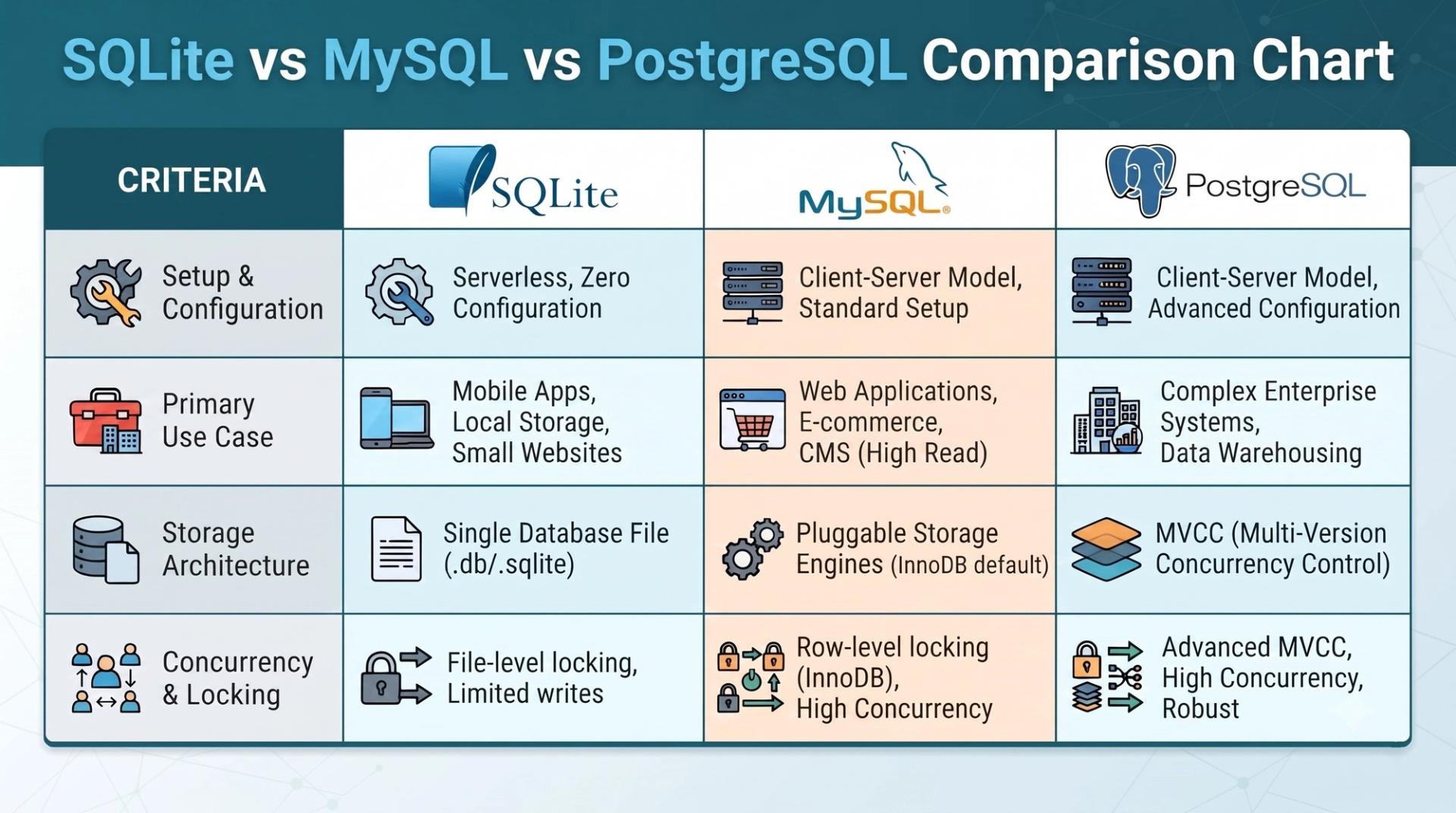
SQLite is ideal for learning, prototypes, small desktop apps, and mobile applications. MySQL and PostgreSQL suit production web applications with multiple concurrent users and larger datasets. If your goal is a data-driven career, it is worth exploring both our SQL for BI analysts guide covers query techniques that apply across SQLite, MySQL, and PostgreSQL alike.
Best Practices for Database Connectivity in Python
As you move from practice scripts to real projects, these habits will save you a lot of debugging time:

- Use parameterized queries (
?placeholders) instead of formatting values directly into SQL strings. - Close every connection you open, or use a
withblock so it happens automatically. - Wrap write operations in try/except and use
rollback()to recover from errors. - Never forget commit() after INSERT, UPDATE, or DELETE - SQLite will not save changes without it.
- Use context managers for cleaner, safer code.
- Index columns you query often if a table grows large, to keep SELECT queries fast.
These principles apply once you combine databases with real-world data workflows covered further in a Data Science and Machine Learning course, where SQLite is often used to store and query datasets before analysis.
A Practical Use Case: Where This Skill Actually Matters
Database connectivity is not an academic exercise it shows up constantly in real projects:
- Web scraping projects that need to store extracted data instead of losing it when the script ends (a natural next step after our web scraping with BeautifulSoup tutorial)
- API testing and automation frameworks, where test results and logs are often stored locally for reporting a skill covered in the API Testing course
- ETL pipelines, where SQLite is used as a lightweight staging database before data loads into a larger system, explored further in ETL Testing
- Interview preparation, since database connectivity questions come up often in technical interviews see our Python interview preparation guide
Frequently Asked Questions
Is SQLite good enough for production applications?
For small to medium applications with light concurrent usage, yes. For large-scale apps with many simultaneous users, a server-based database like MySQL or PostgreSQL fits better.
Do I need to install sqlite3 separately?
No. It is part of Python's standard library, available as soon as you install Python.
What happens if I forget to call commit()?
Your changes exist only within that session and are not saved to the database file. Closing the connection without committing means the changes are lost.
Can I use SQLite with pandas?
Yes. Pandas supports reading and writing SQLite data with pd.read_sql_query() and DataFrame.to_sql(), useful for data analysis projects.
Is SQLite the same as SQL?
Not quite. SQL is the query language, while SQLite is a database engine that understands and executes SQL commands.
Conclusion
Database connectivity is one of those skills that quietly separates a beginner script from a real, functioning application. SQLite makes this transition approachable: no server to install, no complicated setup, and everything you learn connections, cursors, CRUD operations, and error handling carries over directly to MySQL and PostgreSQL later on.
Start small. Build a simple students database, an expense tracker, or a to-do list app that remembers your tasks after you close it. The moment your data survives a restart, database connectivity stops feeling like a concept and starts feeling like a Python skill you actually own.
If you would like structured, mentor-led guidance on Python, databases, and the tools built around them, explore Cinute Digital's Python Programming Course or browse more hands-on tutorials on the Cinute Digital blog.
Tags

A visionary data scientist dedicated to unlocking the potential of data to drive informed decision-making and spark innovation. With a strong foundation in Data Science.