
How to Do Load Testing with JMeter (Step-by-Step 2026)
Want to learn load testing with JMeter without drowning in jargon? This step-by-step guide shows you how to build a JMeter test plan, simulate thousands of users, run it in non-GUI mode, and read the metrics that matter for real QA jobs.
A practical, beginner-friendly walkthrough that takes you from a blank JMeter screen to a real load test you can run, read, and put on your resume.
Picture this. It is the morning of a big festival sale. A Mumbai-based shopping app launches its offer at 10 AM. By 10:02, the app crashes. Lakhs of users see a spinning wheel. The company loses crores in minutes. The painful part? A simple load test could have caught this weeks earlier.
This is exactly why companies hire people who know load testing with JMeter. You learn to break an application before real users do.
In this step-by-step guide, you will learn what load testing is, why Indian IT teams care about it in 2026, and how to build your first JMeter test plan from scratch. You will also run it the way real teams do in non-GUI mode and read the numbers that actually matter.
Let us start with the one definition every interviewer expects you to nail.
Load testing with JMeter means using the free, open-source Apache JMeter tool to simulate many virtual users hitting an application at the same time. You measure how the system responds its speed, stability, and error rate under expected and peak load, so you can fix weak points before real users ever notice them.
What Is Load Testing with JMeter?
Think of a Mumbai local train. At 3 PM, ten people board easily. At 6 PM, four hundred people squeeze into the same coach. The train still moves, but slower, and a few doors jam. Load testing checks how your "train" behaves at 6 PM, not 3 PM.
In software terms, load testing measures how an application performs when many users use it together. You are not hunting for functional bugs here. You are asking three questions: How fast does it respond? Does it stay stable? When does it start failing?
Apache JMeter is the tool that lets you ask these questions cheaply. It is 100% free and open-source, written in Java, and trusted by QA teams worldwide. You define a group of virtual users, point them at your application, and JMeter fires thousands of requests for you.
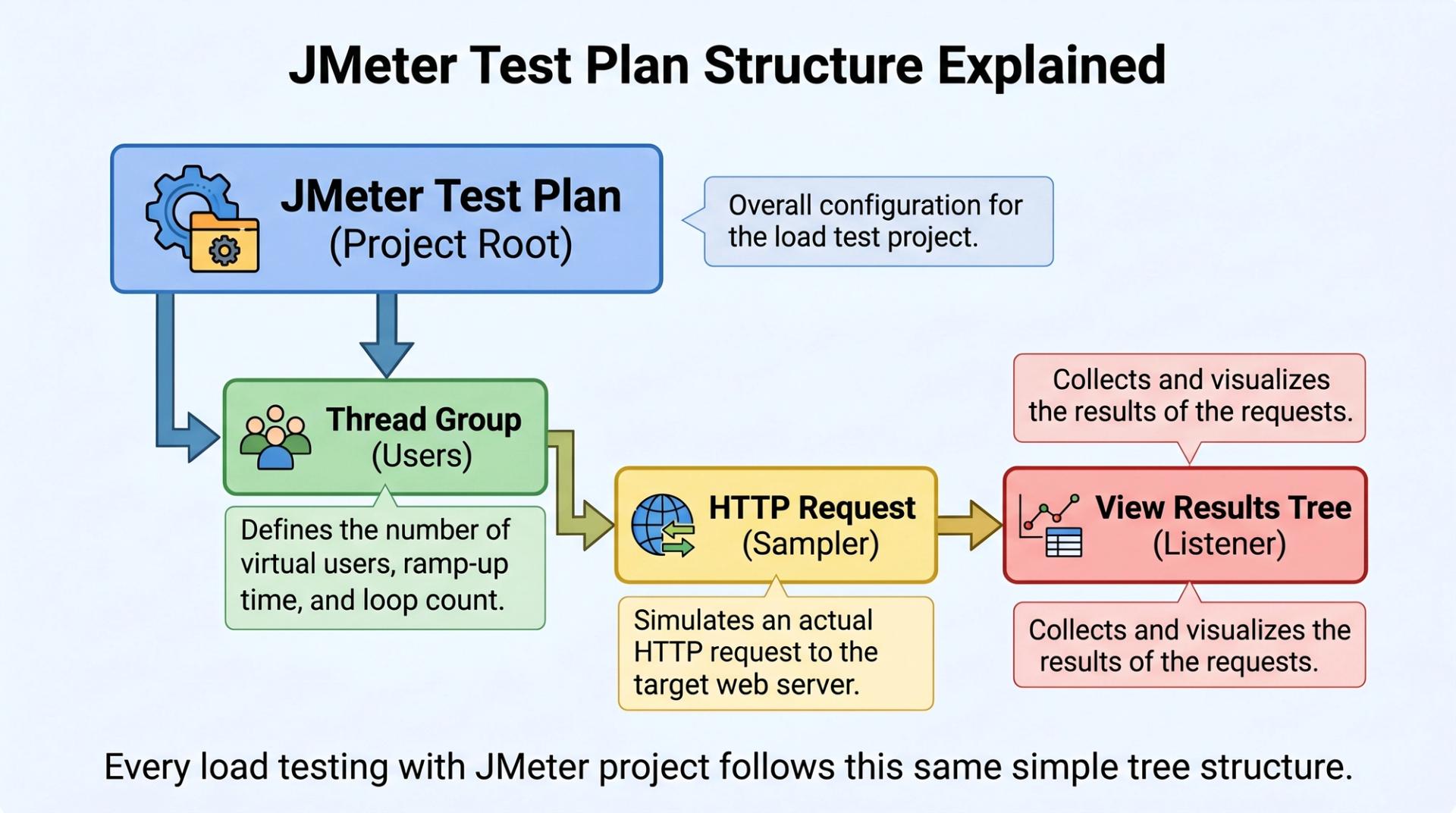
A few core building blocks you will meet:
- Thread Group : your virtual users (how many, how fast they arrive)
- Samplers : the actual requests (usually HTTP Requests)
- Listeners : where you read results (Summary Report, Aggregate Report)
- Timers : pauses that mimic real human "think time"
Key Takeaway: Load testing does not ask "does it work?" it asks "does it survive a crowd?"
Why It Matters / Industry Context
Indian apps now serve some of the largest user bases on earth. Payments, ed-tech, OTT, quick-commerce all of them face sudden traffic spikes during sales, results day, or match day. A slow app does not just annoy users; it directly loses revenue.
That is why performance testing has moved from a "nice-to-have" to a core QA skill. Many software testing job descriptions in metros now list JMeter explicitly. Building strong advanced software testing skills including performance and security test readiness is what separates you from a purely manual tester.
Roles this skill opens up include Performance Tester, SDET, and QA Engineer with a performance focus.
On salary (read carefully): performance-focused QA roles in India often pay more than pure manual roles. As an approximate range verify with a live salary tool like AmbitionBox or Glassdoor performance testers in metros may earn meaningfully above entry-level manual testers, with the gap widening as you add automation and CI/CD. Treat any figure you see online as a starting estimate, not a promise.
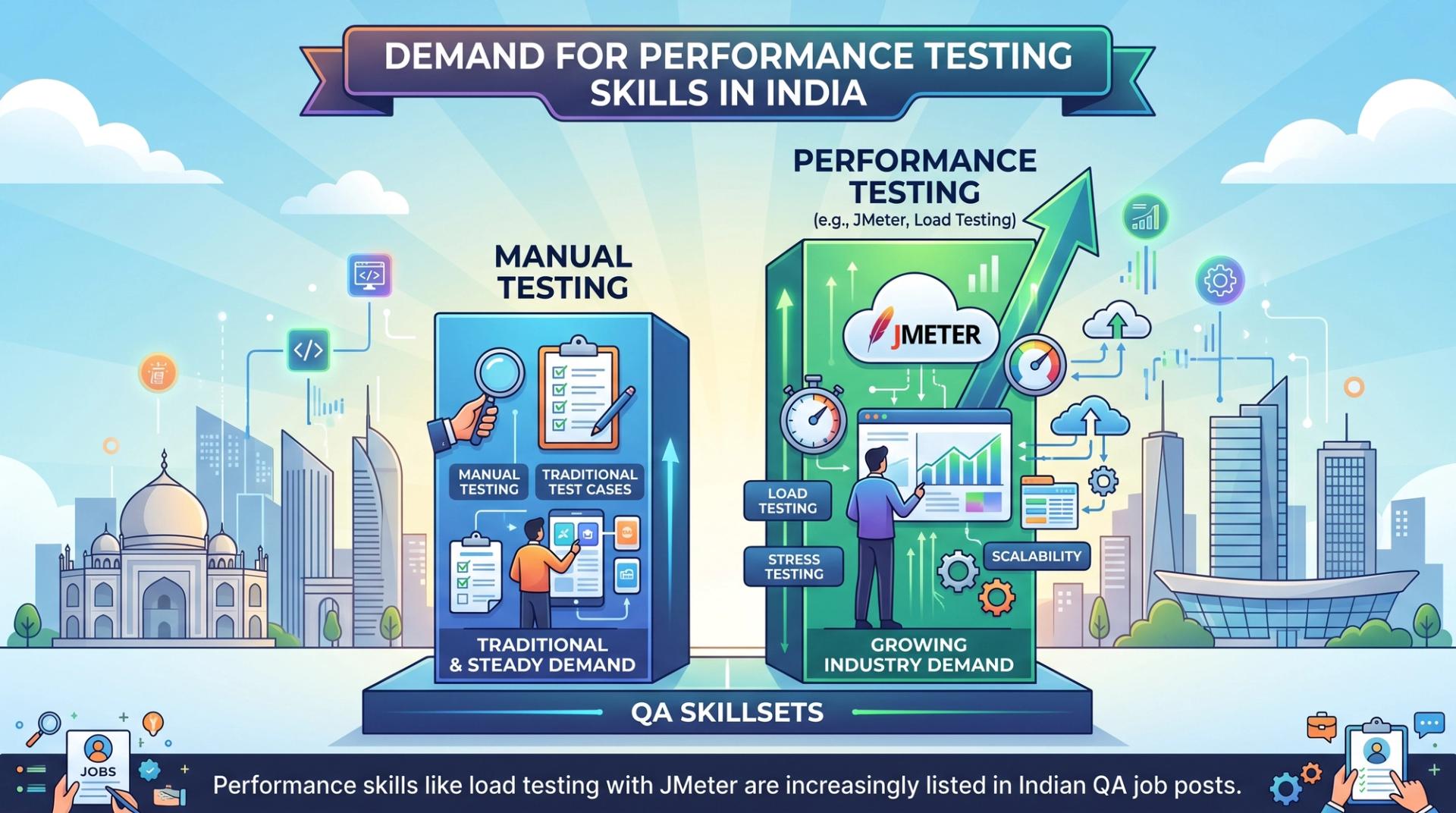
Key Takeaway: Manual testing gets you in the door; performance testing helps you climb.
Deep Dive: How to Do Load Testing with JMeter (Step-by-Step)
Here is the full workflow. Follow it in order.
Step 1 : Confirm Java is installed. JMeter runs on Java, so check your version first.
Expected output (your version may differ):
If you see a version number, you are ready. If you get "command not found", install a JDK (8 or higher) first.
Step 2 : Download and launch JMeter. Get the binary from the official Apache site, unzip it, and open the bin folder. Launch the GUI:
This opens the JMeter GUI. Important rule: use the GUI only to build and debug your test, never to run a real load test.
Step 3 : Build your test plan. Inside the GUI:
- Right-click Test Plan → Add → Threads (Users) → Thread Group.
- Set your load. For a first test, try: Number of Threads (users) =
50, Ramp-up period =10seconds, Loop Count =5. - Right-click Thread Group → Add → Sampler → HTTP Request.
- Fill in your target: Protocol
https, Server Nameyour-app.com, Path/. - Right-click Thread Group → Add → Listener → Aggregate Report (and Summary Report).
What those Thread Group numbers mean, in plain language: 50 virtual users arrive gradually over 10 seconds, and each repeats the request 5 times. That is 250 total requests.
Step 4 : Add realistic "think time". Real users do not click non-stop. Add a timer so your test behaves like humans, not a robot.
- Right-click Thread Group → Add → Timer → Constant Timer, set it to
1000ms.
Step 5 : Save, then run from the command line. Save your plan as LoadTest.jmx. Now close the GUI run button and use non-GUI (CLI) mode this is how professionals run load tests, because the GUI itself eats memory and skews results.
Line-by-line, what each flag does:
-n→ run in non-GUI mode-t LoadTest.jmx→ the test plan to run-l results.jtl→ save raw results to this file-e→ generate an HTML dashboard report at the end-o html-report→ put that report in this (empty) folder
Expected tail of the output:
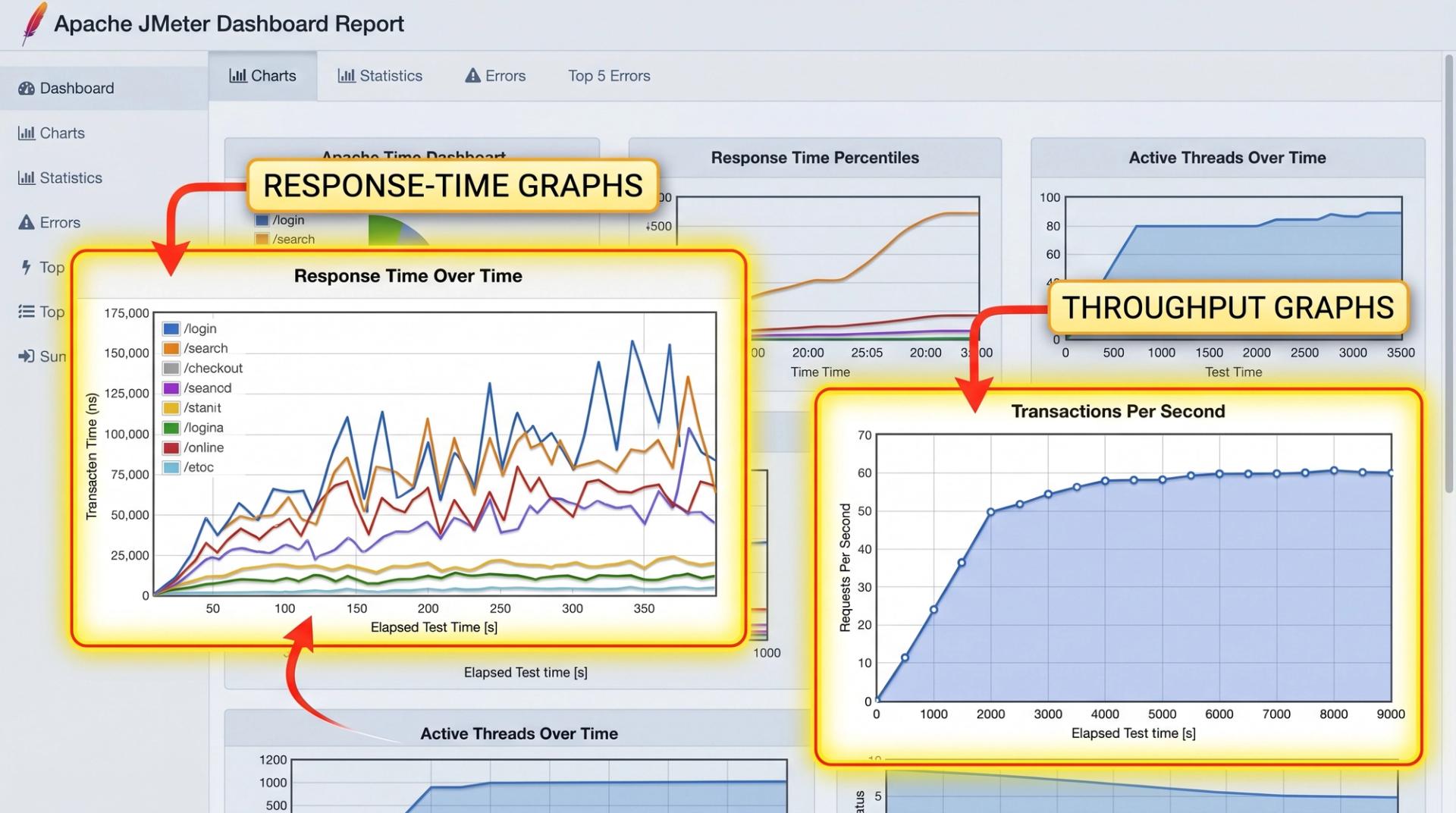
Open html-report/index.html in a browser to see graphs of response time, throughput, and errors.
Here is when to use each mode :
Once your test runs cleanly, the natural next step is firing it inside a CI/CD pipeline the exact Jenkins workflow taught in CDPL's advanced automation testing track.
Key Takeaway: Build in the GUI, but always run your real load test from the command line.
Practical Tips, Common Mistakes & Responsible Testing
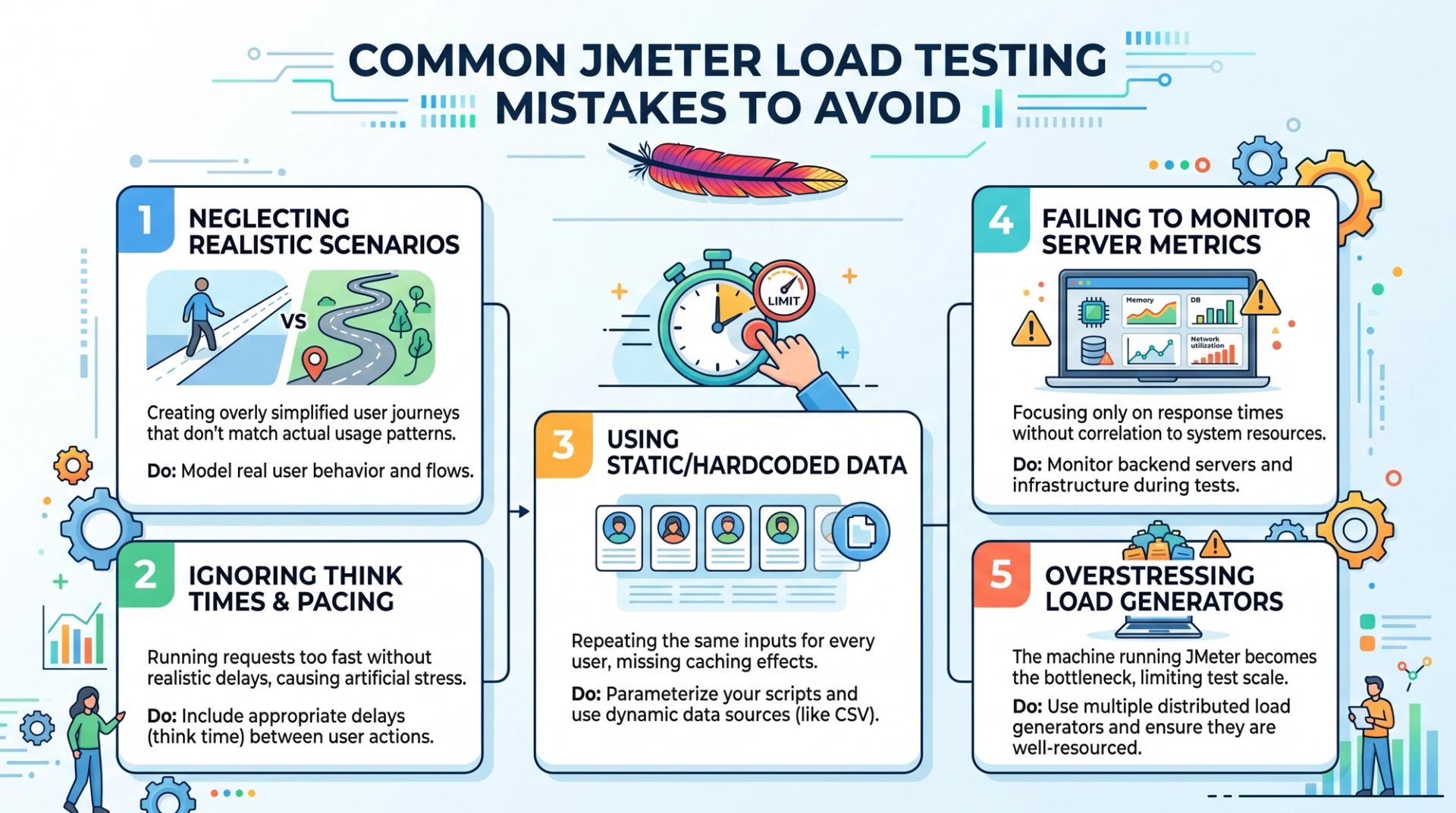
Five mistakes that trip up almost every beginner:
- Running load tests in GUI mode. It distorts results. Always switch to non-GUI for the real run.
- No ramp-up. Dumping 1,000 users in 1 second is unrealistic and crashes your own machine, not the server.
- Ignoring percentiles. The average response time hides pain. Watch the 90th and 95th percentile that is what most users actually feel.
- Forgetting think time. Without timers, you test a robot, not real traffic.
- Skipping a baseline. Run a small test first. You cannot spot a problem if you never recorded "normal".
Most load tests hammer backend endpoints, so a solid grounding in API testing using Postman and REST APIs helps you design realistic JMeter HTTP samplers.
A note on responsible testing (important). Only load test systems you own or have written permission to test. Hitting a live third-party website or someone else's server with heavy traffic can look exactly like a denial-of-service attack. That is illegal under India's IT Act and most Terms of Service. Always test on staging, throttle your load sensibly, and get sign-off in writing before any production test.
One more growth tip: a common beginner mistake is dodging custom logic. A basic Java programming foundation lets you use JSR223 and BeanShell samplers confidently instead of fighting the GUI.
Key Takeaway: Permission first, baseline second, percentiles always.
Career Path & Learning Roadmap
So where does this skill take you? Knowing load testing with JMeter qualifies you for roles like Performance Tester, QA Engineer, and SDET all of which are in steady demand across Indian metros.
Here is a realistic roadmap:
- Months 1–2: Manual testing foundations + basic JMeter test plans.
- Months 3–4: Automation basics, CI/CD, and reading performance reports confidently.
- Months 5–6: Real projects, framework design, and interview preparation.
With consistent practice, most career switchers reach job-ready performance-testing skills in about six months. For the full structured path from manual basics to enterprise-scale performance testing, CDPL's advanced manual and automation testing master program covers strategy, frameworks, and CI/CD at scale.
You can also read more about Cinute Digital's mentor-led, project-first teaching approach before you pick a track.
Frequently Ask Question
Q1. What is load testing with JMeter?
Load testing with JMeter is the practice of using Apache JMeter, a free open-source tool, to simulate many virtual users hitting an application at once. It measures response time, throughput, and error rate under expected and peak load. The goal is to find performance weak points before real users do, so teams can fix slowdowns and crashes ahead of high-traffic events.
Q2. How do I run a JMeter load test step by step?
First confirm Java is installed. Then download JMeter and open the GUI. Build a Test Plan with a Thread Group, an HTTP Request sampler, a timer, and a listener. Save it as a .jmx file. Finally, run it in non-GUI mode using jmeter -n -t test.jmx -l results.jtl -e -o report. Open the generated HTML report to read your results.
Q3. Is JMeter worth learning in 2026?
Yes, for most QA professionals it is worth it. JMeter is free, widely used, and frequently named in Indian software testing job descriptions. Performance skills tend to command better pay than pure manual testing. Because JMeter is open-source, you can practise the entire workflow at zero cost, which makes it one of the most accessible high-value skills for career switchers.
Q4. How long does it take to learn JMeter?
You can build your first working test plan in a single afternoon. Reaching comfortable, job-ready proficiency including non-GUI runs, reading percentiles, and CI/CD integration usually takes about three to six months of consistent practice. A structured, mentor-led course shortens this curve by giving you real projects and feedback instead of trial and error.
Q5. How much does Apache JMeter cost?
Apache JMeter is completely free and open-source. There are no licence fees, user limits, or paid tiers. You only need a computer with Java installed. This is a major reason it is popular for learning and for budget-conscious teams. (Any salary or tool-cost comparison figures elsewhere are approximate verify in a live industry tool.)
Conclusion
Three things to carry away. First, load testing checks whether your app survives a crowd, not just whether it works. Second, build your JMeter test plan in the GUI but always run the real test in non-GUI mode. Third, the metrics that matter are response time percentiles, throughput, and error rate not just the average.
Performance testing is one of the most practical, well-paid corners of QA, and JMeter is the perfect free tool to start with today. You do not need to be a hardcore coder to begin you need a clear method and a little practice.
Ready to move from theory to a working test plan? Book a free demo and walk through a live JMeter session with a mentor.
You have the steps. Now go break something safely.
Tags

A Manual Tester in TESTRIQ QA LLP and also as Corporate Trainer with CDPL. With a focused career in training and development.