
NumPy for Beginners: Job-Ready Python Skills for 2026


NumPy for beginners explained like a friend would: what NumPy arrays are, why they're faster than Python lists, and why they sit behind Pandas and machine learning. Includes one hands-on demo and a realistic roadmap to job-ready Python skills for freshers in India.
Description (hero) Every data analyst job description asks for NumPy. Here's what it actually is, how it works in 5 minutes, and how it fits into your first Python career in 2026
Picture this. You finished your BSc IT or BCom last year. You've opened twenty data analyst job posts on Naukri, and nearly every one says the same thing: "Python (NumPy, Pandas)". You know a little Python from college. But NumPy? It sounds like something only engineers at big tech firms touch.
Here's the good news. NumPy for beginners is far simpler than it sounds, and it's one of the quickest ways to make your Python skills job-ready.
In this guide, you'll learn what NumPy is through an everyday Mumbai analogy. You'll see why Indian employers keep asking for it in 2026, run one short demo, and avoid the mistakes most freshers make. We'll finish with a realistic roadmap from "I know basic Python" to "I'm ready for interviews".
We've trained many freshers at Cinute Digital, and NumPy is usually where Python starts to feel useful instead of academic.
By the end, you'll be able to explain NumPy to a friend over chai, and that's exactly what interviewers check.
NumPy (Numerical Python) is a free, open-source Python library for fast maths on large collections of numbers. It stores data in arrays and applies one operation to every value at once, without writing loops. Pandas, scikit-learn and most data science tools are built on it.
What Is NumPy? NumPy for Beginners, Explained Simply
NumPy is a Python library that gives you one powerful new data type: the array (officially, the ndarray, short for "N-dimensional array"). Think of an array as a grid of numbers, a single row or a full table, that Python can process extremely fast.
You already know Python lists. So why do you need anything else?
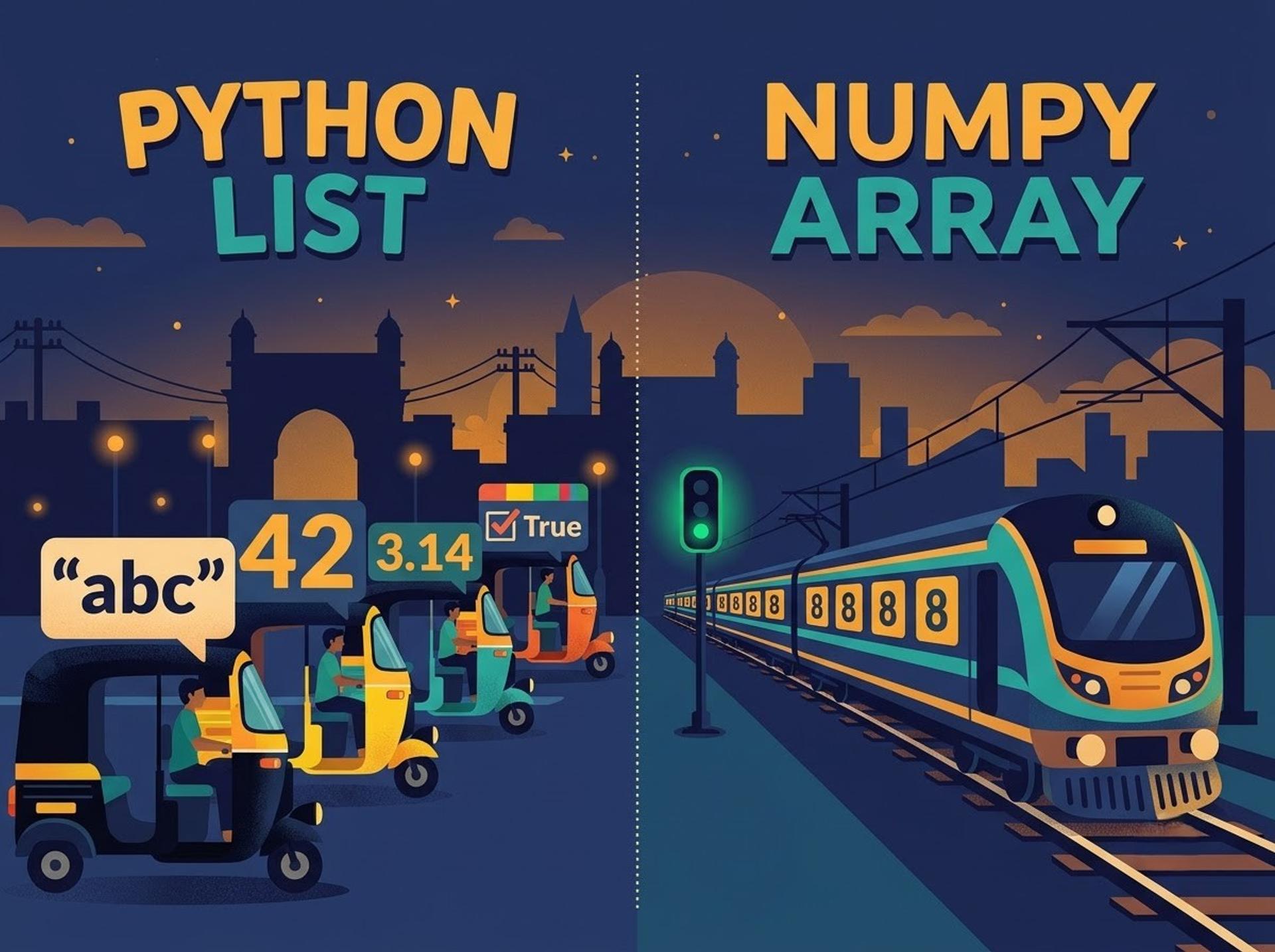
Here's the Mumbai analogy. A Python list is like a line of auto-rickshaws. Each auto can carry anything: a passenger, a parcel, a sack of onions. Each one also moves on its own, and the driver decides at every signal. That flexibility is useful, but it's slow when you need to move 10 lakh people.
A NumPy array is like a Mumbai local train. Every coach is the same type, and they all move together on one track. One signal moves the entire train. That's what NumPy does with numbers: one instruction updates every value at once.
Two rules make this possible:
- Same data type. Every value in an array is the same type: all integers or all decimals. Python doesn't have to check each value separately.
- Vectorisation. When you write
prices * 2, NumPy doesn't loop in Python. It hands the whole job to fast, pre-compiled C code. That's why arrays are faster and more memory-efficient than lists for numerical work.
This is also why NumPy sits underneath almost everything in Python for data science. Pandas DataFrames store their columns using NumPy. Scikit-learn expects NumPy arrays as input. Even deep learning "tensors" are the same idea extended to more dimensions.
The best news about NumPy for beginners? To learn it comfortably, you only need basic Python: variables, lists, loops and functions. If those still feel shaky, start with a structured Python programming course first; NumPy will then feel like a natural next step rather than a wall.
Once you're comfortable, bookmark the official NumPy beginner's guide. It's free, accurate, and the best reference when you forget a function name.
Why NumPy Matters for Python Jobs for Freshers in India (2026)
Let's be honest about the 2026 job market first, because you deserve the real picture.
India's tech sector is still hiring, but slowly and selectively. According to industry body Nasscom, the tech workforce grew by about 2.3% in FY26, a net addition of roughly 1.35 lakh people. That's growth, but not the mass campus hiring of earlier years.
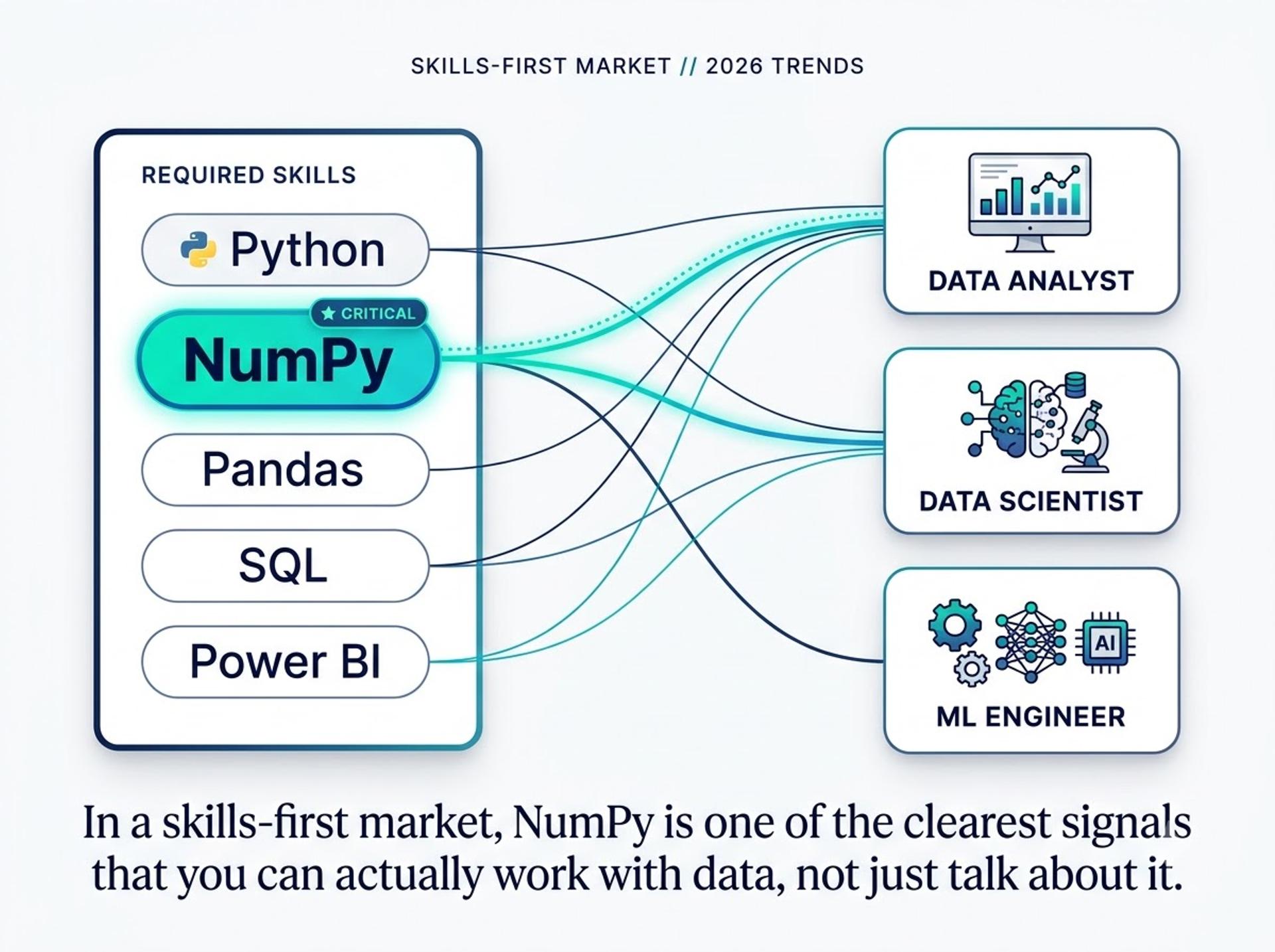
What has changed is how freshers get picked. The TeamLease EdTech Career Outlook report for the first half of 2026 found employers moving from degree-based screening to skills-first hiring, with data and AI skills among the top priorities.
Meanwhile, one October 2026 analysis of about 18,700 LinkedIn and Naukri postings found only around 4% were tagged entry-level. The takeaway is simple: freshers who can prove practical skills stand out; those with only a degree struggle.
That's where NumPy helps. It appears, directly or through Pandas, in job descriptions for:
*Approximate ranges compiled from 2026 salary reports (Glassdoor-based summaries, PayScale and career-portal surveys). Pay varies widely by company, city and skills. Verify on Naukri, AmbitionBox or Glassdoor before relying on these.
Mumbai has a special advantage here. Banks, insurers, fintechs and global capability centres (GCCs) in the city run on numbers, and their analytics teams use Python daily.
One honest caveat: NumPy alone won't get you hired. When you learn NumPy for data analysis, recruiters expect it as part of a bundle with Pandas, Matplotlib and SQL. That's why good training in data analytics with Python libraries teaches them together, on real datasets.
How NumPy Works: A 5-Minute Demo of NumPy Array Operations
Enough theory. Let's do one small, real task.
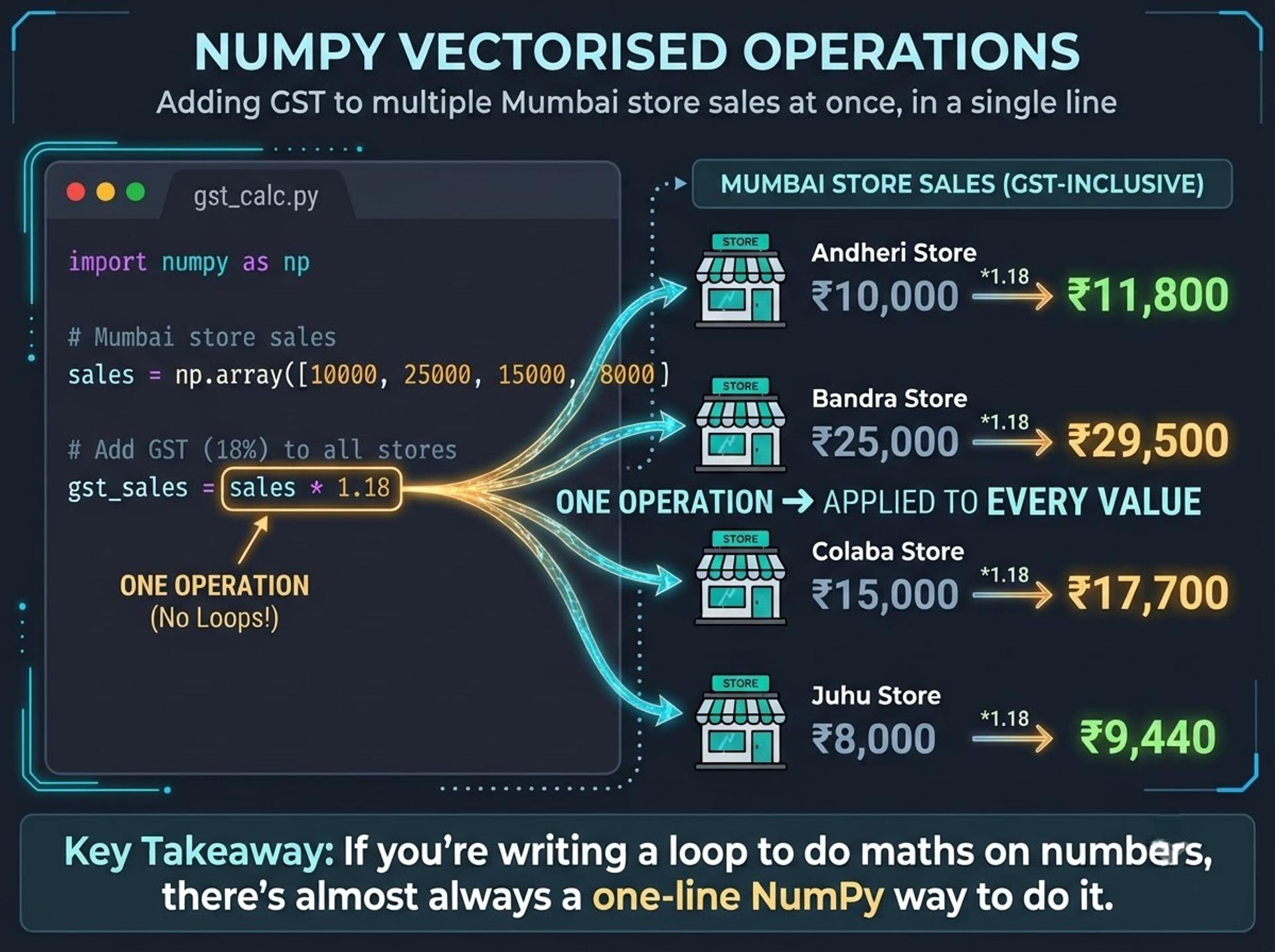
The scenario: You're an intern at a retail chain with four stores across Mumbai. Your manager sends last week's sales (in ₹ thousand) and asks three questions. What are sales including 18% GST? What's the average? Which stores crossed ₹100k?
Step 1: Set up. Open Google Colab (free, NumPy is pre-installed) or Jupyter. On your own machine, run pip install numpy once.
Step 2: Run this snippet.
Expected output:
Step 3: Read it line by line.
import numpy as np: loads NumPy under the short namenp, the convention every company uses.np.array(sales_list)converts your ordinary list into an array. Same numbers, new superpowers.sales_list * 2repeats the list. Python treats lists as containers, not numbers. This surprises almost every beginner.sales * 2doubles every value. The array treats its contents as numbers and applies the maths to each one.sales * 1.18adds GST to all four stores in one line, with noforloop. That's vectorisation.sales.mean()returns the average, 117.0. NumPy also has.sum(),.max(),.min()and.std().sales[sales > 100]is boolean filtering.sales > 100creates a True/False mask, and the array keeps only the True positions.
Now imagine 4,000 stores instead of 4. The code doesn't change at all, and NumPy still runs it quickly. That's why analysts love it.
Your turn: change 1.18 to 1.05 to model a 5% tax rate. Then find the weaker stores with sales[sales < 100]. Small edits like these are how the logic sticks, far better than reading another tutorial.
NumPy vs Python list vs Pandas: quick comparison
This same pattern (data in arrays, one operation over everything) is the foundation of machine learning. When you later study machine learning with Python, your training data will sit in NumPy arrays under the hood.
5 Common Beginner Mistakes with NumPy (and How to Avoid Them)
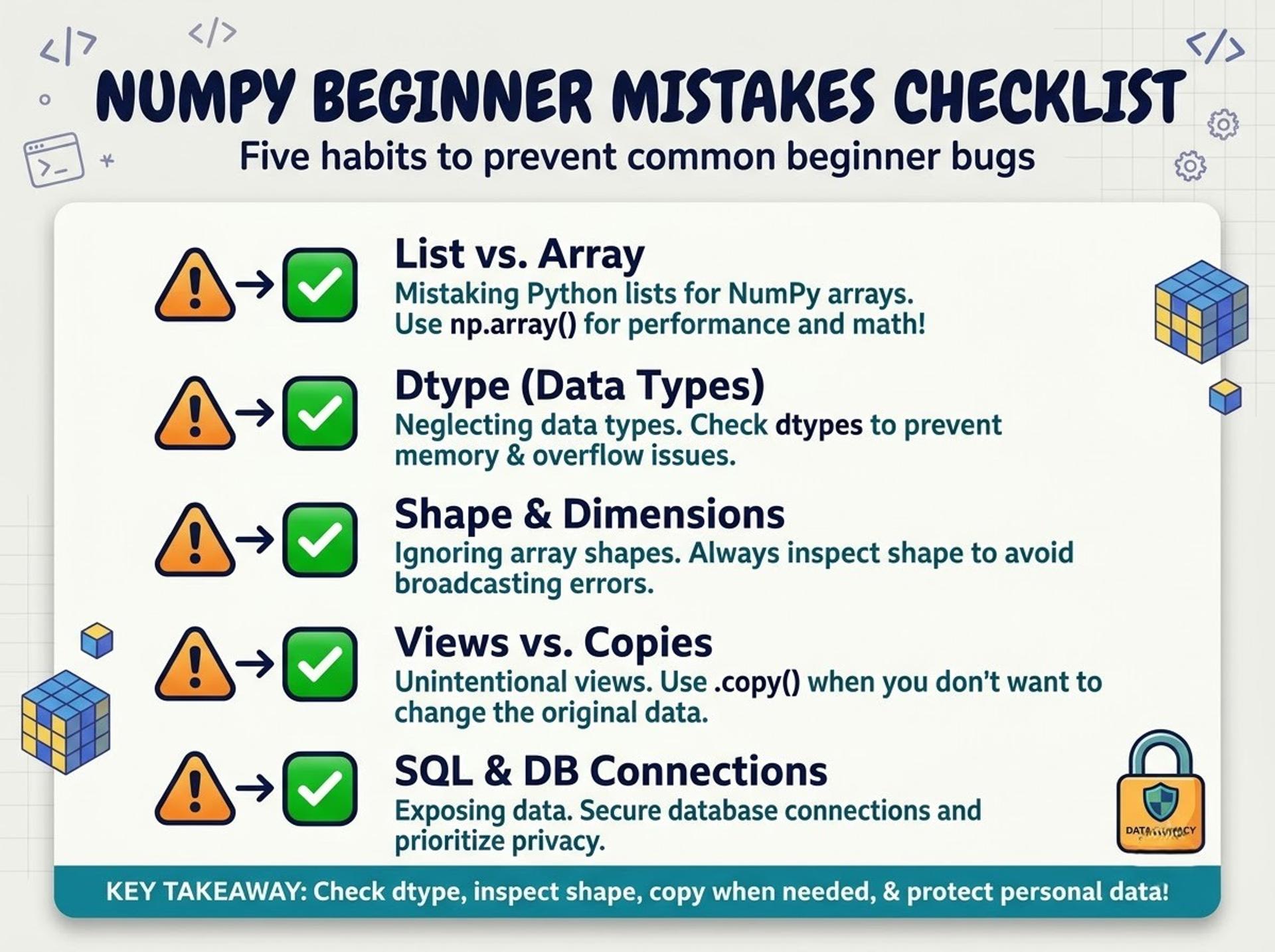
Almost every NumPy for beginners journey hits the same five potholes. Here they are, so you can skip them.
1. Treating arrays like lists. + adds values rather than joining arrays, and np.append() returns a new array instead of changing the old one. Always store the result: sales = np.append(sales, 99).
2. Mixing data types by accident. np.array([1, "2", 3]) silently turns everything into text, so your maths breaks. Check .dtype after loading data, especially from CSV files.
3. Ignoring shape. Adding a 4-value array to a 3-value array throws a ValueError ("could not be broadcast together"). Check .shape before combining arrays.
4. Forgetting that slices are views. part = sales[:2] doesn't copy data. Change part, and sales changes too. Use sales[:2].copy() when you need an independent copy.
5. Skipping SQL. NumPy crunches numbers, but in most companies those numbers first come out of a database. Pairing NumPy with SQL makes you useful from week one, which is why many freshers take a course in SQL and MySQL basics alongside it.
A note on responsible practice: when you practise on real data from an internship or a college project, remove names, phone numbers and other personal details first. India's Digital Personal Data Protection Act, 2023 sets rules for handling personal data. Never upload company or customer data to a public GitHub repo or a public AI tool. Use open datasets (government portals, Kaggle) for your portfolio instead.
Your Roadmap: From NumPy for Beginners to Your First Data Job
Here's a realistic path if you can give 1–2 hours a day. Timelines are approximate; everyone learns at a different pace.
- Weeks 1–2: Python basics. Variables, lists, loops, functions, reading files.
- Weeks 3–4: NumPy. Arrays, indexing, slicing, vectorised maths, boolean filtering, basic statistics.
- Weeks 5–8: Pandas, Matplotlib and SQL. Load CSVs, clean data, make charts, write queries.
- Months 3–4: Projects. Build 2–3 small projects on public datasets (sales trends, cricket stats, rainfall data). Put them on GitHub with a clear README.
- Month 5 onwards: Interviews or deeper learning. Apply for junior analyst roles, or continue into machine learning.
In total, that's roughly 4–6 months of steady practice to be interview-ready for junior analyst roles. It's not a guarantee, but it's a realistic target.
Who this path suits: freshers who enjoy numbers and patterns and like asking "why did this happen?" Who it may not suit: if you prefer building interfaces or testing apps, web development or software testing may be a better first step. There's no shame in choosing differently.
If you want to go further, the bridge is natural. Deep learning frameworks like PyTorch and TensorFlow use tensors, which are NumPy-style arrays with more dimensions. A structured Data Science and AI Master Program can take you from these arrays to real AI models.
Conclusion: Start Small, Start Now
Three things matter most:
- NumPy arrays are a Mumbai local for numbers. Same type, one track, every value moves together, which makes them fast.
- Employers in 2026 hire for proof of skills, not just degrees, and NumPy (with Pandas and SQL) is one of the clearest proofs for data roles.
- One line beats one loop. Vectorised thinking is the habit that separates beginners from job-ready analysts.
NumPy for beginners isn't about memorising functions; it's about learning to think in arrays.
If you'd like guided practice, CDPL runs live online and classroom batches from Mira Road and Vasai, with hands-on projects, mock interviews, resume support and placement assistance. Want to see how a session feels before deciding? You can book a free demo class and ask our trainers anything.
Frequently Asked Questions
1. What is NumPy used for in Python?
NumPy is used for fast numerical work in Python. It stores numbers in arrays and lets you apply maths to every value at once, without loops. Analysts use it to clean and calculate data, often through Pandas, which is built on NumPy. Data scientists use it for statistics and to prepare data for machine learning models. Engineers and researchers use it for simulations and matrix calculations.
2. How do I learn NumPy as a beginner?
First, get comfortable with basic Python: lists, loops and functions. Then learn NumPy in this order: creating arrays, indexing and slicing, vectorised maths, boolean filtering and simple statistics like mean and sum. Practise in Google Colab, which has NumPy pre-installed. Finally, use NumPy with Pandas on a real public dataset, so you learn by solving actual problems instead of memorising functions.
3. Is NumPy worth learning in 2026?
Yes, if you are aiming for data analyst, data scientist or machine learning roles. NumPy sits underneath Pandas, scikit-learn and most Python data tools, so it shows up directly or indirectly in most data job descriptions. On its own, though, it will not get you hired. Learn it alongside Pandas, SQL and a visualisation tool, and back it up with two or three portfolio projects.
4. How long does it take to learn NumPy?
If you already know basic Python, you can learn the core of NumPy in about two to four weeks with one to two hours of daily practice. That covers arrays, slicing, vectorised maths and filtering. Becoming confident enough to use it in interviews and projects usually takes longer, because you will also be learning Pandas and SQL. These timelines are approximate and depend on your practice.
5. Is NumPy free, and how much does a NumPy course cost?
NumPy itself is completely free and open source, and the official documentation is free too. Course fees vary widely depending on duration, live versus recorded teaching, projects and placement assistance. For current CDPL fees and batch timings, check the relevant course page or contact the Cinute Digital team directly, since fees can change.
Tags

A visionary data scientist dedicated to unlocking the potential of data to drive informed decision-making and spark innovation. With a strong foundation in Data Science.