
Manual Testing Tools in Software testing
Manual testing tools are the backbone of every QA team's daily work. This guide breaks down the test management, bug tracking, and API tools you'll actually use on the job and how to learn them fast enough to land a high-paying QA role in 2026.
Learn the exact manual testing tools that hiring managers expect from a junior QA explained simply, with a realistic roadmap to your first ₹5 LPA (approximate) testing job.
Picture this: a Mumbai startup ships an app update on a Friday evening. By Saturday, users can't log in. The fix existed someone just never tested the login flow. That gap is exactly why companies hire QA testers, and why manual testing tools sit at the centre of every product team.
If you're a fresh graduate or a career switcher eyeing tech, manual testing is one of the most accessible doors into the industry. You don't need a coding background to start. You need a tester's mindset and command of the right tools.
In this guide, you'll learn what manual testing tools actually do, the exact ones QA teams use in India today, and how each fits a real workday. You'll also see a realistic salary picture and a roadmap to job-readiness. Let's start with the foundation.
Manual testing tools are software applications that help QA testers plan, execute, and track tests done by hand rather than by automated scripts. They cover test case management, defect (bug) tracking, API checking, and cross-browser testing helping teams document results, report bugs clearly, and ship reliable software.
What Are Manual Testing Tools?
Manual testing means a human checks the software the way a real user would clicking buttons, filling forms, and confirming the app behaves correctly. Manual testing tools are the support system that makes this work organised and repeatable.
Think of it like a building inspection. The inspector still walks the site personally. But they carry a checklist, a camera, and a report form. Without those, findings get lost and nothing improves. Manual testing tools are that checklist, camera, and report form for software.
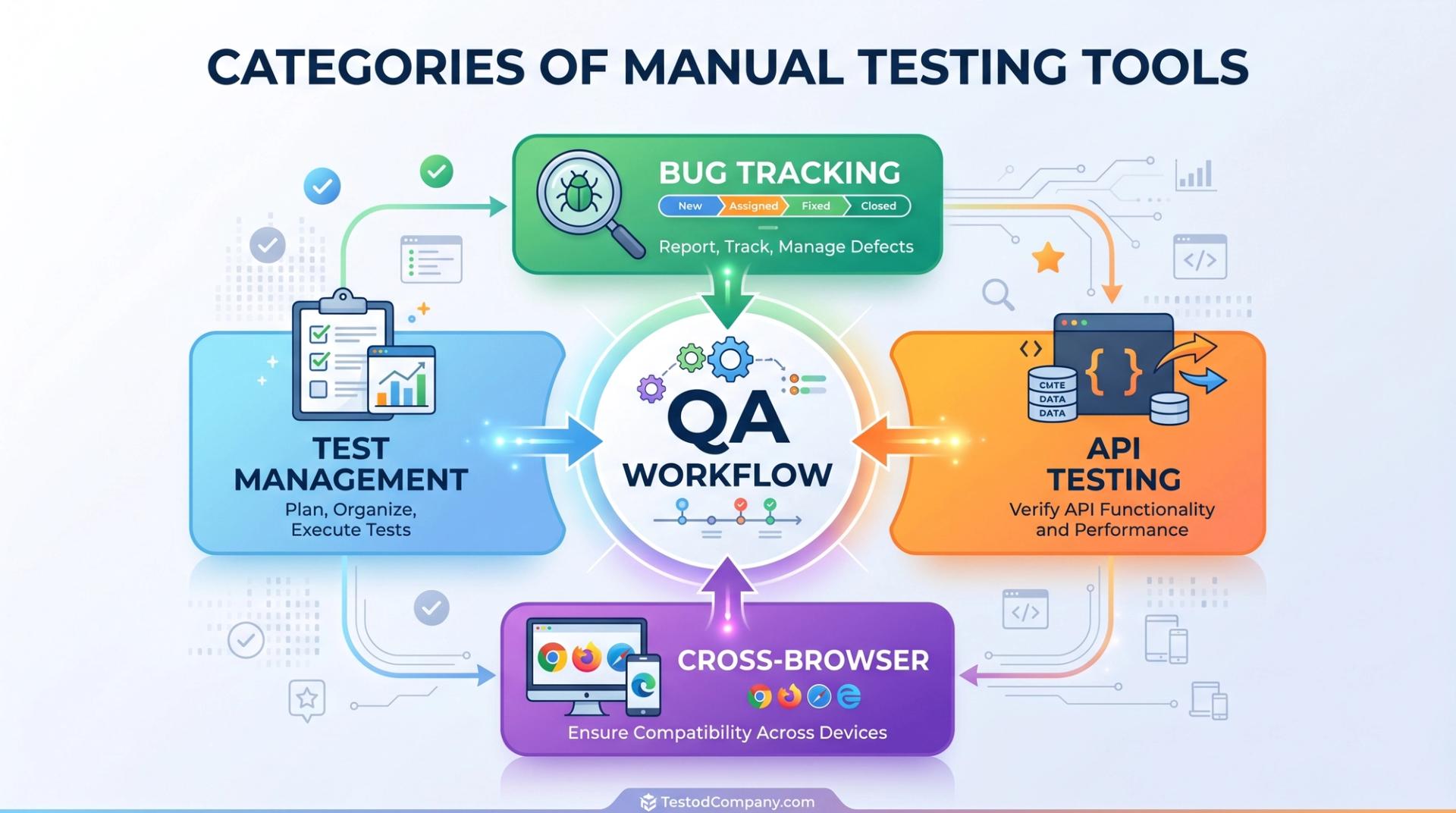
These tools fall into clear categories. Test management tools store your test cases and results. Bug tracking tools log every defect you find. API testing tools let you check the hidden data layer behind an app. Cross-browser tools confirm the app works on Chrome, Safari, and different devices.
A common myth is that manual testing is "just clicking around". In reality, a skilled tester designs structured test cases, records evidence, and communicates issues precisely. The tools make that discipline possible and make you look professional to a hiring manager.
Key Takeaway: Manual testing tools don't replace the tester they make a tester's work organised, evidence-based, and trusted.
Why Manual Testing Tools Matter for Your Career
India's software and QA hiring stays strong, especially across metros like Mumbai, Pune, Bengaluru, and Hyderabad. Product companies, service firms, and startups all need testers to protect quality before release. Manual testing remains the most beginner-friendly entry point into a tech career.
Here's a realistic salary picture for India in 2025–2026. Treat every figure as approximate verify with a salary tool like AmbitionBox, Glassdoor, or Naukri.
Why does tool fluency matter so much? Because interviewers rarely ask "can you click a button". They ask whether you can write a clean test case in a tool like TestRail, log a reproducible bug in Jira, or validate an API response in Postman. Knowing the tools is what separates a hireable candidate from a hopeful one.
This is also why training quality matters. A mentor-led institute like Cinute Digital focuses on the exact tools and workflows employers expect, so you practise on real scenarios instead of theory alone.
Key Takeaway: Hiring managers pay for proven tool skills, not just a "QA" label on your resume.
The Manual Testing Tools You'll Actually Use (Step-by-Step Workflow)
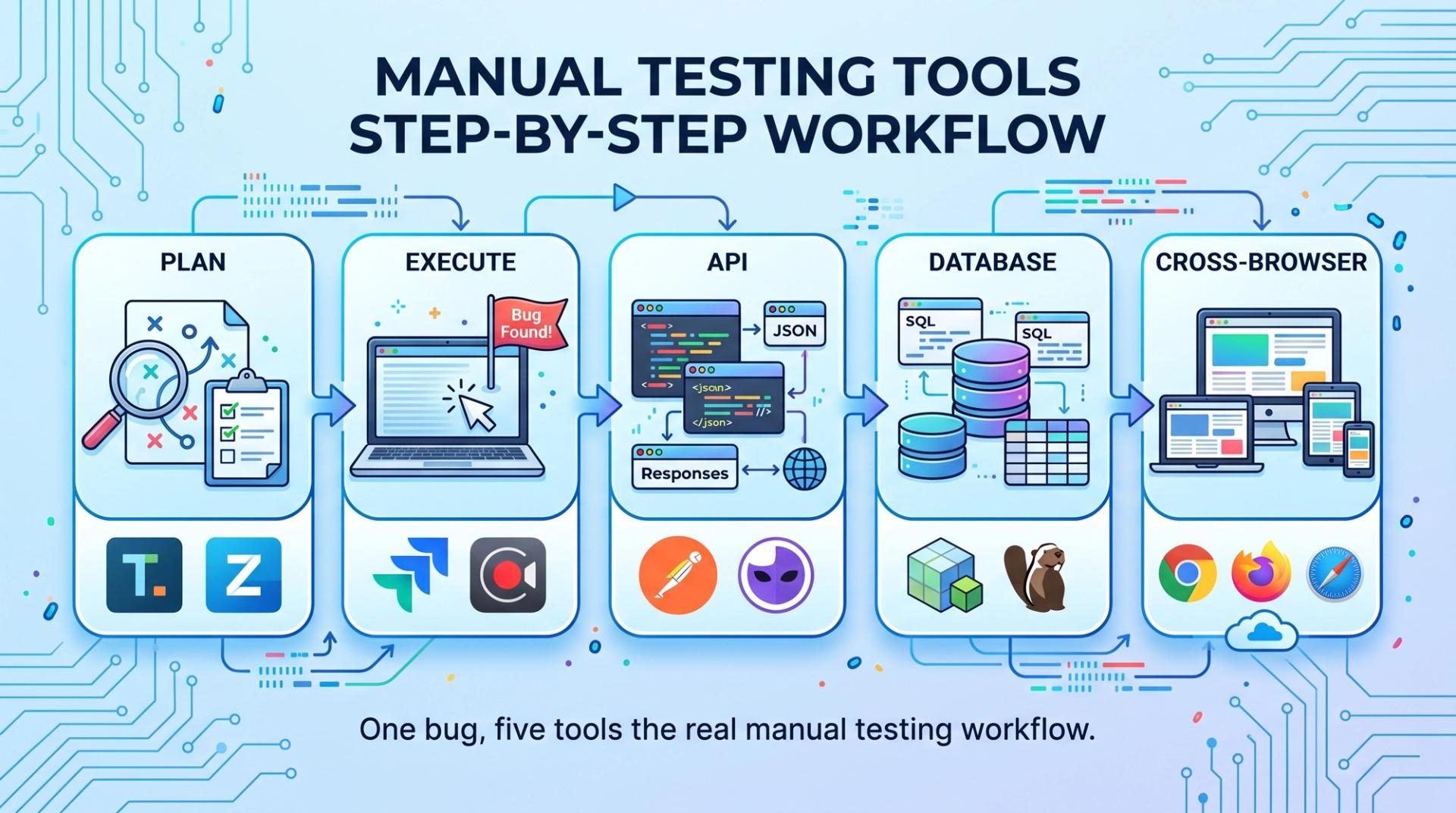
Let's walk through a real junior QA's day and meet the tools at each step. This is how the work flows in most Indian product teams.
Step 1 : Plan and write test cases (Test management tools). Before testing, you document what to check. Popular tools include Jira (with Zephyr or Xray), TestRail, qTest, and PractiTest. For learners, even a structured spreadsheet teaches the discipline first.
A simple manual test case looks like this:
Step 2 : Execute tests and log defects (Bug tracking tools). When something breaks, you raise a defect. The industry standard is Jira, with Bugzilla, MantisBT, and Azure DevOps Boards also common. A clear bug report is your most important deliverable.
A good defect always includes: a clear title, steps to reproduce, expected vs actual result, severity, and a screenshot. Here's the structure interviewers love to see:
Step 3 : Test the data layer (API testing tools). Many bugs hide behind the screen, in the API. Postman is the go-to tool for manual API checks, with SoapUI for SOAP services. You send a request and confirm the response is correct no automation needed to start. If this layer excites you, a focused API Testing using Postman course takes you from basics to job-ready confidence.
Step 4 : Check the database (SQL clients). Testers often verify that data saved correctly. Using a tool like MySQL Workbench or DBeaver, you run a simple query:
Expected output: one row showing the new user with status = 'active'. If the row is missing, you've caught a real bug. Strong SQL is a quiet superpower for testers, and database testing with MySQL is one of the most underrated skills you can add early.
Step 5 : Confirm cross-browser and device behaviour. Apps must work everywhere. BrowserStack and LambdaTest let you test on browsers and devices you don't physically own essential for web QA.
Key Takeaway: Master one tool per workflow stage and you can already do a junior QA's core job.
As QA teams move from manual browser checks into automation, tools such as Shiplight can help bridge the gap between human validation and maintained E2E coverage. Shiplight gives coding agents a real browser to verify UI changes during development, then turns verified flows into readable, self-healing E2E tests that live in the team’s repository.
This makes Shiplight especially relevant for teams where manual testers and developers are starting to work with AI-assisted development workflows. Instead of treating automation as a separate project after testing is complete, Shiplight helps teams turn verified user flows into regression coverage that can run locally or in CI.
Practical Tips, Common Mistakes & Responsible Testing
A few habits will make you stand out faster. Quality of communication beats quantity of bugs every time.
- Write reproducible bugs. If a developer can't recreate the issue, it won't get fixed. Always include exact steps and environment.
- Learn one tool deeply, not five shallowly. Strong Jira skills beat surface knowledge of every tool on the market.
- Keep test cases simple and traceable. One clear scenario per case, linked to a requirement.
- Practice with real apps. Test a public website or your own project and build a portfolio of sample test cases and bug reports.
Common beginner mistakes to avoid: vague bug titles ("it doesn't work"), missing screenshots, testing without a plan, and ignoring edge cases like empty fields or slow networks.
A note on responsible and ethical testing: When you practise on third-party or live applications, stay within legal and ethical limits. Read the site's Terms of Service, respect rate limits, and never run load or security tests on systems you don't own or have permission to test. Never use real customers' personal data for practice use dummy or anonymised data to respect privacy. Responsible testers protect both quality and people's data.
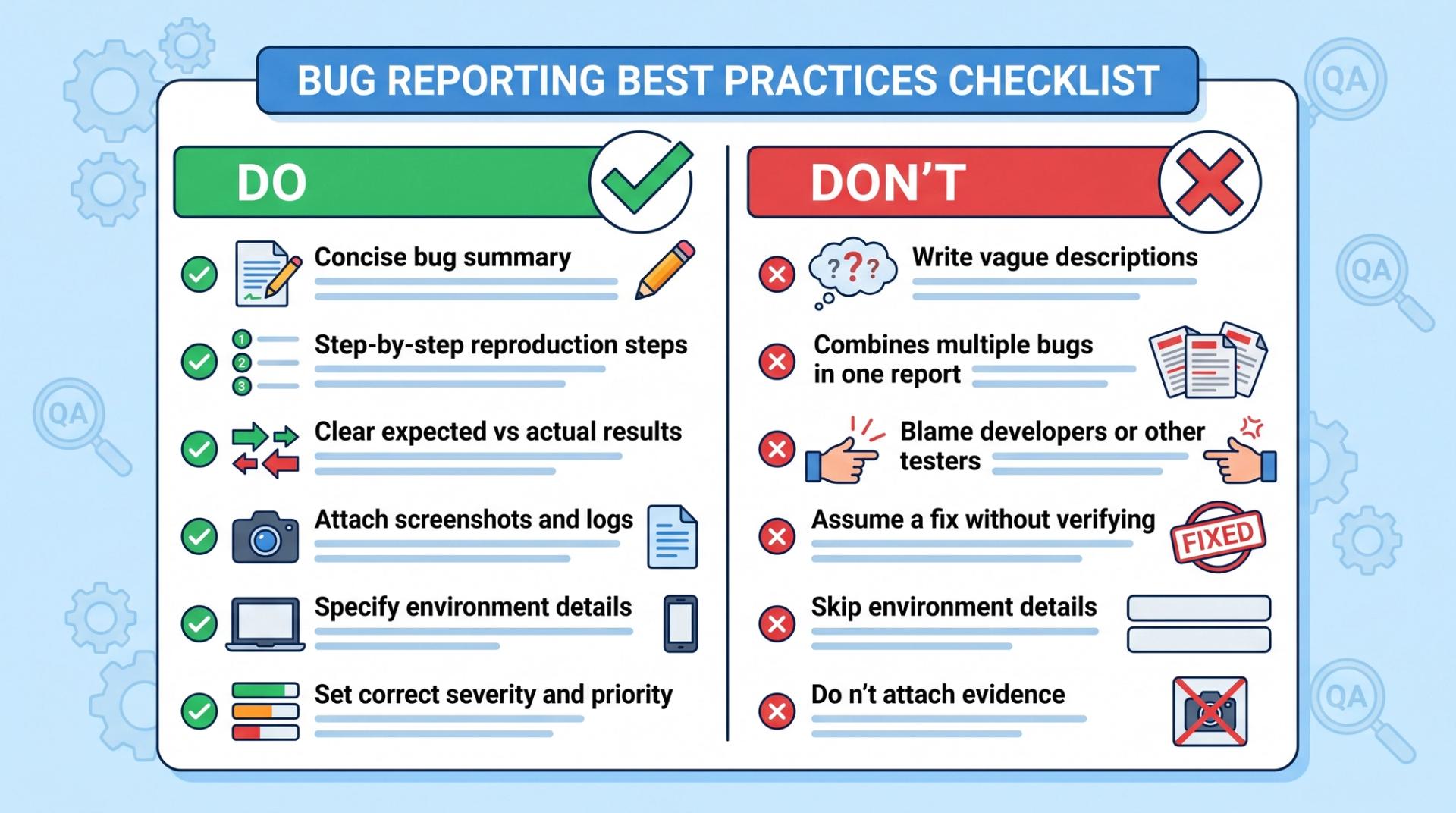
Key Takeaway: Clear, honest, privacy-respecting reporting is what earns a tester long-term trust.
Career Path & Learning Roadmap
Manual testing skills open several roles: QA Tester, Manual Test Engineer, QA Analyst, and Test Coordinator. These are real entry points in product and service companies across India.
The smartest first step is mastering the fundamentals and core tools together. A structured Manual Software Testing course covers test case design, the defect life cycle, and hands-on tool practice — exactly what freshers need for that first interview.
Here's a realistic roadmap to job-readiness:
- Weeks 1–4: Learn testing fundamentals SDLC, STLC, test case design, and the defect life cycle.
- Weeks 5–8: Get hands-on with core manual testing tools Jira for bug tracking, a test management tool, and basic SQL.
- Weeks 9–12: Add Postman for API testing, build a portfolio, and prepare for interviews (including ISTQB Foundation concepts).
Once your basics are strong, you can deepen your edge with Advanced Software Testing, which covers test strategy, risk-based testing, and quality metrics that senior roles demand.
A focused learner can become interview-ready in roughly 3–4 months of consistent practice. When you're ready for the next salary jump, the Advanced Manual & Automation Testing Master Program bridges you smoothly from manual foundations into in-demand automation skills.
Frequently Ask Question
Q1. What are manual testing tools?
Manual testing tools are applications that help QA testers plan, run, and track tests done by hand. They include test management tools like TestRail, bug tracking tools like Jira, API tools like Postman, and cross-browser tools like BrowserStack. These tools help you document test cases, report defects clearly, and prove the software works as expected before release.
Q2. How do I learn manual testing tools as a beginner?
Start with testing fundamentals SDLC, STLC, and the defect life cycle. Then practise one tool per workflow stage: Jira for bugs, a test management tool for test cases, and Postman for APIs. Test real public websites, build a portfolio of sample test cases and bug reports, and prepare for ISTQB Foundation concepts. A structured, mentor-led course speeds this up considerably.
Q3. Is manual testing worth it as a career in 2026?
Yes, for most beginners it remains a strong entry point into tech. Companies still need testers to protect software quality, and manual testing requires no coding background to start. It also opens a clear growth path toward automation, API, and performance testing each lifting your salary band. Treat it as your foundation, not your ceiling.
Q4. How long does it take to become job-ready in manual testing?
With consistent daily practice, most learners become interview-ready in roughly 3–4 months. Spend the first month on fundamentals, the next on core tools like Jira and SQL, and the final weeks on API testing, portfolio building, and interview prep. Timelines vary by your starting point and study hours, so adjust to your own pace.
Q5. How much salary can a manual tester earn in India?
Figures are approximate and should be verified on AmbitionBox, Glassdoor, or Naukri. Freshers typically earn around ₹3–5 LPA (approximate). With 2–4 years' experience, ₹5–9 LPA (approximate) is common. Senior QA and test leads can cross ₹10 LPA (approximate). Salaries vary by city, company type, and your added skills like automation.
Conclusion
Let's recap the three things that matter most. First, manual testing tools turn careful clicking into professional, evidence-based QA work. Second, employers hire on proven tool skills Jira, a test management tool, Postman, and SQL form your core kit. Third, manual testing is a genuine, beginner-friendly launchpad into a well-paid tech career.
You don't need a coding degree to start. Explore the full range of courses at Cinute Digital and pick the path that fits where you are right now.
Still unsure where to begin? Book a free demo and our team will map a personalised roadmap for your QA journey. Every great QA career starts with one well-written test case yours can start this month.
Tags

A Manual Tester in TESTRIQ QA LLP and also as Corporate Trainer with CDPL. With a focused career in training and development.